<?xml version="1.0" encoding="utf-8"?>

<feed xmlns="http://www.w3.org/2005/Atom">
    <id>https://maester.dev/blog</id>
    <title>Maester Blog</title>
    <updated>2026-10-20T00:00:00.000Z</updated>
    <generator>https://github.com/jpmonette/feed</generator>
    <link rel="alternate" href="https://maester.dev/blog"/>
    <subtitle>Maester Blog</subtitle>
    <icon>https://maester.dev/img/favicon.ico</icon>
    <entry>
        <title type="html"><![CDATA[Behind the Tenant: one of the first looks at Maester 3.0]]></title>
        <id>https://maester.dev/blog/maester-3-first-look</id>
        <link href="https://maester.dev/blog/maester-3-first-look"/>
        <updated>2026-10-20T00:00:00.000Z</updated>
        <summary type="html"><![CDATA[I joined Rich Dean on the first episode of Syncro's Behind the Tenant to give one of the first public looks at Maester 3.0.]]></summary>
        <content type="html"><![CDATA[<p>I joined Rich Dean on the very first episode of Syncro's <strong>Behind the Tenant</strong> show, and it turned out to be one of the first public looks at <a class="" href="https://maester.dev/blog/maester-3-0">Maester 3.0</a>.</p>
<p>We talk about why Maester exists (starting with a Conditional Access policy that looked right in the portal but protected no one for a year), and then walk through what's new in 3.0: the new test engine, drift tracking between runs, tests that skip themselves when the tenant isn't licensed, framework mappings, and the affected objects view. We also cover MaesterCloud for MSPs who manage many tenants, and community Packs.</p>
<p>If the episode inspires you to write your own checks, try the brand new <a href="https://maester.dev/test-builder" target="_blank" rel="noopener noreferrer" class="">Test Builder</a>: pick the attributes of your test in a form, see the rule for each one, and get the code for your test as you go.</p>
<div style="position:relative;padding-bottom:56.25%;height:0;overflow:hidden;margin-bottom:1.5rem"><iframe src="https://player.vimeo.com/video/1236618920?dnt=1" title="Behind the Tenant Ep 1: First Look at Maester 3.0" style="position:absolute;top:0;left:0;width:100%;height:100%;border:0" allow="autoplay; fullscreen; picture-in-picture" allowfullscreen=""></iframe></div>
<p>For the full story, head over to the Syncro blog, where Rich has written up the episode with a TL;DR and a list of what to do on Monday: <a href="https://syncrosecure.com/blog/maester-3-first-look/" target="_blank" rel="noopener noreferrer" class="">Maester 3.0: First Look at Microsoft 365 Security Testing</a>. You can also <a href="https://vimeo.com/1236618920" target="_blank" rel="noopener noreferrer" class="">watch it on Vimeo</a>.</p>
<p>If you run Maester on a schedule, read the <a class="" href="https://maester.dev/blog/maester-3-0">Maester 3.0 announcement</a> before your next run picks up the new version.</p>]]></content>
        <author>
            <name>Merill Fernando</name>
        </author>
        <category label="maester" term="maester"/>
        <category label="video" term="video"/>
    </entry>
    <entry>
        <title type="html"><![CDATA[Maester 3.0: a new test engine, and a heads-up for preview users]]></title>
        <id>https://maester.dev/blog/maester-3-0</id>
        <link href="https://maester.dev/blog/maester-3-0"/>
        <updated>2026-10-07T00:00:00.000Z</updated>
        <summary type="html"><![CDATA[Maester 3.0 merges into main on 8 October 2026 at 10:00 UTC, so the preview build on the PowerShell Gallery becomes 3.0. Here's what that means for your automation, and a walkthrough of the new native test format and engine.]]></summary>
        <content type="html"><![CDATA[<p>Maester 3.0 merges into <code>main</code> on <strong>Thursday, 8 October 2026 at 10:00 UTC</strong> (8 pm AEST). From that moment the <strong>preview</strong> build of Maester on the PowerShell Gallery is Maester 3.0, and 3.0 has breaking changes.</p>
<div class="theme-admonition theme-admonition-warning admonition_xJq3 alert alert--warning"><div class="admonitionHeading_Gvgb"><span class="admonitionIcon_Rf37"><svg viewBox="0 0 16 16"><path fill-rule="evenodd" d="M8.893 1.5c-.183-.31-.52-.5-.887-.5s-.703.19-.886.5L.138 13.499a.98.98 0 0 0 0 1.001c.193.31.53.501.886.501h13.964c.367 0 .704-.19.877-.5a1.03 1.03 0 0 0 .01-1.002L8.893 1.5zm.133 11.497H6.987v-2.003h2.039v2.003zm0-3.004H6.987V5.987h2.039v4.006z"></path></svg></span>If you run Maester in automation with the preview build, switch to the release build now</div><div class="admonitionContent_BuS1"><p>Your next scheduled run after the merge will pick up 3.0. The biggest change is that <strong>Maester 3.0 needs PowerShell 7.4 or later</strong>. Windows PowerShell 5.1 is no longer supported. We've worked hard to keep your custom tests (including Pester tests) working, but a rewrite this size will have rough edges.</p><p>You're on the preview build if your pipeline does any of these:</p><ul>
<li class=""><code>Install-Module Maester -AllowPrerelease</code> or <code>Update-Module Maester -AllowPrerelease</code></li>
<li class=""><code>maester_version: preview</code> in the <a href="https://github.com/maester365/maester-action" target="_blank" rel="noopener noreferrer" class="">Maester GitHub Action</a></li>
</ul><p>To stay on 2.x, install the release build instead: drop <code>-AllowPrerelease</code>, or pin the version with <code>Install-Module Maester -RequiredVersion 2.3.0</code>. In the GitHub Action, use <code>maester_version: latest</code>.</p></div></div>
<div class="root_qKuW timeline_gYOU"><div class="when_wxBe"><b>Now</b><span>Move automation off the preview build</span></div><div class="when_wxBe primary_O3u2"><b>8 Oct, 10:00 UTC</b><span>3.0 merges into main and becomes the preview build</span></div><div class="when_wxBe"><b>After that</b><span>We fix what the preview finds, then ship 3.0 as the release build</span></div></div>
<p>If you're using Maester interactively and want to see what's coming, the preview is exactly where we want you. Try it, and tell us what breaks.</p>
<!-- -->
<div class="root_qKuW hero_yau5"><div class="eyebrow_zBCC">Maester 3.0</div><div class="heroTitle_lXDZ">Its own test engine. Pester optional.</div><p class="lede_byXb">Every built-in security check is now a plain PowerShell function with its metadata attached. Maester reads that metadata to decide what runs, a small engine runs it, and the results keep the 2.x shape.</p><div class="facts_U_mt"><div class="fact_mhME"><b>747</b><span>native tests</span></div><div class="fact_mhME"><b>0</b><span>built-in Pester files</span></div><div class="fact_mhME"><b>64</b><span>exported commands (2.x: ~730)</span></div><div class="fact_mhME"><b>7.4+</b><span>PowerShell</span></div></div></div>
<p>This post has two halves. The first half covers what most of you will notice: you no longer install a tests folder, and <strong>the way a test is written has changed</strong>. The second half is the technical detail for people who build pipelines on Maester, write a lot of custom tests, or just want to know how it works.</p>
<div class="root_qKuW eyebrow_zBCC chapter_vvdR">What changed</div>
<h2 class="anchor anchorTargetStickyNavbar_Vzrq" id="maester-2x-and-30-side-by-side">Maester 2.x and 3.0 side by side<a href="https://maester.dev/blog/maester-3-0#maester-2x-and-30-side-by-side" class="hash-link" aria-label="Direct link to Maester 2.x and 3.0 side by side" title="Direct link to Maester 2.x and 3.0 side by side" translate="no">​</a></h2>
<p>In 2.x a check came in two parts: a function in the module, and a Pester <code>It</code> block in a <code>*.Tests.ps1</code> file that you copied into your own folder. Pester found and ran those files, so selecting, skipping and reporting all went through Pester.</p>
<div class="root_qKuW split_ra_5"><div class="panel_xfgF panelOld_nYjD"><h4>Maester 2.x</h4><ul><li>A check is a module function plus a Pester <code>It</code> wrapper</li><li>Tests are copied into your folder with <code>Install-MaesterTests</code></li><li>Severity lives in a 700-row <code>maester-config.json</code></li><li>Every check guards its own connection and licence inside a try/catch</li><li>Pester is required, and tags are the only way to select tests</li></ul></div><div class="panel_xfgF panelNow_qDrZ"><h4>Maester 3.0</h4><ul><li>A check is one function with a <code>[MaesterTest]</code> attribute, plus a <code>.md</code> file</li><li>Built-in tests ship inside the module and run from it</li><li>Severity, services, licences and authors are declared on the test</li><li>The engine checks connections and licences, and turns exceptions into Error rows</li><li>Pester is only needed for Pester-format custom tests; select by tag or by test ID</li></ul></div></div>
<div class="root_qKuW say_tKa1"><b>What you'll notice</b><p>You no longer install or update a tests folder: <strong>updating the module updates the tests</strong>. And nothing needs Pester unless you wrote Pester tests yourself.</p></div>
<div class="root_qKuW eyebrow_zBCC chapter_vvdR">The new test format</div>
<h2 class="anchor anchorTargetStickyNavbar_Vzrq" id="anatomy-of-a-native-test">Anatomy of a native test<a href="https://maester.dev/blog/maester-3-0#anatomy-of-a-native-test" class="hash-link" aria-label="Direct link to Anatomy of a native test" title="Direct link to Anatomy of a native test" translate="no">​</a></h2>
<p>A Maester 3.0 test is a pair of files. Every test that ships with Maester is written this way, and your own tests use the same format.</p>
<div class="root_qKuW files_bjiZ"><div class="file_TuTA"><span class="fileTag_U0JY">code</span><h4>Test.&lt;ID&gt;.ps1</h4><p>One PowerShell function with a [MaesterTest(...)] attribute. It reads the tenant, decides, and returns $true or $false.</p></div><div class="file_TuTA"><span class="fileTag_U0JY">docs</span><h4>Test.&lt;ID&gt;.md</h4><p>The description and remediation steps shown in the report, with a %TestResult% placeholder for the result.</p></div></div>
<p>Here's a real built-in test, <code>MT.1012</code>, shortened:</p>
<div class="language-powershell codeBlockContainer_Ckt0 theme-code-block" style="--prism-color:#9EFEFF;--prism-background-color:#2D2A55"><div class="codeBlockTitle_OeMC">tests/Maester/Entra/Test.MT.1012.ps1</div><div class="codeBlockContent_QJqH"><pre tabindex="0" class="prism-code language-powershell codeBlock_bY9V thin-scrollbar" style="color:#9EFEFF;background-color:#2D2A55"><code class="codeBlockLines_e6Vv"><div class="token-line" style="color:#9EFEFF"><span class="token keyword" style="color:rgb(255, 157, 0)">function</span><span class="token plain"> </span><span class="token function" style="color:rgb(250, 208, 0)">Test-MtCaMfaForRiskySignIn</span><span class="token plain"> </span><span class="token punctuation" style="color:rgb(255, 255, 255)">{</span><span class="token plain"></span><br></div><div class="token-line" style="color:#9EFEFF"><span class="token plain">    </span><span class="token punctuation" style="color:rgb(255, 255, 255)">[</span><span class="token plain">MaesterTest</span><span class="token punctuation" style="color:rgb(255, 255, 255)">(</span><span class="token plain"></span><br></div><div class="token-line" style="color:#9EFEFF"><span class="token plain">        Id                = </span><span class="token string" style="color:rgb(165, 255, 144)">'MT.1012'</span><span class="token punctuation" style="color:rgb(255, 255, 255)">,</span><span class="token plain"></span><br></div><div class="token-line" style="color:#9EFEFF"><span class="token plain">        Title             = </span><span class="token string" style="color:rgb(165, 255, 144)">'At least one Conditional Access policy is configured to require MFA for risky sign-ins.'</span><span class="token punctuation" style="color:rgb(255, 255, 255)">,</span><span class="token plain"></span><br></div><div class="token-line" style="color:#9EFEFF"><span class="token plain">        Severity          = </span><span class="token string" style="color:rgb(165, 255, 144)">'High'</span><span class="token punctuation" style="color:rgb(255, 255, 255)">,</span><span class="token plain"></span><br></div><div class="token-line" style="color:#9EFEFF"><span class="token plain">        Category          = </span><span class="token string" style="color:rgb(165, 255, 144)">'Maester/Entra'</span><span class="token punctuation" style="color:rgb(255, 255, 255)">,</span><span class="token plain"></span><br></div><div class="token-line" style="color:#9EFEFF"><span class="token plain">        Tag               = </span><span class="token punctuation" style="color:rgb(255, 255, 255)">(</span><span class="token string" style="color:rgb(165, 255, 144)">'CA'</span><span class="token punctuation" style="color:rgb(255, 255, 255)">,</span><span class="token plain"> </span><span class="token string" style="color:rgb(165, 255, 144)">'Maester'</span><span class="token punctuation" style="color:rgb(255, 255, 255)">)</span><span class="token punctuation" style="color:rgb(255, 255, 255)">,</span><span class="token plain"></span><br></div><div class="token-line" style="color:#9EFEFF"><span class="token plain">        Service           = </span><span class="token string" style="color:rgb(165, 255, 144)">'Graph'</span><span class="token punctuation" style="color:rgb(255, 255, 255)">,</span><span class="token plain">            </span><span class="token comment" style="color:rgb(179, 98, 255);font-style:italic"># skipped when Graph is not connected</span><span class="token plain"></span><br></div><div class="token-line" style="color:#9EFEFF"><span class="token plain">        License = </span><span class="token string" style="color:rgb(165, 255, 144)">'AAD_PREMIUM_P2'</span><span class="token punctuation" style="color:rgb(255, 255, 255)">,</span><span class="token plain">   </span><span class="token comment" style="color:rgb(179, 98, 255);font-style:italic"># skipped when the tenant has no Entra ID P2</span><span class="token plain"></span><br></div><div class="token-line" style="color:#9EFEFF"><span class="token plain">        Author            = </span><span class="token string" style="color:rgb(165, 255, 144)">'f-bader'</span><span class="token plain"></span><br></div><div class="token-line" style="color:#9EFEFF"><span class="token plain">    </span><span class="token punctuation" style="color:rgb(255, 255, 255)">)</span><span class="token punctuation" style="color:rgb(255, 255, 255)">]</span><span class="token plain"></span><br></div><div class="token-line" style="color:#9EFEFF"><span class="token plain">    </span><span class="token namespace" style="color:rgb(255, 157, 0)">[CmdletBinding()]</span><span class="token plain"></span><br></div><div class="token-line" style="color:#9EFEFF"><span class="token plain">    </span><span class="token namespace" style="color:rgb(255, 157, 0)">[OutputType([bool])]</span><span class="token plain"></span><br></div><div class="token-line" style="color:#9EFEFF"><span class="token plain">    </span><span class="token keyword" style="color:rgb(255, 157, 0)">param</span><span class="token plain"> </span><span class="token punctuation" style="color:rgb(255, 255, 255)">(</span><span class="token punctuation" style="color:rgb(255, 255, 255)">)</span><span class="token plain"></span><br></div><div class="token-line" style="color:#9EFEFF"><span class="token plain" style="display:inline-block"></span><br></div><div class="token-line" style="color:#9EFEFF"><span class="token plain">    </span><span class="token variable" style="color:rgb(255, 238, 128)">$policies</span><span class="token plain"> = </span><span class="token function" style="color:rgb(250, 208, 0)">Get-MtConditionalAccessPolicy</span><span class="token plain"> </span><span class="token punctuation" style="color:rgb(255, 255, 255)">|</span><span class="token plain"> </span><span class="token function" style="color:rgb(250, 208, 0)">Where-Object</span><span class="token plain"> </span><span class="token punctuation" style="color:rgb(255, 255, 255)">{</span><span class="token plain"> </span><span class="token variable" style="color:rgb(255, 238, 128)">$_</span><span class="token punctuation" style="color:rgb(255, 255, 255)">.</span><span class="token plain">state </span><span class="token operator" style="color:rgb(255, 157, 0)">-eq</span><span class="token plain"> </span><span class="token string" style="color:rgb(165, 255, 144)">'enabled'</span><span class="token plain"> </span><span class="token punctuation" style="color:rgb(255, 255, 255)">}</span><span class="token plain"></span><br></div><div class="token-line" style="color:#9EFEFF"><span class="token plain">    </span><span class="token comment" style="color:rgb(179, 98, 255);font-style:italic"># ... decide, then:</span><span class="token plain"></span><br></div><div class="token-line" style="color:#9EFEFF"><span class="token plain">    </span><span class="token function" style="color:rgb(250, 208, 0)">Add-MtTestResultDetail</span><span class="token plain"> </span><span class="token operator" style="color:rgb(255, 157, 0)">-</span><span class="token plain">Result </span><span class="token variable" style="color:rgb(255, 238, 128)">$markdown</span><span class="token plain"></span><br></div><div class="token-line" style="color:#9EFEFF"><span class="token plain">    </span><span class="token keyword" style="color:rgb(255, 157, 0)">return</span><span class="token plain"> </span><span class="token variable" style="color:rgb(255, 238, 128)">$result</span><span class="token plain"></span><br></div><div class="token-line" style="color:#9EFEFF"><span class="token plain"></span><span class="token punctuation" style="color:rgb(255, 255, 255)">}</span><br></div></code></pre></div></div>
<p>Notice what isn't there: <strong>no connection check, no licence check, and no outer try/catch.</strong> The test declares what it needs, and the engine handles the rest. In 2.x every check carried that boilerplate, and every check got it slightly differently.</p>
<h3 class="anchor anchorTargetStickyNavbar_Vzrq" id="the-attribute-is-read-never-run">The attribute is read, never run<a href="https://maester.dev/blog/maester-3-0#the-attribute-is-read-never-run" class="hash-link" aria-label="Direct link to The attribute is read, never run" title="Direct link to The attribute is read, never run" translate="no">​</a></h3>
<p>Maester reads <code>[MaesterTest]</code> straight from the file's syntax tree. Listing tests, building the catalog and doing a dry run never execute any test code. That's why the values have to be constants: quoted strings, <code>$true</code>/<code>$false</code>, or a list in parentheses.</p>
<table><thead><tr><th>Property</th><th>What it does</th></tr></thead><tbody><tr><td><code>Id</code>, <code>Title</code></td><td>Identity. The file is named <code>Test.&lt;Id&gt;.ps1</code>, and the ID doubles as a tag.</td></tr><tr><td><code>Severity</code></td><td><code>Critical</code>, <code>High</code>, <code>Medium</code>, <code>Low</code> or <code>Info</code>. Your config can override it.</td></tr><tr><td><code>Category</code>, <code>Tag</code></td><td>Report grouping, and selection with <code>-Tag</code> / <code>-ExcludeTag</code>.</td></tr><tr><td><code>Service</code></td><td>Services that must all be connected: <code>Graph</code>, <code>ExchangeOnline</code>, <code>Teams</code>, <code>Azure</code> and so on.</td></tr><tr><td><code>License</code></td><td>Service plans, any one of which is enough. <code>&amp;</code> joins plans that are all required.</td></tr><tr><td><code>Preview</code>, <code>LongRunning</code></td><td>Left out of a run unless you include them.</td></tr><tr><td><code>Platform</code>, <code>TenantType</code>, <code>Cloud</code></td><td>Where the test applies: Windows-only tests, workforce or external tenants, sovereign clouds.</td></tr><tr><td><code>InstanceSource</code></td><td>Makes the test a <em>family</em> that produces one result per item.</td></tr><tr><td><code>Author</code>, <code>Contributor</code></td><td>Credit on maester.dev.</td></tr></tbody></table>
<h3 class="anchor anchorTargetStickyNavbar_Vzrq" id="the-markdown-file">The Markdown file<a href="https://maester.dev/blog/maester-3-0#the-markdown-file" class="hash-link" aria-label="Direct link to The Markdown file" title="Direct link to The Markdown file" translate="no">​</a></h3>
<div class="language-md codeBlockContainer_Ckt0 theme-code-block" style="--prism-color:#9EFEFF;--prism-background-color:#2D2A55"><div class="codeBlockTitle_OeMC">Custom/Test.CONTOSO.1002.md</div><div class="codeBlockContent_QJqH"><pre tabindex="0" class="prism-code language-md codeBlock_bY9V thin-scrollbar" style="color:#9EFEFF;background-color:#2D2A55"><code class="codeBlockLines_e6Vv"><div class="token-line" style="color:#9EFEFF"><span class="token plain">Disabled Conditional Access policies must say why they are disabled, in the form </span><span class="token code-snippet code keyword" style="color:rgb(255, 157, 0)">`Disabled: &lt;reason&gt;`</span><span class="token plain">.</span><br></div><div class="token-line" style="color:#9EFEFF"><span class="token plain" style="display:inline-block"></span><br></div><div class="token-line" style="color:#9EFEFF"><span class="token plain"></span><span class="token title important punctuation" style="color:rgb(255, 255, 255)">####</span><span class="token title important"> Remediation action</span><span class="token plain"></span><br></div><div class="token-line" style="color:#9EFEFF"><span class="token plain" style="display:inline-block"></span><br></div><div class="token-line" style="color:#9EFEFF"><span class="token plain"></span><span class="token list punctuation" style="color:rgb(255, 255, 255)">1.</span><span class="token plain"> In the Microsoft Entra admin center, open </span><span class="token bold punctuation" style="color:rgb(255, 255, 255)">**</span><span class="token bold content">Protection</span><span class="token bold punctuation" style="color:rgb(255, 255, 255)">**</span><span class="token plain"> &gt; </span><span class="token bold punctuation" style="color:rgb(255, 255, 255)">**</span><span class="token bold content">Conditional Access</span><span class="token bold punctuation" style="color:rgb(255, 255, 255)">**</span><span class="token plain"> &gt; </span><span class="token bold punctuation" style="color:rgb(255, 255, 255)">**</span><span class="token bold content">Policies</span><span class="token bold punctuation" style="color:rgb(255, 255, 255)">**</span><span class="token plain">.</span><br></div><div class="token-line" style="color:#9EFEFF"><span class="token plain"></span><span class="token list punctuation" style="color:rgb(255, 255, 255)">2.</span><span class="token plain"> For each policy listed below, add the reason to its name, or delete the policy.</span><br></div><div class="token-line" style="color:#9EFEFF"><span class="token plain" style="display:inline-block"></span><br></div><div class="token-line" style="color:#9EFEFF"><span class="token plain"></span><span class="token comment" style="color:rgb(179, 98, 255);font-style:italic">&lt;!--- Results ---&gt;</span><span class="token plain"></span><br></div><div class="token-line" style="color:#9EFEFF"><span class="token plain">%TestResult%</span><br></div></code></pre></div></div>
<p>Everything above <code>&lt;!--- Results ---&gt;</code> is the description in the report. <code>%TestResult%</code> is replaced with what you pass to <code>Add-MtTestResultDetail -Result</code>. The report shows the description even for tests that didn't run, so readers always see what a test is about.</p>
<h3 class="anchor anchorTargetStickyNavbar_Vzrq" id="what-a-test-returns">What a test returns<a href="https://maester.dev/blog/maester-3-0#what-a-test-returns" class="hash-link" aria-label="Direct link to What a test returns" title="Direct link to What a test returns" translate="no">​</a></h3>
<p>The function's job is to return a verdict. The engine turns it into a result row:</p>
<table><thead><tr><th>The function</th><th>Result</th></tr></thead><tbody><tr><td>returns <code>$true</code></td><td><code>Passed</code></td></tr><tr><td>returns <code>$false</code></td><td><code>Failed</code></td></tr><tr><td>calls <code>Add-MtTestResultDetail -Investigate</code></td><td><code>Investigate</code></td></tr><tr><td>calls <code>Add-MtTestResultDetail -SkippedBecause NotApplicable</code></td><td><code>Skipped</code> (the call ends the test)</td></tr><tr><td>throws an error</td><td><code>Error</code>, with the message as the reason</td></tr><tr><td>returns nothing</td><td><code>Skipped</code>, reason <code>NoResult</code></td></tr></tbody></table>
<div class="root_qKuW say_tKa1"><b>Watch out</b><p>Stray output becomes part of the return value. <code>$list.Add($x)</code> on an <code>ArrayList</code> writes an index to the pipeline, which turns your verdict into an <code>InvalidReturn</code> error. Assign such calls to <code>$null</code> or pipe them to <code>Out-Null</code>.</p></div>
<h3 class="anchor anchorTargetStickyNavbar_Vzrq" id="parameters-you-can-tune">Parameters you can tune<a href="https://maester.dev/blog/maester-3-0#parameters-you-can-tune" class="hash-link" aria-label="Direct link to Parameters you can tune" title="Direct link to Parameters you can tune" translate="no">​</a></h3>
<p>A test's <code>param()</code> block lists the values a user can change per tenant: thresholds, switches, objects to exclude. Each parameter needs a one-line description, and <code>[MaesterParameter(Kind = ...)]</code> tells a user interface what kind of object to offer.</p>
<div class="language-powershell codeBlockContainer_Ckt0 theme-code-block" style="--prism-color:#9EFEFF;--prism-background-color:#2D2A55"><div class="codeBlockContent_QJqH"><pre tabindex="0" class="prism-code language-powershell codeBlock_bY9V thin-scrollbar" style="color:#9EFEFF;background-color:#2D2A55"><code class="codeBlockLines_e6Vv"><div class="token-line" style="color:#9EFEFF"><span class="token keyword" style="color:rgb(255, 157, 0)">param</span><span class="token punctuation" style="color:rgb(255, 255, 255)">(</span><span class="token plain"></span><br></div><div class="token-line" style="color:#9EFEFF"><span class="token plain">    </span><span class="token comment" style="color:rgb(179, 98, 255);font-style:italic"># Longest validity period, in days, that a certificate may be issued for.</span><span class="token plain"></span><br></div><div class="token-line" style="color:#9EFEFF"><span class="token plain">    </span><span class="token namespace" style="color:rgb(255, 157, 0)">[ValidateRange(1, 3650)]</span><span class="token plain"></span><br></div><div class="token-line" style="color:#9EFEFF"><span class="token plain">    </span><span class="token namespace" style="color:rgb(255, 157, 0)">[int]</span><span class="token plain"> </span><span class="token variable" style="color:rgb(255, 238, 128)">$MaximumValidityDays</span><span class="token plain"> = 365</span><span class="token punctuation" style="color:rgb(255, 255, 255)">,</span><span class="token plain"></span><br></div><div class="token-line" style="color:#9EFEFF"><span class="token plain" style="display:inline-block"></span><br></div><div class="token-line" style="color:#9EFEFF"><span class="token plain">    </span><span class="token comment" style="color:rgb(179, 98, 255);font-style:italic"># Members of these groups are exempt from this check.</span><span class="token plain"></span><br></div><div class="token-line" style="color:#9EFEFF"><span class="token plain">    </span><span class="token punctuation" style="color:rgb(255, 255, 255)">[</span><span class="token plain">MaesterParameter</span><span class="token punctuation" style="color:rgb(255, 255, 255)">(</span><span class="token plain">Kind = </span><span class="token string" style="color:rgb(165, 255, 144)">'Entra.Group'</span><span class="token punctuation" style="color:rgb(255, 255, 255)">)</span><span class="token punctuation" style="color:rgb(255, 255, 255)">]</span><span class="token plain"></span><br></div><div class="token-line" style="color:#9EFEFF"><span class="token plain">    </span><span class="token namespace" style="color:rgb(255, 157, 0)">[string[]]</span><span class="token plain"> </span><span class="token variable" style="color:rgb(255, 238, 128)">$ExcludedGroups</span><span class="token plain"></span><br></div><div class="token-line" style="color:#9EFEFF"><span class="token plain"></span><span class="token punctuation" style="color:rgb(255, 255, 255)">)</span><br></div></code></pre></div></div>
<p>Values are set in <code>maester-config.json</code> and checked against the <code>param()</code> block before the test runs:</p>
<div class="language-json codeBlockContainer_Ckt0 theme-code-block" style="--prism-color:#9EFEFF;--prism-background-color:#2D2A55"><div class="codeBlockContent_QJqH"><pre tabindex="0" class="prism-code language-json codeBlock_bY9V thin-scrollbar" style="color:#9EFEFF;background-color:#2D2A55"><code class="codeBlockLines_e6Vv"><div class="token-line" style="color:#9EFEFF"><span class="token punctuation" style="color:rgb(255, 255, 255)">{</span><span class="token plain"></span><br></div><div class="token-line" style="color:#9EFEFF"><span class="token plain">  </span><span class="token property" style="color:rgb(255, 157, 0)">"TestSettings"</span><span class="token operator" style="color:rgb(255, 157, 0)">:</span><span class="token plain"> </span><span class="token punctuation" style="color:rgb(255, 255, 255)">[</span><span class="token plain"></span><br></div><div class="token-line" style="color:#9EFEFF"><span class="token plain">    </span><span class="token punctuation" style="color:rgb(255, 255, 255)">{</span><span class="token plain"> </span><span class="token property" style="color:rgb(255, 157, 0)">"Id"</span><span class="token operator" style="color:rgb(255, 157, 0)">:</span><span class="token plain"> </span><span class="token string" style="color:rgb(165, 255, 144)">"MT.1198"</span><span class="token punctuation" style="color:rgb(255, 255, 255)">,</span><span class="token plain"> </span><span class="token property" style="color:rgb(255, 157, 0)">"Parameters"</span><span class="token operator" style="color:rgb(255, 157, 0)">:</span><span class="token plain"> </span><span class="token punctuation" style="color:rgb(255, 255, 255)">{</span><span class="token plain"> </span><span class="token property" style="color:rgb(255, 157, 0)">"MaximumValidityDays"</span><span class="token operator" style="color:rgb(255, 157, 0)">:</span><span class="token plain"> </span><span class="token number" style="color:rgb(255, 98, 140)">180</span><span class="token plain"> </span><span class="token punctuation" style="color:rgb(255, 255, 255)">}</span><span class="token plain"> </span><span class="token punctuation" style="color:rgb(255, 255, 255)">}</span><span class="token punctuation" style="color:rgb(255, 255, 255)">,</span><span class="token plain"></span><br></div><div class="token-line" style="color:#9EFEFF"><span class="token plain">    </span><span class="token punctuation" style="color:rgb(255, 255, 255)">{</span><span class="token plain"> </span><span class="token property" style="color:rgb(255, 157, 0)">"Id"</span><span class="token operator" style="color:rgb(255, 157, 0)">:</span><span class="token plain"> </span><span class="token string" style="color:rgb(165, 255, 144)">"MT.1012"</span><span class="token punctuation" style="color:rgb(255, 255, 255)">,</span><span class="token plain"> </span><span class="token property" style="color:rgb(255, 157, 0)">"Severity"</span><span class="token operator" style="color:rgb(255, 157, 0)">:</span><span class="token plain"> </span><span class="token string" style="color:rgb(165, 255, 144)">"Critical"</span><span class="token plain"> </span><span class="token punctuation" style="color:rgb(255, 255, 255)">}</span><span class="token punctuation" style="color:rgb(255, 255, 255)">,</span><span class="token plain"></span><br></div><div class="token-line" style="color:#9EFEFF"><span class="token plain">    </span><span class="token punctuation" style="color:rgb(255, 255, 255)">{</span><span class="token plain"> </span><span class="token property" style="color:rgb(255, 157, 0)">"Id"</span><span class="token operator" style="color:rgb(255, 157, 0)">:</span><span class="token plain"> </span><span class="token string" style="color:rgb(165, 255, 144)">"MT.1005"</span><span class="token punctuation" style="color:rgb(255, 255, 255)">,</span><span class="token plain"> </span><span class="token property" style="color:rgb(255, 157, 0)">"Enabled"</span><span class="token operator" style="color:rgb(255, 157, 0)">:</span><span class="token plain"> </span><span class="token boolean" style="color:rgb(255, 98, 140)">false</span><span class="token punctuation" style="color:rgb(255, 255, 255)">,</span><span class="token plain"> </span><span class="token property" style="color:rgb(255, 157, 0)">"Reason"</span><span class="token operator" style="color:rgb(255, 157, 0)">:</span><span class="token plain"> </span><span class="token string" style="color:rgb(165, 255, 144)">"Handled by another control"</span><span class="token plain"> </span><span class="token punctuation" style="color:rgb(255, 255, 255)">}</span><span class="token plain"></span><br></div><div class="token-line" style="color:#9EFEFF"><span class="token plain">  </span><span class="token punctuation" style="color:rgb(255, 255, 255)">]</span><span class="token plain"></span><br></div><div class="token-line" style="color:#9EFEFF"><span class="token plain"></span><span class="token punctuation" style="color:rgb(255, 255, 255)">}</span><br></div></code></pre></div></div>
<p>That last row matters if you used to delete test files to turn tests off. In 3.0 the built-in tests come from the module, so <strong>disable a test in the config instead</strong>.</p>
<h3 class="anchor anchorTargetStickyNavbar_Vzrq" id="write-your-first-native-test">Write your first native test<a href="https://maester.dev/blog/maester-3-0#write-your-first-native-test" class="hash-link" aria-label="Direct link to Write your first native test" title="Direct link to Write your first native test" translate="no">​</a></h3>
<p>The whole loop works offline until you actually run against a tenant:</p>
<div class="language-powershell codeBlockContainer_Ckt0 theme-code-block" style="--prism-color:#9EFEFF;--prism-background-color:#2D2A55"><div class="codeBlockContent_QJqH"><pre tabindex="0" class="prism-code language-powershell codeBlock_bY9V thin-scrollbar" style="color:#9EFEFF;background-color:#2D2A55"><code class="codeBlockLines_e6Vv"><div class="token-line" style="color:#9EFEFF"><span class="token comment" style="color:rgb(179, 98, 255);font-style:italic"># 1. Create Custom/Test.CONTOSO.1001.ps1 and Custom/Test.CONTOSO.1001.md</span><span class="token plain"></span><br></div><div class="token-line" style="color:#9EFEFF"><span class="token plain"></span><span class="token function" style="color:rgb(250, 208, 0)">New-MtTest</span><span class="token plain"> </span><span class="token operator" style="color:rgb(255, 157, 0)">-</span><span class="token plain">Id CONTOSO</span><span class="token punctuation" style="color:rgb(255, 255, 255)">.</span><span class="token plain">1001 </span><span class="token operator" style="color:rgb(255, 157, 0)">-</span><span class="token plain">Title </span><span class="token string" style="color:rgb(165, 255, 144)">'Guest invitations are restricted'</span><span class="token plain"> </span><span class="token operator" style="color:rgb(255, 157, 0)">-</span><span class="token plain">Service Graph </span><span class="token operator" style="color:rgb(255, 157, 0)">-</span><span class="token plain">Severity High</span><br></div><div class="token-line" style="color:#9EFEFF"><span class="token plain" style="display:inline-block"></span><br></div><div class="token-line" style="color:#9EFEFF"><span class="token plain"></span><span class="token comment" style="color:rgb(179, 98, 255);font-style:italic"># 2. Validate the metadata. No tenant connection needed.</span><span class="token plain"></span><br></div><div class="token-line" style="color:#9EFEFF"><span class="token plain"></span><span class="token function" style="color:rgb(250, 208, 0)">Get-MtTest</span><span class="token plain"> </span><span class="token operator" style="color:rgb(255, 157, 0)">-</span><span class="token plain">Path </span><span class="token punctuation" style="color:rgb(255, 255, 255)">.</span><span class="token operator" style="color:rgb(255, 157, 0)">/</span><span class="token plain">Custom</span><br></div><div class="token-line" style="color:#9EFEFF"><span class="token plain" style="display:inline-block"></span><br></div><div class="token-line" style="color:#9EFEFF"><span class="token plain"></span><span class="token comment" style="color:rgb(179, 98, 255);font-style:italic"># 3. Run just this test while you write it</span><span class="token plain"></span><br></div><div class="token-line" style="color:#9EFEFF"><span class="token plain"></span><span class="token function" style="color:rgb(250, 208, 0)">Connect-Maester</span><span class="token plain"></span><br></div><div class="token-line" style="color:#9EFEFF"><span class="token plain"></span><span class="token function" style="color:rgb(250, 208, 0)">Invoke-MtTest</span><span class="token plain"> </span><span class="token operator" style="color:rgb(255, 157, 0)">-</span><span class="token plain">Path </span><span class="token punctuation" style="color:rgb(255, 255, 255)">.</span><span class="token operator" style="color:rgb(255, 157, 0)">/</span><span class="token plain">Custom/Test</span><span class="token punctuation" style="color:rgb(255, 255, 255)">.</span><span class="token plain">CONTOSO</span><span class="token punctuation" style="color:rgb(255, 255, 255)">.</span><span class="token plain">1001</span><span class="token punctuation" style="color:rgb(255, 255, 255)">.</span><span class="token plain">ps1</span><br></div><div class="token-line" style="color:#9EFEFF"><span class="token plain" style="display:inline-block"></span><br></div><div class="token-line" style="color:#9EFEFF"><span class="token plain"></span><span class="token comment" style="color:rgb(179, 98, 255);font-style:italic"># 4. See what a full run would do, without running anything</span><span class="token plain"></span><br></div><div class="token-line" style="color:#9EFEFF"><span class="token plain"></span><span class="token function" style="color:rgb(250, 208, 0)">Invoke-Maester</span><span class="token plain"> </span><span class="token operator" style="color:rgb(255, 157, 0)">-</span><span class="token plain">Path </span><span class="token punctuation" style="color:rgb(255, 255, 255)">.</span><span class="token plain"> </span><span class="token operator" style="color:rgb(255, 157, 0)">-</span><span class="token plain">DryRun</span><br></div></code></pre></div></div>
<p>Use a prefix of your own for IDs (<code>CONTOSO.1001</code>). The <code>MT.</code>, <code>CIS.</code>, <code>CISA.</code>, <code>EIDSCA.</code>, <code>ORCA.</code>, <code>AD-</code> and <code>AZDO.</code> prefixes belong to the built-in tests.</p>
<h3 class="anchor anchorTargetStickyNavbar_Vzrq" id="your-existing-pester-tests-keep-working">Your existing Pester tests keep working<a href="https://maester.dev/blog/maester-3-0#your-existing-pester-tests-keep-working" class="hash-link" aria-label="Direct link to Your existing Pester tests keep working" title="Direct link to Your existing Pester tests keep working" translate="no">​</a></h3>
<p>Custom tests written for 2.x (<code>*.Tests.ps1</code>) still run, and their results appear in the same report. You just need Pester 5.7.1 or later installed yourself, because Maester no longer installs it. When you're ready to move over, <code>Convert-MtTest -Path ./Custom</code> converts them to native tests and tells you what needs a manual touch.</p>
<div class="root_qKuW eyebrow_zBCC chapter_vvdR">Under the hood</div>
<h2 class="anchor anchorTargetStickyNavbar_Vzrq" id="the-life-of-an-invoke-maester-run">The life of an <code>Invoke-Maester</code> run<a href="https://maester.dev/blog/maester-3-0#the-life-of-an-invoke-maester-run" class="hash-link" aria-label="Direct link to the-life-of-an-invoke-maester-run" title="Direct link to the-life-of-an-invoke-maester-run" translate="no">​</a></h2>
<p>Everything below is PowerShell except one step, which runs in a small C# engine that ships inside the module.</p>
<ol class="root_qKuW pipeline_uOsn"><li><div class="step_enCP"><h4>Resolve the run config</h4><p>Merge the config layers into one object: selection, test settings, environment overrides, output options.</p></div></li><li><div class="step_enCP"><h4>Find the test sources</h4><p>Built-in tests always come from the module. -Path adds your custom folder; -SkipBuiltIn runs your custom tests only.</p></div></li><li><div class="step_enCP"><h4>Discover tests from metadata</h4><p>Built-ins come from a catalog file in the module. Custom native tests are read from their syntax trees; Pester files get a static inventory.</p></div></li><li><div class="step_enCP"><h4>Work out the selection</h4><p>Combine -Tag, -ExcludeTag, -TestId, -ExcludeTestId, the include switches and the config. Stale 2.x copies of built-in tests in your folder are skipped.</p></div></li><li><div class="step_enCP"><h4>Build the tenant context</h4><p>Which services are connected, which licences the tenant has, tenant type, cloud and platform.</p></div></li><li><div class="step_enCP"><h4>Plan: apply the gates</h4><p>Each test passes the gates in order, or gets a row with a reason code. Parameters from config are bound and type-checked here.</p></div></li><li class="cs_zG6w"><div class="step_enCP"><h4>Execute<span class="lang_X7ia">C#</span></h4><p>The engine runs each planned test, captures its output, enforces timeouts and decides the outcome. Families expand into instances first.</p></div></li><li><div class="step_enCP"><h4>Run Pester-format custom tests</h4><p>Pester is imported only now, and only if you have Pester tests. Without Pester, those tests become Error rows and everything else still runs.</p></div></li><li><div class="step_enCP"><h4>Build the result and write the outputs</h4><p>Native and Pester rows merge into one result: HTML report, JSON, Markdown, CSV/Excel, NUnit or JUnit XML, mail and Teams.</p></div></li></ol>
<div class="root_qKuW say_tKa1"><b>Try it</b><p><code>-DryRun</code> stops after the plan. You get a full report showing every test that would run, and the reason every other test wouldn't.</p></div>
<h2 class="anchor anchorTargetStickyNavbar_Vzrq" id="gates-and-reason-codes">Gates and reason codes<a href="https://maester.dev/blog/maester-3-0#gates-and-reason-codes" class="hash-link" aria-label="Direct link to Gates and reason codes" title="Direct link to Gates and reason codes" translate="no">​</a></h2>
<p>Every test passes through the same gates, in the same order. The first gate that fails decides the result and the reason code, so the report always tells you <em>why</em> a test didn't run.</p>
<div class="root_qKuW gates_o5kU"><div class="gate_F5G7"><b>Metadata</b><span>InvalidMetadata</span></div><span class="arrow_trJT">→</span><div class="gate_F5G7"><b>Config</b><span>DisabledByConfig</span></div><span class="arrow_trJT">→</span><div class="gate_F5G7"><b>Selection</b><span>NotSelected · Preview · LongRunning</span></div><span class="arrow_trJT">→</span><div class="gate_F5G7"><b>Platform</b><span>PlatformMismatch</span></div><span class="arrow_trJT">→</span><div class="gate_F5G7"><b>Tenant type</b><span>TenantTypeMismatch</span></div><span class="arrow_trJT">→</span><div class="gate_F5G7"><b>Cloud</b><span>CloudMismatch</span></div><span class="arrow_trJT">→</span><div class="gate_F5G7"><b>Service</b><span>ServiceNotConnected</span></div><span class="arrow_trJT">→</span><div class="gate_F5G7"><b>Licence</b><span>LicenseNotFound</span></div><span class="arrow_trJT">→</span><div class="gate_F5G7"><b>Parameters</b><span>InvalidConfiguration</span></div></div>
<p>The six results are unchanged from 2.x:</p>
<div class="root_qKuW statuses_PMqZ"><span class="pill_wxLp good_AyLE">Passed</span><span class="pill_wxLp bad_fDzM">Failed</span><span class="pill_wxLp warn_ZdQi">Skipped</span><span class="pill_wxLp bad_fDzM">Error</span><span class="pill_wxLp warn_ZdQi">Investigate</span><span class="pill_wxLp">NotRun</span></div>
<p>The HTML report has a new reason column and filter, so a page full of skipped tests now explains itself.</p>
<h2 class="anchor anchorTargetStickyNavbar_Vzrq" id="configuration-layers">Configuration layers<a href="https://maester.dev/blog/maester-3-0#configuration-layers" class="hash-link" aria-label="Direct link to Configuration layers" title="Direct link to Configuration layers" translate="no">​</a></h2>
<p>Config files are found from <code>-Path</code>: the folder, its <code>tests</code> subfolder, and up to five parent folders. Layers merge from the bottom up, and each one only needs the settings it changes.</p>
<div class="root_qKuW layers_twOJ" aria-label="Config layers, highest priority first"><div class="layer_t9Nv"><div><code>maester-config.&lt;tenantId&gt;.json</code><br><small>Per-tenant overrides. Wins over everything below.</small></div><small>highest</small></div><div class="layer_t9Nv"><div><code>Custom/maester-config.json</code><br><small>Your customisations, kept apart from the root file.</small></div><small></small></div><div class="layer_t9Nv"><div><code>maester-config.json</code><br><small>The root config in your folder.</small></div><small></small></div><div class="layer_t9Nv"><div><code>Shipped defaults</code><br><small>The module's own config: global settings only. Test defaults now live on the tests.</small></div><small>lowest</small></div></div>
<p>Pipelines can skip discovery entirely with <code>-Config</code> (a path, a hashtable or both) or the <code>MAESTER_CONFIG</code> environment variable.</p>
<h2 class="anchor anchorTargetStickyNavbar_Vzrq" id="the-c-engine">The C# engine<a href="https://maester.dev/blog/maester-3-0#the-c-engine" class="hash-link" aria-label="Direct link to The C# engine" title="Direct link to The C# engine" translate="no">​</a></h2>
<p>The engine is a 37 KB DLL loaded as a nested module, and it does three jobs:</p>
<div class="root_qKuW split_ra_5"><div class="panel_xfgF"><h4>Attribute types</h4><p><code>[MaesterTest]</code> and <code>[MaesterParameter]</code> must be real .NET types for PowerShell to accept them on a function.</p></div><div class="panel_xfgF"><h4>Session state</h4><p>It tracks which test is running, so <code>Add-MtTestResultDetail</code> knows where its result belongs.</p></div><div class="panel_xfgF"><h4>The scheduler</h4><p>It runs each test, captures output and streams, enforces timeouts, handles Ctrl+C, and classifies the outcome.</p></div></div>
<p>Reliable timeouts, cancellation, and catching every way a script can end are hard to get right in pure PowerShell, so that part is C#. Everything else (selection, gates, config, families, results) stays in PowerShell. The scheduler is built for parallel runs, but 3.0 runs one test at a time on your session to stay as close to 2.x behaviour as possible.</p>
<p>The DLL is committed to the repository, so you never need the .NET SDK. CI rebuilds it from source on every change and fails if the bytes differ.</p>
<h2 class="anchor anchorTargetStickyNavbar_Vzrq" id="families-one-test-many-results">Families: one test, many results<a href="https://maester.dev/blog/maester-3-0#families-one-test-many-results" class="hash-link" aria-label="Direct link to Families: one test, many results" title="Direct link to Families: one test, many results" translate="no">​</a></h2>
<p>Some checks run once per item: once per Entra recommendation, per Defender for Identity health issue, per drift folder. In 2.x these were Pester <code>-ForEach</code> blocks. In 3.0 the test names an <code>InstanceSource</code> function in the same file, and each item becomes its own row, such as <code>MT.1024.&lt;suffix&gt;</code>. <code>-TestId MT.1024.*</code> selects the whole family. The source only runs when the test actually runs, never during discovery or a dry run.</p>
<h2 class="anchor anchorTargetStickyNavbar_Vzrq" id="results-and-outputs">Results and outputs<a href="https://maester.dev/blog/maester-3-0#results-and-outputs" class="hash-link" aria-label="Direct link to Results and outputs" title="Direct link to Results and outputs" translate="no">​</a></h2>
<p>The result JSON keeps its 2.x shape, so anything that reads it keeps working. Schema 2.1 only adds fields: <code>ReasonCode</code>, <code>ReasonDetail</code>, <code>Source</code>, <code>Format</code> (Native or Pester), <code>Parameters</code> and <code>Diagnostics</code> on each row; <code>TenantContext</code>, <code>RunMetadata</code> and <code>Selection</code> at the top level.</p>
<p>Maester now writes the NUnit 2.5 or JUnit XML file itself, for native and Pester tests together, with the same test-case names your pipelines expect. A run split across processes or containers merges back into one report with <code>Merge-MtMaesterResult -SameRun</code>.</p>
<div class="root_qKuW eyebrow_zBCC chapter_vvdR">Upgrading</div>
<h2 class="anchor anchorTargetStickyNavbar_Vzrq" id="what-to-do-when-you-move-to-30">What to do when you move to 3.0<a href="https://maester.dev/blog/maester-3-0#what-to-do-when-you-move-to-30" class="hash-link" aria-label="Direct link to What to do when you move to 3.0" title="Direct link to What to do when you move to 3.0" translate="no">​</a></h2>
<ol>
<li class="">
<p>Run Maester on <strong>PowerShell 7.4 or later</strong>.</p>
</li>
<li class="">
<p>Update the module, remove Maester 2.x, and start a new session:</p>
<div class="language-powershell codeBlockContainer_Ckt0 theme-code-block" style="--prism-color:#9EFEFF;--prism-background-color:#2D2A55"><div class="codeBlockContent_QJqH"><pre tabindex="0" class="prism-code language-powershell codeBlock_bY9V thin-scrollbar" style="color:#9EFEFF;background-color:#2D2A55"><code class="codeBlockLines_e6Vv"><div class="token-line" style="color:#9EFEFF"><span class="token function" style="color:rgb(250, 208, 0)">Update-Module</span><span class="token plain"> Maester </span><span class="token operator" style="color:rgb(255, 157, 0)">-</span><span class="token plain">AllowPrerelease </span><span class="token operator" style="color:rgb(255, 157, 0)">-</span><span class="token plain">Force</span><br></div><div class="token-line" style="color:#9EFEFF"><span class="token plain"></span><span class="token function" style="color:rgb(250, 208, 0)">Uninstall-Module</span><span class="token plain"> Maester </span><span class="token operator" style="color:rgb(255, 157, 0)">-</span><span class="token plain">MaximumVersion 2</span><span class="token punctuation" style="color:rgb(255, 255, 255)">.</span><span class="token plain">99</span><span class="token punctuation" style="color:rgb(255, 255, 255)">.</span><span class="token plain">99 </span><span class="token operator" style="color:rgb(255, 157, 0)">-</span><span class="token plain">AllVersions</span><br></div></code></pre></div></div>
</li>
<li class="">
<p>Clean up your tests folder with <code>Update-MaesterTests -Path ./maester-tests -WhatIf</code>, then without <code>-WhatIf</code>. It removes the 2.x copies of the built-in tests and keeps your custom tests and config.</p>
</li>
<li class="">
<p>If you disabled built-in tests by deleting their files, disable them in <code>maester-config.json</code> instead.</p>
</li>
<li class="">
<p>If you have Pester-format custom tests, install Pester 5.7.1 or later, or convert them with <code>Convert-MtTest</code>.</p>
</li>
<li class="">
<p>If a custom test calls a built-in <code>Test-Mt*</code> function, call <code>Invoke-MtTest -Id &lt;ID&gt;</code> instead. The check functions are no longer exported.</p>
</li>
<li class="">
<p>Try your usual command with <code>-DryRun</code> first to see what would run.</p>
</li>
</ol>
<p>A few results can come out differently from 2.x. The main one: a built-in test that throws is now <code>Error</code>, not <code>Failed</code>, so your failed count can go down and your error count up. The <a href="https://maester.dev/docs/next/upgrading-from-2x" target="_blank" rel="noopener noreferrer" class="">upgrade guide</a> lists every change, and the <a href="https://maester.dev/docs/next/writing-tests" target="_blank" rel="noopener noreferrer" class="">native test guide</a> covers the format in full. Both are in the preview docs from 8 October.</p>
<h2 class="anchor anchorTargetStickyNavbar_Vzrq" id="tell-us-what-breaks">Tell us what breaks<a href="https://maester.dev/blog/maester-3-0#tell-us-what-breaks" class="hash-link" aria-label="Direct link to Tell us what breaks" title="Direct link to Tell us what breaks" translate="no">​</a></h2>
<p>This is the biggest change to Maester since it started. All 747 built-in checks moved to the new format, with tests that hold selection and tags to their 2.x behaviour, but your tenants and pipelines will find things ours didn't. If something breaks, please <a href="https://github.com/maester365/maester/issues" target="_blank" rel="noopener noreferrer" class="">open an issue</a> with the command you ran and what you saw. The work is in <a href="https://github.com/maester365/maester/pull/2334" target="_blank" rel="noopener noreferrer" class="">maester365/maester#2334</a> if you want to dig in.</p>
<p>Contributions have been paused during the rewrite. They reopen once 3.0 is on <code>main</code>, and new checks should use the native format from then on.</p>]]></content>
        <author>
            <name>Merill Fernando</name>
        </author>
        <category label="maester" term="maester"/>
        <category label="release" term="release"/>
        <category label="preview" term="preview"/>
        <category label="powershell" term="powershell"/>
    </entry>
    <entry>
        <title type="html"><![CDATA[Maester 2.3: From AI Agents to Affected Objects]]></title>
        <id>https://maester.dev/blog/maester-2-3</id>
        <link href="https://maester.dev/blog/maester-2-3"/>
        <updated>2026-10-06T00:00:00.000Z</updated>
        <summary type="html"><![CDATA[A new Affected objects report, security checks for Microsoft Entra Agent ID, the CIS Microsoft 365 Foundations Benchmark v7.0.0, macOS and Azure DevOps Advanced Security coverage, multi-forest Active Directory, a much smaller report, and security hardening across the module.]]></summary>
        <content type="html"><![CDATA[<p>Maester 2.3 is here.</p>
<p>2.2 went wide. 2.3 goes deep: the objects behind every failed check, AI agents in Microsoft Entra, the latest CIS benchmark, the Macs and code repositories in your estate, and a hard look at how Maester itself handles the data it collects from your tenant.</p>
<h2 class="anchor anchorTargetStickyNavbar_Vzrq" id="highlights">Highlights<a href="https://maester.dev/blog/maester-2-3#highlights" class="hash-link" aria-label="Direct link to Highlights" title="Direct link to Highlights" translate="no">​</a></h2>
<ul>
<li class=""><strong>Security hardening</strong> for the report, email, and pipeline output. Please update.</li>
<li class=""><strong>14 Microsoft Entra Agent ID checks</strong> for orphaned, over-privileged, and unowned AI agent identities</li>
<li class=""><strong>CIS Microsoft 365 Foundations Benchmark v7.0.0</strong>, with updated logic and guidance across the CIS checks</li>
<li class=""><strong>4 new Entra ID checks</strong> for dynamic group rules (including the <code>memberOf</code> operator Microsoft retires on November 3) and app registration credentials</li>
<li class=""><strong>4 macOS checks</strong> for Intune compliance and enrollment</li>
<li class=""><strong>7 Azure DevOps checks</strong> for GitHub Advanced Security Secret Protection, Code Security, and Copilot code review</li>
<li class=""><strong>Multi-forest Active Directory</strong>, Kerberos (GSSAPI) over SSH for testing AD from Linux and macOS, and severity ratings for the AD checks</li>
<li class=""><strong>A new Affected objects report</strong> that shows every policy, user, app, and group behind your failed checks, plus optional user identity redaction</li>
<li class=""><strong>A rebuilt HTML report</strong> that's about 85% smaller and opens without a single network request</li>
<li class=""><strong>A clearer <code>Connect-Maester</code></strong> that ends with a per-service summary and keeps going when one service fails</li>
<li class=""><strong>More reliable runs</strong>: Graph retries, sovereign cloud fixes, PIM license fallback, and skips that are no longer reported as errors</li>
</ul>
<h2 class="anchor anchorTargetStickyNavbar_Vzrq" id="security-hardening">Security hardening<a href="https://maester.dev/blog/maester-2-3#security-hardening" class="hash-link" aria-label="Direct link to Security hardening" title="Direct link to Security hardening" translate="no">​</a></h2>
<p>A Maester report is built from data in your tenant, and some of that data is controlled by people you don't fully trust. Anyone who can register an app or accept a guest invite can choose a display name.</p>
<p><a href="https://github.com/itpropro" target="_blank" rel="noopener noreferrer" class="">Jan-Henrik Damaschke</a> privately reported that a crafted display name could break out of the report's embedded data and run script when the report was opened (<a href="https://github.com/maester365/maester/security/advisories/GHSA-65g9-g8h8-qw5g" target="_blank" rel="noopener noreferrer" class="">GHSA-65g9-g8h8-qw5g</a>). Thank you for the responsible disclosure. That's fixed, and we went looking for related problems while we were there:</p>
<ul>
<li class=""><strong>Report data</strong> is escaped before it's embedded, so values can no longer end the script block</li>
<li class=""><strong>Markdown injection</strong>: tenant-controlled names are now escaped in 48 checks, so a name can't render as a fake link, a tracking image, or a broken table. As a backstop, the report only renders images that are embedded or hosted on maester.dev</li>
<li class=""><strong>Email alerts</strong>: <code>Send-MtMail</code> now HTML-encodes every dynamic value, and <code>Invoke-Maester</code> validates <code>-MailTestResultsUri</code> before the run starts</li>
<li class=""><strong>GitHub Actions</strong>: token and input handling in our workflows has been tightened</li>
</ul>
<p><strong>We recommend everyone update to 2.3, and run <code>Update-MaesterTests</code> so your test files pick up the escaping changes too.</strong> If you write custom tests, wrap any tenant-controlled value in <code>Get-MtSafeMarkdown</code> before adding it to a result.</p>
<p>Special thanks to <a class="" href="https://maester.dev/contributors/f-bader">Fabian Bader</a> for the email hardening and <a class="" href="https://maester.dev/contributors/thetechgy">Travis McDade</a> for the GitHub Actions hardening.</p>
<h2 class="anchor anchorTargetStickyNavbar_Vzrq" id="security-checks-for-microsoft-entra-agent-id">Security checks for Microsoft Entra Agent ID<a href="https://maester.dev/blog/maester-2-3#security-checks-for-microsoft-entra-agent-id" class="hash-link" aria-label="Direct link to Security checks for Microsoft Entra Agent ID" title="Direct link to Security checks for Microsoft Entra Agent ID" translate="no">​</a></h2>
<p>AI agents are getting their own identities in Microsoft Entra, and they come with all the identity problems you already know: no owner, no sponsor, stale credentials, too many permissions. They're also new enough that most tenants have no process for reviewing them yet.</p>
<p>Fourteen new preview checks (<code>MT.1200</code>, <code>MT.1201</code>, <code>MT.1203</code> to <code>MT.1213</code>, and <code>MT.1223</code>) cover the Agent ID lifecycle:</p>
<ul>
<li class=""><strong>Orphaned objects</strong>: agent identities, agent users, and blueprint principals whose parent no longer exists</li>
<li class=""><strong>Ownership and sponsorship</strong>: agents and blueprints that need active, enabled owners and assigned sponsors</li>
<li class=""><strong>Inactive agents</strong>: enabled agent identities with no sign-in activity in 180 days</li>
<li class=""><strong>Privileged access</strong>: agents holding privileged directory roles, membership in role-assignable groups, or high-risk Microsoft Graph permissions, including foreign and multi-tenant agents</li>
<li class=""><strong>Blueprint hygiene</strong>: expired or long-lived credentials, <code>allAllowed</code> permission inheritance, unassigned app roles, and wildcard or plain-HTTP redirect URIs</li>
</ul>
<p>The Agent ID Graph APIs are still in preview, so these checks are tagged <code>Preview</code> and need the preview scopes. Several of them make a Graph call per object, so those are also tagged <code>LongRunning</code>:</p>
<div class="language-powershell codeBlockContainer_Ckt0 theme-code-block" style="--prism-color:#9EFEFF;--prism-background-color:#2D2A55"><div class="codeBlockContent_QJqH"><pre tabindex="0" class="prism-code language-powershell codeBlock_bY9V thin-scrollbar" style="color:#9EFEFF;background-color:#2D2A55"><code class="codeBlockLines_e6Vv"><div class="token-line" style="color:#9EFEFF"><span class="token function" style="color:rgb(250, 208, 0)">Connect-Maester</span><span class="token plain"> </span><span class="token operator" style="color:rgb(255, 157, 0)">-</span><span class="token plain">IncludePreview</span><br></div><div class="token-line" style="color:#9EFEFF"><span class="token plain"></span><span class="token function" style="color:rgb(250, 208, 0)">Invoke-Maester</span><span class="token plain"> </span><span class="token operator" style="color:rgb(255, 157, 0)">-</span><span class="token plain">IncludePreview </span><span class="token operator" style="color:rgb(255, 157, 0)">-</span><span class="token plain">IncludeLongRunning</span><br></div></code></pre></div></div>
<p>Special thanks to <a class="" href="https://maester.dev/contributors/agnivesh">Agnivesh</a> for building this coverage.</p>
<h2 class="anchor anchorTargetStickyNavbar_Vzrq" id="cis-microsoft-365-foundations-benchmark-v700">CIS Microsoft 365 Foundations Benchmark v7.0.0<a href="https://maester.dev/blog/maester-2-3#cis-microsoft-365-foundations-benchmark-v700" class="hash-link" aria-label="Direct link to CIS Microsoft 365 Foundations Benchmark v7.0.0" title="Direct link to CIS Microsoft 365 Foundations Benchmark v7.0.0" translate="no">​</a></h2>
<p>The CIS checks now follow v7.0.0 of the benchmark. This is more than a version bump:</p>
<ul>
<li class="">Two controls moved from Level 2 to Level 1 (device compliance, and blocking users from registering applications)</li>
<li class="">The attachment-filter check verifies that all 53 CIS default extensions are blocked, not just that the filter is on, and the comprehensive filter list picks up <code>apk</code> and <code>library</code></li>
<li class="">The DKIM check now excludes initial (<code>onmicrosoft.com</code>) and coexistence domains entirely, instead of passing them automatically</li>
<li class="">SharePoint guest access expiration must be exactly 30 days</li>
<li class="">The Microsoft 365 group audit only looks at unified groups, matching the new benchmark audit</li>
<li class="">The Teams app permission policy check has been retitled and drops the retired "Microsoft apps" step</li>
<li class="">The guest dynamic group control (5.1.3.1) is no longer in the benchmark, so we've removed it</li>
</ul>
<p>Rationale, impact, and remediation text has been refreshed across the CIS documentation. If you report against CIS, expect some results to change after you update.</p>
<p>Special thanks to <a class="" href="https://maester.dev/contributors/mynster9361">Morten Mynster</a> for the v7.0.0 update.</p>
<h2 class="anchor anchorTargetStickyNavbar_Vzrq" id="more-entra-id-checks">More Entra ID checks<a href="https://maester.dev/blog/maester-2-3#more-entra-id-checks" class="hash-link" aria-label="Direct link to More Entra ID checks" title="Direct link to More Entra ID checks" translate="no">​</a></h2>
<p>Four new checks look at things that are easy to set up once and forget:</p>
<table><thead><tr><th>Test</th><th>What it checks</th></tr></thead><tbody><tr><td><code>MT.1196</code></td><td>Dynamic group rules that use attributes users or other parties may be able to change</td></tr><tr><td><code>MT.1197</code></td><td>Dynamic groups that use the <code>memberOf</code> rule operator, which Microsoft is retiring on November 3, 2026</td></tr><tr><td><code>MT.1198</code></td><td>App registration certificates issued with excessive validity periods (default: over 365 days)</td></tr><tr><td><code>MT.1199</code></td><td>App registration certificates and secrets that have expired or expire within 30 days</td></tr></tbody></table>
<p><code>MT.1198</code> closes a gap that app management policies leave open. Those policies only apply to credentials added after the policy takes effect, so a tenant can pass <code>MT.1002</code> and still authenticate with multi-year certificates issued years ago.</p>
<h3 class="anchor anchorTargetStickyNavbar_Vzrq" id="memberof-dynamic-groups-stop-updating-on-november-3"><code>memberOf</code> dynamic groups stop updating on November 3<a href="https://maester.dev/blog/maester-2-3#memberof-dynamic-groups-stop-updating-on-november-3" class="hash-link" aria-label="Direct link to memberof-dynamic-groups-stop-updating-on-november-3" title="Direct link to memberof-dynamic-groups-stop-updating-on-november-3" translate="no">​</a></h3>
<p>Microsoft sent its final reminder on October 5:</p>
<div style="border:1px solid var(--ifm-color-emphasis-300);border-radius:12px;padding:1rem 1.25rem;margin:1.25rem 0;max-width:640px;background:var(--ifm-background-surface-color);box-shadow:var(--ifm-global-shadow-lw)"><div style="font-size:0.8rem;color:var(--ifm-color-emphasis-700)">Message Center · <a href="https://mc.merill.net/message/MC1488834">MC1488834</a></div><div style="font-weight:700;font-size:1.05rem;line-height:1.35;margin:0.35rem 0 0.75rem">Microsoft Entra ID: Final reminder to replace MemberOf rule operator configurations by November 3, 2026</div><div style="display:flex;flex-wrap:wrap;align-items:center;gap:0.5rem 1.25rem;font-size:0.85rem"><span><span style="color:var(--ifm-color-emphasis-700)">Published</span> <strong>Oct 5, 2026</strong></span><span><span style="color:var(--ifm-color-emphasis-700)">Act by</span> <strong style="color:var(--ifm-color-danger-dark)">Nov 3, 2026</strong></span><span style="display:inline-flex;gap:0.35rem;flex-wrap:wrap"><span style="display:inline-block;padding:0.05rem 0.5rem;border-radius:999px;background:var(--ifm-color-emphasis-200);font-size:0.75rem;font-weight:600">Retirement</span><span style="display:inline-block;padding:0.05rem 0.5rem;border-radius:999px;background:var(--ifm-color-emphasis-200);font-size:0.75rem;font-weight:600">Admin impact</span><span style="display:inline-block;padding:0.05rem 0.5rem;border-radius:999px;background:var(--ifm-color-emphasis-200);font-size:0.75rem;font-weight:600">User impact</span></span></div></div>
<p>After November 3, dynamic groups that use the <code>memberOf</code> operator stop updating. Their membership freezes, and anything that relies on them, like license assignments and Conditional Access policies, keeps working from that stale membership.</p>
<p><strong>Run Maester 2.3 and <code>MT.1197</code> finds these groups for you.</strong> It lists each affected group with its source groups, assigned licenses, and any Conditional Access policies that reference it, so you can see what breaks before it does:</p>
<div class="language-powershell codeBlockContainer_Ckt0 theme-code-block" style="--prism-color:#9EFEFF;--prism-background-color:#2D2A55"><div class="codeBlockContent_QJqH"><pre tabindex="0" class="prism-code language-powershell codeBlock_bY9V thin-scrollbar" style="color:#9EFEFF;background-color:#2D2A55"><code class="codeBlockLines_e6Vv"><div class="token-line" style="color:#9EFEFF"><span class="token function" style="color:rgb(250, 208, 0)">Invoke-Maester</span><span class="token plain"> </span><span class="token operator" style="color:rgb(255, 157, 0)">-</span><span class="token plain">Tag </span><span class="token string" style="color:rgb(165, 255, 144)">"MT.1197"</span><br></div></code></pre></div></div>
<p><code>MT.1197</code> checks dynamic groups. The retirement also covers administrative units and entitlement management policies that use <code>memberOf</code>, so review those as well.</p>
<p>Special thanks to <a class="" href="https://maester.dev/contributors/agnivesh">Agnivesh</a> for the dynamic group checks and <a class="" href="https://maester.dev/contributors/simon-vedder">Simon Vedder</a> for the app registration credential checks.</p>
<h2 class="anchor anchorTargetStickyNavbar_Vzrq" id="macos-coverage-in-intune">macOS coverage in Intune<a href="https://maester.dev/blog/maester-2-3#macos-coverage-in-intune" class="hash-link" aria-label="Direct link to macOS coverage in Intune" title="Direct link to macOS coverage in Intune" translate="no">​</a></h2>
<p>Until now, Maester's Apple coverage stopped at certificate and token expiry. Four new checks look at the Macs themselves:</p>
<table><thead><tr><th>Test</th><th>What it checks</th></tr></thead><tbody><tr><td><code>MT.1214</code></td><td>A macOS compliance policy requires System Integrity Protection</td></tr><tr><td><code>MT.1215</code></td><td>Gatekeeper restricts where apps can be downloaded from</td></tr><tr><td><code>MT.1216</code></td><td>A macOS compliance policy requires a Defender machine risk score</td></tr><tr><td><code>MT.1217</code></td><td>macOS LAPS is configured on Automated Device Enrollment profiles</td></tr></tbody></table>
<p>The three compliance checks only count policies that are actually assigned. <code>MT.1217</code> looks at every Automated Device Enrollment profile, and flags any that create an admin account without rotating its password, since that gives every Mac the same static local admin password.</p>
<p>On the Windows side, the BitLocker (<code>MT.1123</code>) and Attack Surface Reduction (<code>MT.1178</code>) checks now detect settings configured through the Settings catalog.</p>
<p>Special thanks to <a class="" href="https://maester.dev/contributors/daniellystad">Daniel Lystad</a> for the macOS checks and <a class="" href="https://maester.dev/contributors/royklo">Roy Klooster</a> for the Settings catalog fixes.</p>
<h2 class="anchor anchorTargetStickyNavbar_Vzrq" id="azure-devops-advanced-security-and-copilot-code-review">Azure DevOps: Advanced Security and Copilot code review<a href="https://maester.dev/blog/maester-2-3#azure-devops-advanced-security-and-copilot-code-review" class="hash-link" aria-label="Direct link to Azure DevOps: Advanced Security and Copilot code review" title="Direct link to Azure DevOps: Advanced Security and Copilot code review" translate="no">​</a></h2>
<p>GitHub Advanced Security for Azure DevOps is now sold as two separate plans, Secret Protection and Code Security. The existing <code>AZDO.1026</code> check only covered the old bundled offering, so organizations on the new plans got no signal at all.</p>
<p>Six new checks, <code>AZDO.1039</code> to <code>AZDO.1044</code>, cover each plan from three angles: whether new repositories are enrolled automatically, whether existing repositories are enrolled, and whether the protections are actually on (push protection for secrets, dependency and CodeQL alerts for code). Splitting these matters. Auto-enrollment only applies to new repositories, so an organization can have the toggle on and still leave a large share of its existing repositories unprotected.</p>
<p>A seventh preview check, <code>AZDO.1045</code>, reports whether Copilot code review is allowed for repositories.</p>
<p>Special thanks to <a class="" href="https://maester.dev/contributors/sebastianclaesson">Sebastian Claesson</a> for these checks.</p>
<h2 class="anchor anchorTargetStickyNavbar_Vzrq" id="active-directory-multi-forest-and-cross-platform">Active Directory: multi-forest and cross-platform<a href="https://maester.dev/blog/maester-2-3#active-directory-multi-forest-and-cross-platform" class="hash-link" aria-label="Direct link to Active Directory: multi-forest and cross-platform" title="Direct link to Active Directory: multi-forest and cross-platform" translate="no">​</a></h2>
<p>The Active Directory checks we shipped in 2.2 got a lot of real-world feedback, and 2.3 acts on it:</p>
<ul>
<li class=""><strong>Multi-forest targeting</strong>: <code>Connect-Maester</code> accepts <code>-ActiveDirectoryDomain</code> and <code>-ActiveDirectoryForest</code> so you can target child domains and separate forests</li>
<li class=""><strong>Kerberos over SSH</strong>: run AD checks from Linux and macOS through GSSAPI-authenticated SSH, with domain controller discovery through DNS SRV records</li>
<li class=""><strong>Richer forest data</strong>: FSMO role holders, UPN and SPN suffixes, and cross-forest references</li>
<li class=""><strong>More resilient LDAP</strong>: individual queries recover from missing attributes instead of failing the whole collection, and AD libraries only load when you actually test AD</li>
<li class=""><strong>Computer name targeting</strong> when collecting domain state</li>
<li class=""><strong>Connection fixes</strong>: WinRM falls back to HTTP with Negotiate encryption when HTTPS fails and you've supplied credentials, and a domain controller without LDAPS or StartTLS now gives a clear error</li>
<li class=""><strong>Cache scoped to the target</strong>: switching between domains no longer returns cached data from the previous one</li>
<li class=""><strong>SYSVOL on PowerShell 7.2</strong>: SYSVOL content collection now works on PowerShell 7.2</li>
<li class=""><strong>Easier troubleshooting</strong>: <code>-Verbose</code> now shows each step of the LDAP connection, certificate problems are detected and explained, and a new troubleshooting guide covers the common connection errors. On Linux and macOS, Maester skips StartTLS by default because of an upstream .NET bug</li>
</ul>
<p>The AD checks also have <strong>severity ratings</strong> now. Checks that match a checkpoint in the <a href="https://www.cert.ssi.gouv.fr/uploads/ad_checklist.html" target="_blank" rel="noopener noreferrer" class="">CERT-FR (ANSSI) Active Directory checklist</a> take their severity from it and link to it in their docs. Inventory-only checks are rated <code>Info</code>. A small number that need a closer look are still unrated. The AD checks also have their own pages in the Tests section of maester.dev, so you can browse them like any other suite.</p>
<p>The AD checks are still in preview and we're still working through feedback, so keep it coming.</p>
<p>Special thanks to <a class="" href="https://maester.dev/contributors/soulemike">Mike Soule</a> for the refactor and connection fixes, <a class="" href="https://maester.dev/contributors/agnivesh">Agnivesh</a> for the severity ratings and AD test pages, and everyone who ran the preview against their own domains and told us what broke.</p>
<h2 class="anchor anchorTargetStickyNavbar_Vzrq" id="see-what-your-failed-checks-actually-affect">See what your failed checks actually affect<a href="https://maester.dev/blog/maester-2-3#see-what-your-failed-checks-actually-affect" class="hash-link" aria-label="Direct link to See what your failed checks actually affect" title="Direct link to See what your failed checks actually affect" translate="no">​</a></h2>
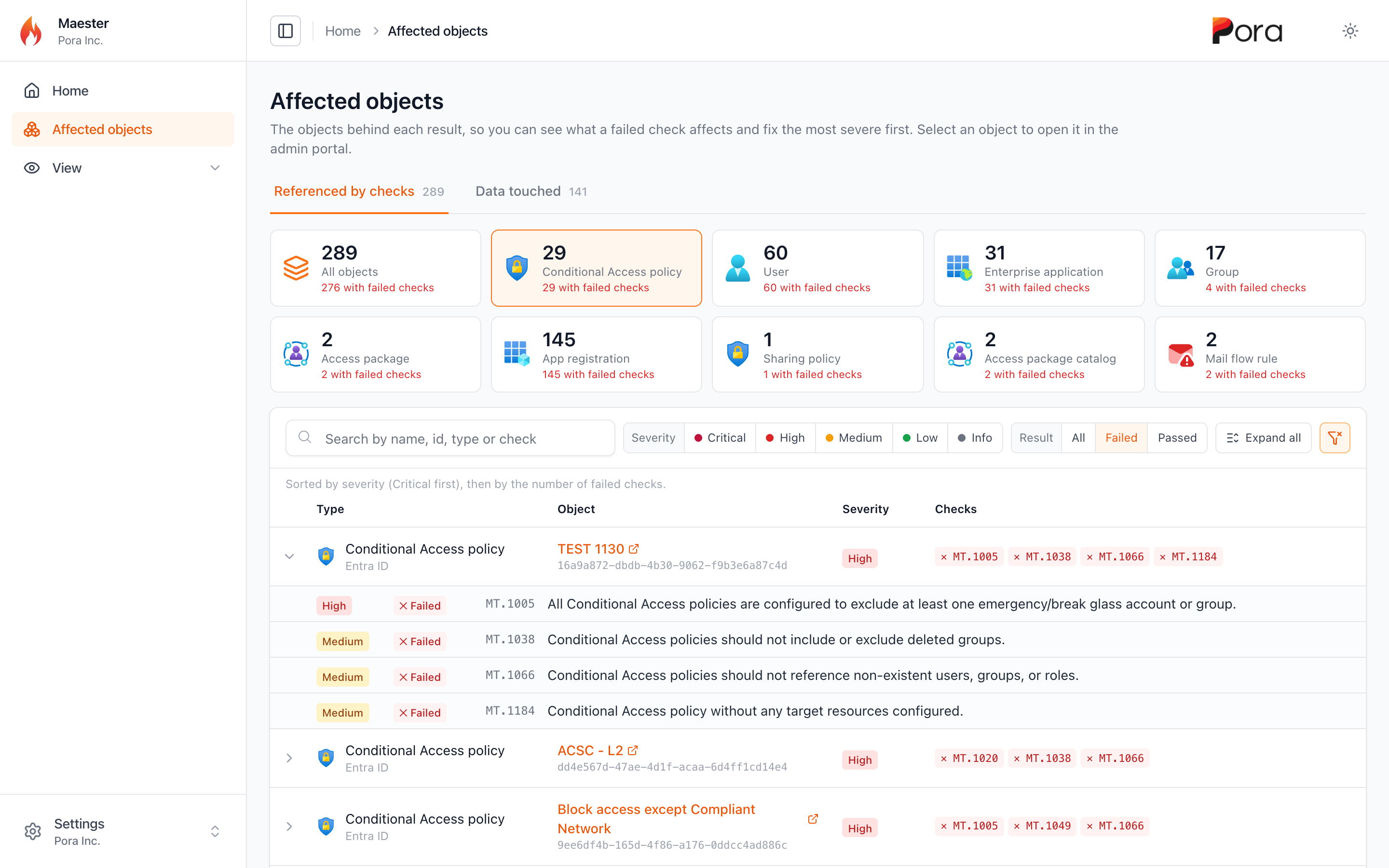
<p>A Maester report tells you which checks failed. The question that usually comes next is <em>what does this affect?</em> Which Conditional Access policies, which users, which apps? Until now, the answer was buried in the details of each result.</p>
<p>The new <strong>Affected objects</strong> report turns that around. Run Maester with <code>-IncludeAffectedObjects</code> and the HTML report gets a new page that lists every object your checks pointed at, alongside every check that pointed at it:</p>
<div class="language-powershell codeBlockContainer_Ckt0 theme-code-block" style="--prism-color:#9EFEFF;--prism-background-color:#2D2A55"><div class="codeBlockContent_QJqH"><pre tabindex="0" class="prism-code language-powershell codeBlock_bY9V thin-scrollbar" style="color:#9EFEFF;background-color:#2D2A55"><code class="codeBlockLines_e6Vv"><div class="token-line" style="color:#9EFEFF"><span class="token function" style="color:rgb(250, 208, 0)">Invoke-Maester</span><span class="token plain"> </span><span class="token operator" style="color:rgb(255, 157, 0)">-</span><span class="token plain">IncludeAffectedObjects</span><br></div></code></pre></div></div>
<p><img decoding="async" loading="lazy" alt="The Affected objects page showing only Conditional Access policies, filtered to failed checks, with one policy expanded to show its four failed checks" src="https://maester.dev/assets/images/affected-objects-2a32b7272d12c49b4b406e2f7d5ba674.png" width="2880" height="1800" class="img_ev3q"></p>
<ul>
<li class=""><strong>One tile per object type</strong>, showing how many objects have failed checks. The tiles work like tabs: <em>All objects</em> shows everything, and selecting a type, such as <em>User</em>, shows only that type</li>
<li class=""><strong>Sorted for remediation</strong>: by severity, Critical first, then by the number of failed checks, so the objects to fix first are at the top</li>
<li class=""><strong>Filters for severity and result</strong>. Select <em>Failed</em>, and each row shows only its failed checks. One click on the clear filter button resets everything</li>
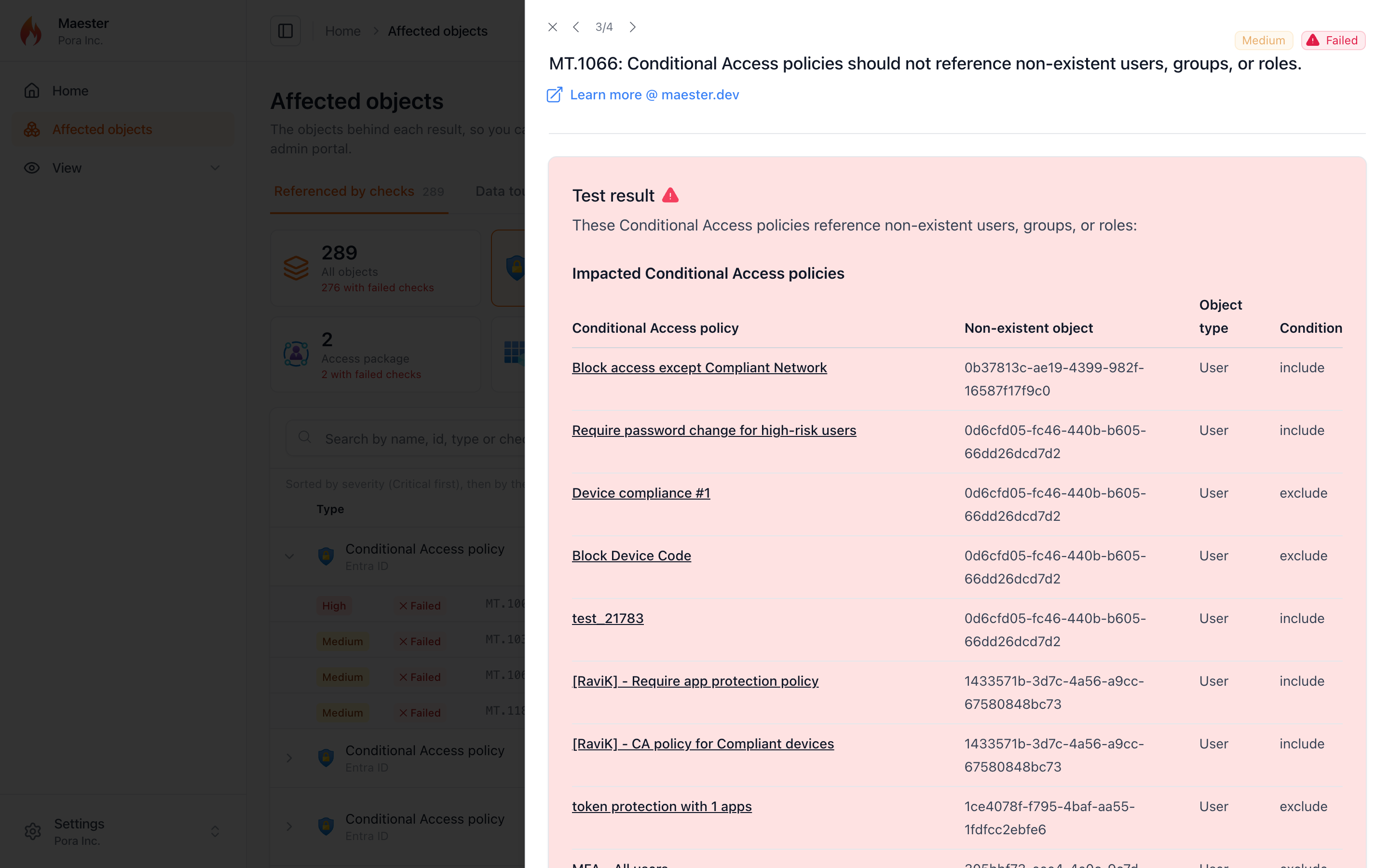
<li class=""><strong>Expand a row</strong> to see each check that referenced the object, and select a check to open its result without leaving the page</li>
<li class=""><strong>Select the object's name</strong> to open it in the admin portal</li>
</ul>
<p><img decoding="async" loading="lazy" alt="A failed check opened in the side panel from the Affected objects page" src="https://maester.dev/assets/images/affected-objects-check-0e583a5a845232c3c8a038bd8af63d21.png" width="2880" height="1800" class="img_ev3q"></p>
<p>A second tab, <strong>Data touched</strong>, lists everything the run read, with a tile for each area: Intune, Entra roles, PIM alerts, and so on. It's a quick way to see the scope of what Maester looked at.</p>
<p>The same list is also saved next to your results as <code>&lt;name&gt;-affected-objects.json</code>, and as a CSV when you use <code>-ExportCsv</code>, so you can feed it into your own tooling. Nothing is collected unless you pass the switch.</p>
<p>Running Maester from the <a class="" href="https://maester.dev/docs/monitoring/github">GitHub Action</a>? Set <code>include_affected_objects: true</code> and the report and JSON file are included in the uploaded results:</p>
<div class="language-yaml codeBlockContainer_Ckt0 theme-code-block" style="--prism-color:#9EFEFF;--prism-background-color:#2D2A55"><div class="codeBlockContent_QJqH"><pre tabindex="0" class="prism-code language-yaml codeBlock_bY9V thin-scrollbar" style="color:#9EFEFF;background-color:#2D2A55"><code class="codeBlockLines_e6Vv"><div class="token-line" style="color:#9EFEFF"><span class="token punctuation" style="color:rgb(255, 255, 255)">-</span><span class="token plain"> </span><span class="token key atrule">uses</span><span class="token punctuation" style="color:rgb(255, 255, 255)">:</span><span class="token plain"> maester365/maester</span><span class="token punctuation" style="color:rgb(255, 255, 255)">-</span><span class="token plain">action@main</span><br></div><div class="token-line" style="color:#9EFEFF"><span class="token plain">  </span><span class="token key atrule">with</span><span class="token punctuation" style="color:rgb(255, 255, 255)">:</span><span class="token plain"></span><br></div><div class="token-line" style="color:#9EFEFF"><span class="token plain">    </span><span class="token key atrule">tenant_id</span><span class="token punctuation" style="color:rgb(255, 255, 255)">:</span><span class="token plain"> $</span><span class="token punctuation" style="color:rgb(255, 255, 255)">{</span><span class="token punctuation" style="color:rgb(255, 255, 255)">{</span><span class="token plain"> secrets.AZURE_TENANT_ID </span><span class="token punctuation" style="color:rgb(255, 255, 255)">}</span><span class="token punctuation" style="color:rgb(255, 255, 255)">}</span><span class="token plain"></span><br></div><div class="token-line" style="color:#9EFEFF"><span class="token plain">    </span><span class="token key atrule">client_id</span><span class="token punctuation" style="color:rgb(255, 255, 255)">:</span><span class="token plain"> $</span><span class="token punctuation" style="color:rgb(255, 255, 255)">{</span><span class="token punctuation" style="color:rgb(255, 255, 255)">{</span><span class="token plain"> secrets.AZURE_CLIENT_ID </span><span class="token punctuation" style="color:rgb(255, 255, 255)">}</span><span class="token punctuation" style="color:rgb(255, 255, 255)">}</span><span class="token plain"></span><br></div><div class="token-line" style="color:#9EFEFF"><span class="token plain">    </span><span class="token key atrule">include_affected_objects</span><span class="token punctuation" style="color:rgb(255, 255, 255)">:</span><span class="token plain"> </span><span class="token boolean important" style="color:rgb(255, 98, 140)">true</span><br></div></code></pre></div></div>
<h3 class="anchor anchorTargetStickyNavbar_Vzrq" id="redact-user-identities">Redact user identities<a href="https://maester.dev/blog/maester-2-3#redact-user-identities" class="hash-link" aria-label="Direct link to Redact user identities" title="Direct link to Redact user identities" translate="no">​</a></h3>
<p>Sharing a report outside your security team? <code>-RedactUserIdentity</code> replaces user display names, UPNs, and object IDs with a stable token:</p>
<div class="language-powershell codeBlockContainer_Ckt0 theme-code-block" style="--prism-color:#9EFEFF;--prism-background-color:#2D2A55"><div class="codeBlockContent_QJqH"><pre tabindex="0" class="prism-code language-powershell codeBlock_bY9V thin-scrollbar" style="color:#9EFEFF;background-color:#2D2A55"><code class="codeBlockLines_e6Vv"><div class="token-line" style="color:#9EFEFF"><span class="token comment" style="color:rgb(179, 98, 255);font-style:italic"># Redact the HTML report, keep real identifiers in the JSON, CSV, and other exports</span><span class="token plain"></span><br></div><div class="token-line" style="color:#9EFEFF"><span class="token plain"></span><span class="token function" style="color:rgb(250, 208, 0)">Invoke-Maester</span><span class="token plain"> </span><span class="token operator" style="color:rgb(255, 157, 0)">-</span><span class="token plain">IncludeAffectedObjects </span><span class="token operator" style="color:rgb(255, 157, 0)">-</span><span class="token plain">RedactUserIdentity HtmlOnly</span><br></div><div class="token-line" style="color:#9EFEFF"><span class="token plain" style="display:inline-block"></span><br></div><div class="token-line" style="color:#9EFEFF"><span class="token plain"></span><span class="token comment" style="color:rgb(179, 98, 255);font-style:italic"># Redact every output</span><span class="token plain"></span><br></div><div class="token-line" style="color:#9EFEFF"><span class="token plain"></span><span class="token function" style="color:rgb(250, 208, 0)">Invoke-Maester</span><span class="token plain"> </span><span class="token operator" style="color:rgb(255, 157, 0)">-</span><span class="token plain">RedactUserIdentity AllOutputs</span><br></div></code></pre></div></div>
<p>Two things to know before you rely on it. This is pseudonymization, not anonymization: the token is an unsalted hash, so anyone with a list of candidate users can reverse it. And it's best effort: only users the run read from Microsoft Graph (plus the signed-in account) are replaced, and email and Teams notifications aren't redacted.</p>
<p>Special thanks to <a class="" href="https://maester.dev/contributors/cloud-architekt">Thomas Naunheim</a> for building the Affected objects report and redaction.</p>
<h2 class="anchor anchorTargetStickyNavbar_Vzrq" id="a-smaller-faster-report">A smaller, faster report<a href="https://maester.dev/blog/maester-2-3#a-smaller-faster-report" class="hash-link" aria-label="Direct link to A smaller, faster report" title="Direct link to A smaller, faster report" translate="no">​</a></h2>
<p>The HTML report has been rebuilt on a much smaller stack. It looks the same, and filters, search, deep links, keyboard navigation, and multi-tenant reports all work as before, but:</p>
<p><img decoding="async" loading="lazy" alt="Bar charts comparing report size: the report app drops from 2.24 MB in Maester 2.2 to 335 kB in 2.3, and a real 764-test report is 40% smaller" src="data:image/svg+xml;base64,PHN2ZyB4bWxucz0iaHR0cDovL3d3dy53My5vcmcvMjAwMC9zdmciIHZpZXdCb3g9IjAgMCA2NDAgNTYwIiB3aWR0aD0iNjQwIiBoZWlnaHQ9IjU2MCIgcm9sZT0iaW1nIiBhcmlhLWxhYmVsbGVkYnk9InRpdGxlIGRlc2MiIGZvbnQtZmFtaWx5PSItYXBwbGUtc3lzdGVtLCBCbGlua01hY1N5c3RlbUZvbnQsICdTZWdvZSBVSScsIFJvYm90bywgSGVsdmV0aWNhLCBBcmlhbCwgc2Fucy1zZXJpZiI+Cjx0aXRsZSBpZD0idGl0bGUiPk1hZXN0ZXIgMi4zIHJlcG9ydCBzaXplIGNvbXBhcmVkIHdpdGggMi4yPC90aXRsZT4KPGRlc2MgaWQ9ImRlc2MiPlJlcG9ydCBhcHA6IDIuMjQgTUIgaW4gTWFlc3RlciAyLjIsIDMzNSBrQiBpbiAyLjMsIGFib3V0IDg1JSBzbWFsbGVyLiBBIHJlYWwgNzY0LXRlc3QgcmVwb3J0IGZpbGUgaXMgNDAlIHNtYWxsZXIgaW4gMi4zLjwvZGVzYz4KPHN0eWxlPgouaHtmb250LXNpemU6MjRweDtmb250LXdlaWdodDo3MDA7ZmlsbDojMTgxODFifQoudHtmb250LXNpemU6MTlweDtmb250LXdlaWdodDo2MDA7ZmlsbDojMTgxODFifQouc3tmb250LXNpemU6MTVweDtmaWxsOiM3MTcxN2F9Ci5sLC52e2ZvbnQtc2l6ZToxN3B4O2ZpbGw6IzNmM2Y0Nn0KLnZie2ZvbnQtc2l6ZToxN3B4O2ZvbnQtd2VpZ2h0OjcwMDtmaWxsOiMxODE4MWJ9Ci5heHtzdHJva2U6I2Q0ZDRkODtzdHJva2Utd2lkdGg6MX0KPC9zdHlsZT4KPHJlY3QgeD0iMC41IiB5PSIwLjUiIHdpZHRoPSI2MzkiIGhlaWdodD0iNTU5IiByeD0iMTIiIGZpbGw9IiNmZmZmZmYiIHN0cm9rZT0iI2U0ZTRlNyIvPgo8dGV4dCB4PSIzMiIgeT0iNTIiIGNsYXNzPSJoIj5BIHNtYWxsZXIgcmVwb3J0IGluIE1hZXN0ZXIgMi4zPC90ZXh0Pgo8dGV4dCB4PSIzMiIgeT0iMTA0IiBjbGFzcz0idCI+UmVwb3J0IGFwcDwvdGV4dD4KPHRleHQgeD0iMzIiIHk9IjEyOCIgY2xhc3M9InMiPlRoZSBIVE1MIHJlcG9ydCB0ZW1wbGF0ZTwvdGV4dD4KPHRleHQgeD0iMzIiIHk9IjE3MyIgY2xhc3M9ImwiPk1hZXN0ZXIgMi4yPC90ZXh0Pgo8cGF0aCBkPSJNMTUwIDE1MmgyOTZhNCA0IDAgMCAxIDQgNHYyMmE0IDQgMCAwIDEgLTQgNGgtMjk2eiIgZmlsbD0iI0ZCOTIzQyIvPgo8dGV4dCB4PSI0NjAiIHk9IjE3MyIgY2xhc3M9InYiPjIuMjQgTUI8L3RleHQ+Cjx0ZXh0IHg9IjMyIiB5PSIyMjUiIGNsYXNzPSJsIj5NYWVzdGVyIDIuMzwvdGV4dD4KPHBhdGggZD0iTTE1MCAyMDRoNDFhNCA0IDAgMCAxIDQgNHYyMmE0IDQgMCAwIDEgLTQgNGgtNDF6IiBmaWxsPSIjQzI0MTBDIi8+Cjx0ZXh0IHg9IjIwNSIgeT0iMjI1IiBjbGFzcz0idmIiPjMzNSBrQiDCtyA4NSUgc21hbGxlcjwvdGV4dD4KPGxpbmUgeDE9IjE1MCIgeTE9IjE0NCIgeDI9IjE1MCIgeTI9IjI0MiIgY2xhc3M9ImF4Ii8+Cjx0ZXh0IHg9IjMyIiB5PSIzMjIiIGNsYXNzPSJ0Ij5BIHJlYWwgNzY0LXRlc3QgcmVwb3J0PC90ZXh0Pgo8dGV4dCB4PSIzMiIgeT0iMzQ2IiBjbGFzcz0icyI+UmVsYXRpdmUgZmlsZSBzaXplPC90ZXh0Pgo8dGV4dCB4PSIzMiIgeT0iMzkxIiBjbGFzcz0ibCI+TWFlc3RlciAyLjI8L3RleHQ+CjxwYXRoIGQ9Ik0xNTAgMzcwaDI5NmE0IDQgMCAwIDEgNCA0djIyYTQgNCAwIDAgMSAtNCA0aC0yOTZ6IiBmaWxsPSIjRkI5MjNDIi8+Cjx0ZXh0IHg9IjQ2MCIgeT0iMzkxIiBjbGFzcz0idiI+MTAwJTwvdGV4dD4KPHRleHQgeD0iMzIiIHk9IjQ0MyIgY2xhc3M9ImwiPk1hZXN0ZXIgMi4zPC90ZXh0Pgo8cGF0aCBkPSJNMTUwIDQyMmgxNzZhNCA0IDAgMCAxIDQgNHYyMmE0IDQgMCAwIDEgLTQgNGgtMTc2eiIgZmlsbD0iI0MyNDEwQyIvPgo8dGV4dCB4PSIzNDAiIHk9IjQ0MyIgY2xhc3M9InZiIj42MCUgwrcgNDAlIHNtYWxsZXI8L3RleHQ+CjxsaW5lIHgxPSIxNTAiIHkxPSIzNjIiIHgyPSIxNTAiIHkyPSI0NjAiIGNsYXNzPSJheCIvPgo8dGV4dCB4PSIzMiIgeT0iNTMyIiBjbGFzcz0icyI+U2FtZSBmZWF0dXJlcywgYW5kIGEgcmVwb3J0IG9wZW5zIHdpdGggbm8gbmV0d29yayByZXF1ZXN0cy48L3RleHQ+Cjwvc3ZnPg==" width="640" height="560" class="img_ev3q"></p>
<ul>
<li class="">The report app is <strong>about 85% smaller</strong> (2.24 MB down to 335 kB)</li>
<li class="">The favicon is embedded, so a report opens with <strong>no network requests at all</strong>. That helps when you open reports offline, send them by email, or host them behind a strict Content Security Policy</li>
<li class="">Reports no longer embed each test's internal PowerShell error record. That shaved 40% off a real 764-test report, and stops local file paths (like your user name) from leaking into reports you share</li>
<li class="">The result panel slides in more smoothly, the theme toggle is instant, the table no longer jumps when you select a row, and long test IDs are truncated instead of overlapping the title</li>
</ul>
<p>Special thanks to <a href="https://github.com/itpropro" target="_blank" rel="noopener noreferrer" class="">Jan-Henrik Damaschke</a> for the rebuild.</p>
<h2 class="anchor anchorTargetStickyNavbar_Vzrq" id="a-clearer-connect-maester">A clearer <code>Connect-Maester</code><a href="https://maester.dev/blog/maester-2-3#a-clearer-connect-maester" class="hash-link" aria-label="Direct link to a-clearer-connect-maester" title="Direct link to a-clearer-connect-maester" translate="no">​</a></h2>
<p><code>Connect-Maester -Service All</code> used to print a stream of warnings, even for services you never meant to use. Now it finishes with a single table that shows what happened to each service:</p>
<div class="language-text codeBlockContainer_Ckt0 theme-code-block" style="--prism-color:#9EFEFF;--prism-background-color:#2D2A55"><div class="codeBlockContent_QJqH"><pre tabindex="0" class="prism-code language-text codeBlock_bY9V thin-scrollbar" style="color:#9EFEFF;background-color:#2D2A55"><code class="codeBlockLines_e6Vv"><div class="token-line" style="color:#9EFEFF"><span class="token plain">Service                Status     Details</span><br></div><div class="token-line" style="color:#9EFEFF"><span class="token plain">-------                ------     -------</span><br></div><div class="token-line" style="color:#9EFEFF"><span class="token plain">Microsoft Graph        Connected  admin@contoso.com</span><br></div><div class="token-line" style="color:#9EFEFF"><span class="token plain">Azure                  Connected  admin@contoso.com</span><br></div><div class="token-line" style="color:#9EFEFF"><span class="token plain">Dataverse              Skipped    No environment found, set DataverseEnvironmentUrl in maester-config.json</span><br></div><div class="token-line" style="color:#9EFEFF"><span class="token plain">Exchange Online        Connected  admin@contoso.com</span><br></div><div class="token-line" style="color:#9EFEFF"><span class="token plain">Security &amp; Compliance  Connected  admin@contoso.com</span><br></div><div class="token-line" style="color:#9EFEFF"><span class="token plain">Microsoft Teams        Connected  admin@contoso.com</span><br></div><div class="token-line" style="color:#9EFEFF"><span class="token plain">SharePoint Online      Skipped    -SharePointClientId was not provided</span><br></div></code></pre></div></div>
<ul>
<li class=""><strong>One failure no longer stops the rest.</strong> Previously, a sign-in error from one service stopped <code>Connect-Maester</code>, and every service after it was never tried. Now that service is marked <code>Failed</code> with the first line of the error, and the rest still connect</li>
<li class=""><strong>Missing modules</strong> show the <code>Install-Module</code> command you need</li>
<li class=""><strong>The full details</strong> are still available with <code>-Verbose</code></li>
<li class=""><strong>Admin consent</strong>: Global Readers and other non-admins who hit "Approval required" now get clear steps to get consent, instead of a cryptic <code>User canceled authentication</code></li>
</ul>
<p>Special thanks to <a class="" href="https://maester.dev/contributors/mynster9361">Morten Mynster</a> for the idea and proposal behind the connection summary, and <a class="" href="https://maester.dev/contributors/rafalfitt">Rafał Fitt</a> for the admin consent guidance.</p>
<h2 class="anchor anchorTargetStickyNavbar_Vzrq" id="more-reliable-runs">More reliable runs<a href="https://maester.dev/blog/maester-2-3#more-reliable-runs" class="hash-link" aria-label="Direct link to More reliable runs" title="Direct link to More reliable runs" translate="no">​</a></h2>
<p>A lot of this release is about Maester behaving well in tenants that aren't quite like ours:</p>
<ul>
<li class=""><strong>Transient Graph errors</strong>: <code>500</code> and <code>502</code> responses are retried, with backoff, for requests that are safe to repeat</li>
<li class=""><strong>PIM licensing</strong>: when the PIM API rejects a tenant's license, role lookups fall back to role assignments instead of erroring out the CIS checks that depend on them</li>
<li class=""><strong>Sovereign clouds</strong>: requests that were hard-coded to the global Graph endpoint now use the cloud you connected to</li>
<li class=""><strong>Long runs</strong>: <code>Connect-Maester -ClientTimeout</code> passes a longer HTTP timeout through to Microsoft Graph</li>
<li class=""><strong>Skips stay skips</strong>: a check that skipped from inside its own error handling was reported as <strong>Error</strong>. That affected 17 checks, and it's now fixed centrally, so your custom tests benefit too</li>
<li class=""><strong>Azure DevOps</strong>: a saved ADOPS sign-in with an expired token no longer turns every Azure DevOps test into an error. The tests now skip with "Not connected to Azure DevOps"</li>
<li class=""><strong>Copilot Studio</strong>: when the agent query fails, the <code>MT.1113</code> to <code>MT.1122</code> skips now say why (for example, a missing Dataverse permission) instead of dumping raw JSON to the console</li>
<li class=""><strong>ORCA checks in scripts</strong>: when the module was imported from inside a script (as many CI pipelines do), every ORCA check failed with <code>Cannot find type [PolicyInfo]</code>. The ORCA classes now load in the module's own scope</li>
<li class=""><strong>No runtime downloads for role tiers</strong>: the privileged-role classification used by the permanent role and PIM alert checks now ships with the module instead of being downloaded from GitHub at runtime. It's refreshed automatically through a reviewed pull request each month</li>
<li class=""><strong>Exposure Management</strong>: the XSPM identity queries use the correct Advanced Hunting schema, and the external data sources they use can be pointed at your own mirrors</li>
<li class=""><strong>Fewer false positives</strong>: the MFA checks ignore risk-scoped Conditional Access policies, break-glass accounts are excluded from risk recommendations, <code>MT.1011</code> explains why browser-scoped policies don't match, and checks that can't be verified now skip with a reason instead of failing silently</li>
</ul>
<p>Special thanks to <a class="" href="https://maester.dev/contributors/nathanmcnulty">Nathan McNulty</a>, <a class="" href="https://maester.dev/contributors/sebastianclaesson">Sebastian Claesson</a>, <a class="" href="https://maester.dev/contributors/blindzero">Matthias</a>, <a class="" href="https://maester.dev/contributors/rafalfitt">Rafał Fitt</a>, <a class="" href="https://maester.dev/contributors/earbona23">eduardarbona</a>, <a class="" href="https://maester.dev/contributors/samerde">Sam Erde</a>, and <a class="" href="https://maester.dev/contributors/massimomazzariol">Massimo Mazzariol</a>.</p>
<h2 class="anchor anchorTargetStickyNavbar_Vzrq" id="website-and-docs">Website and docs<a href="https://maester.dev/blog/maester-2-3#website-and-docs" class="hash-link" aria-label="Direct link to Website and docs" title="Direct link to Website and docs" translate="no">​</a></h2>
<ul>
<li class="">EIDSCA test pages now include the remediation action for each setting</li>
<li class="">"Edit this page" links work again</li>
<li class="">Product names and accessibility were cleaned up across the docs</li>
<li class="">And yes, the homepage will now tell you how to pronounce Maester 🔊</li>
</ul>
<h2 class="anchor anchorTargetStickyNavbar_Vzrq" id="thank-you-to-every-contributor">Thank you to every contributor<a href="https://maester.dev/blog/maester-2-3#thank-you-to-every-contributor" class="hash-link" aria-label="Direct link to Thank you to every contributor" title="Direct link to Thank you to every contributor" translate="no">​</a></h2>
<p>Maester 2.3 includes contributions from 25 people:</p>
<ul>
<li class=""><a class="" href="https://maester.dev/contributors/agnivesh">Agnivesh</a> for the Agent ID and dynamic group checks, Active Directory severity ratings, and generated docs fixes.</li>
<li class=""><a class="" href="https://maester.dev/contributors/brianveldman">Beerd Veldman</a> for fixing typos across the docs.</li>
<li class=""><a class="" href="https://maester.dev/contributors/daniellystad">Daniel Lystad</a> for the four macOS checks.</li>
<li class=""><a class="" href="https://maester.dev/contributors/earbona23">eduardarbona</a> for fixing false positives and silent failures in several Entra and Global Secure Access checks.</li>
<li class=""><a class="" href="https://maester.dev/contributors/f-bader">Fabian Bader</a> for hardening <code>Send-MtMail</code> against HTML injection.</li>
<li class=""><a class="" href="https://maester.dev/contributors/amlhive-tech">Haris Habib</a> for handling missing DKIM signing configurations.</li>
<li class=""><a class="" href="https://maester.dev/contributors/bakkerjan">Jan Bakker</a> for teaching the homepage how to say "Maester".</li>
<li class=""><a href="https://github.com/itpropro" target="_blank" rel="noopener noreferrer" class="">Jan-Henrik Damaschke</a> for responsibly disclosing the report vulnerability and rebuilding the report.</li>
<li class=""><a href="https://github.com/BuckeyeGuyJFlo" target="_blank" rel="noopener noreferrer" class="">John Flores</a> for branding and accessibility fixes across the docs.</li>
<li class=""><a class="" href="https://maester.dev/contributors/massimomazzariol">Massimo Mazzariol</a> for fixes to BitLocker, Azure DevOps, Entra recommendation links, and unit tests.</li>
<li class=""><a class="" href="https://maester.dev/contributors/blindzero">Matthias</a> for the Graph client timeout, the CISA DKIM coexistence fix, and clearer Entra Connect guidance.</li>
<li class=""><a class="" href="https://maester.dev/contributors/michaelmsonne">Michael Morten Sonne</a> for documenting the risks of client secret authentication.</li>
<li class=""><a class="" href="https://maester.dev/contributors/soulemike">Mike Soule</a> for multi-forest, cross-platform Active Directory support, AD connection fixes, and the AD troubleshooting guide.</li>
<li class=""><a class="" href="https://maester.dev/contributors/mynster9361">Morten Mynster</a> for updating the CIS checks to v7.0.0 and proposing the <code>Connect-Maester</code> connection summary.</li>
<li class=""><a class="" href="https://maester.dev/contributors/nathanmcnulty">Nathan McNulty</a> for Graph retries, the PIM fallback, the embedded role classification, and XSPM data sources.</li>
<li class=""><a class="" href="https://maester.dev/contributors/rafalfitt">Rafał Fitt</a> for admin consent guidance in <code>Connect-Maester</code> and fixing the XSPM identity queries.</li>
<li class=""><a class="" href="https://maester.dev/contributors/royklo">Roy Klooster</a> for Settings catalog support in the BitLocker and ASR checks.</li>
<li class=""><a class="" href="https://maester.dev/contributors/samerde">Sam Erde</a> for MFA check fixes, telemetry timeouts, and agent instructions for contributors.</li>
<li class=""><a class="" href="https://maester.dev/contributors/sebastianclaesson">Sebastian Claesson</a> for the Azure DevOps Advanced Security checks and sovereign cloud fixes.</li>
<li class=""><a class="" href="https://maester.dev/contributors/simon-vedder">Simon Vedder</a> for the app registration credential checks.</li>
<li class=""><a class="" href="https://maester.dev/contributors/weycc81">Stefan Wey</a> for EIDSCA remediation docs and fixing "Edit this page".</li>
<li class=""><a class="" href="https://maester.dev/contributors/cloud-architekt">Thomas Naunheim</a> for the Affected objects report and user identity redaction.</li>
<li class=""><a class="" href="https://maester.dev/contributors/thomas-s-schmidt">Thomas S. Schmidt</a> for centralizing the module preamble.</li>
<li class=""><a class="" href="https://maester.dev/contributors/thetechgy">Travis McDade</a> for hardening our GitHub Actions workflows.</li>
<li class=""><a class="" href="https://maester.dev/contributors/merill">Merill Fernando</a> for security hardening, the <code>Connect-Maester</code> summary, report polish, and release and automation improvements.</li>
</ul>
<p>Thank you as well to everyone who reviewed a pull request, reported an issue, tested a preview build, or ran the AD checks against a domain we'll never see. Your feedback shaped this release.</p>
<h2 class="anchor anchorTargetStickyNavbar_Vzrq" id="get-maester-23">Get Maester 2.3<a href="https://maester.dev/blog/maester-2-3#get-maester-23" class="hash-link" aria-label="Direct link to Get Maester 2.3" title="Direct link to Get Maester 2.3" translate="no">​</a></h2>
<p>Update the module and your test collection:</p>
<div class="language-powershell codeBlockContainer_Ckt0 theme-code-block" style="--prism-color:#9EFEFF;--prism-background-color:#2D2A55"><div class="codeBlockContent_QJqH"><pre tabindex="0" class="prism-code language-powershell codeBlock_bY9V thin-scrollbar" style="color:#9EFEFF;background-color:#2D2A55"><code class="codeBlockLines_e6Vv"><div class="token-line" style="color:#9EFEFF"><span class="token function" style="color:rgb(250, 208, 0)">Update-Module</span><span class="token plain"> Maester</span><br></div><div class="token-line" style="color:#9EFEFF"><span class="token plain"></span><span class="token function" style="color:rgb(250, 208, 0)">Update-MaesterTests</span><br></div></code></pre></div></div>
<p>Then explore what's new:</p>
<div class="language-powershell codeBlockContainer_Ckt0 theme-code-block" style="--prism-color:#9EFEFF;--prism-background-color:#2D2A55"><div class="codeBlockContent_QJqH"><pre tabindex="0" class="prism-code language-powershell codeBlock_bY9V thin-scrollbar" style="color:#9EFEFF;background-color:#2D2A55"><code class="codeBlockLines_e6Vv"><div class="token-line" style="color:#9EFEFF"><span class="token comment" style="color:rgb(179, 98, 255);font-style:italic"># Affected objects report</span><span class="token plain"></span><br></div><div class="token-line" style="color:#9EFEFF"><span class="token plain"></span><span class="token function" style="color:rgb(250, 208, 0)">Invoke-Maester</span><span class="token plain"> </span><span class="token operator" style="color:rgb(255, 157, 0)">-</span><span class="token plain">IncludeAffectedObjects</span><br></div><div class="token-line" style="color:#9EFEFF"><span class="token plain" style="display:inline-block"></span><br></div><div class="token-line" style="color:#9EFEFF"><span class="token plain"></span><span class="token comment" style="color:rgb(179, 98, 255);font-style:italic"># Microsoft Entra Agent ID (preview)</span><span class="token plain"></span><br></div><div class="token-line" style="color:#9EFEFF"><span class="token plain"></span><span class="token function" style="color:rgb(250, 208, 0)">Connect-Maester</span><span class="token plain"> </span><span class="token operator" style="color:rgb(255, 157, 0)">-</span><span class="token plain">IncludePreview</span><br></div><div class="token-line" style="color:#9EFEFF"><span class="token plain"></span><span class="token function" style="color:rgb(250, 208, 0)">Invoke-Maester</span><span class="token plain"> </span><span class="token operator" style="color:rgb(255, 157, 0)">-</span><span class="token plain">Tag </span><span class="token string" style="color:rgb(165, 255, 144)">"MT.1200"</span><span class="token punctuation" style="color:rgb(255, 255, 255)">,</span><span class="token plain"> </span><span class="token string" style="color:rgb(165, 255, 144)">"MT.1201"</span><span class="token punctuation" style="color:rgb(255, 255, 255)">,</span><span class="token plain"> </span><span class="token string" style="color:rgb(165, 255, 144)">"MT.1203"</span><span class="token punctuation" style="color:rgb(255, 255, 255)">,</span><span class="token plain"> </span><span class="token string" style="color:rgb(165, 255, 144)">"MT.1204"</span><span class="token punctuation" style="color:rgb(255, 255, 255)">,</span><span class="token plain"> </span><span class="token string" style="color:rgb(165, 255, 144)">"MT.1205"</span><span class="token punctuation" style="color:rgb(255, 255, 255)">,</span><span class="token plain"> </span><span class="token string" style="color:rgb(165, 255, 144)">"MT.1206"</span><span class="token punctuation" style="color:rgb(255, 255, 255)">,</span><span class="token plain"> </span><span class="token string" style="color:rgb(165, 255, 144)">"MT.1207"</span><span class="token punctuation" style="color:rgb(255, 255, 255)">,</span><span class="token plain"> </span><span class="token string" style="color:rgb(165, 255, 144)">"MT.1208"</span><span class="token punctuation" style="color:rgb(255, 255, 255)">,</span><span class="token plain"> </span><span class="token string" style="color:rgb(165, 255, 144)">"MT.1209"</span><span class="token punctuation" style="color:rgb(255, 255, 255)">,</span><span class="token plain"> </span><span class="token string" style="color:rgb(165, 255, 144)">"MT.1210"</span><span class="token punctuation" style="color:rgb(255, 255, 255)">,</span><span class="token plain"> </span><span class="token string" style="color:rgb(165, 255, 144)">"MT.1211"</span><span class="token punctuation" style="color:rgb(255, 255, 255)">,</span><span class="token plain"> </span><span class="token string" style="color:rgb(165, 255, 144)">"MT.1212"</span><span class="token punctuation" style="color:rgb(255, 255, 255)">,</span><span class="token plain"> </span><span class="token string" style="color:rgb(165, 255, 144)">"MT.1213"</span><span class="token punctuation" style="color:rgb(255, 255, 255)">,</span><span class="token plain"> </span><span class="token string" style="color:rgb(165, 255, 144)">"MT.1223"</span><span class="token plain"> </span><span class="token operator" style="color:rgb(255, 157, 0)">-</span><span class="token plain">IncludePreview </span><span class="token operator" style="color:rgb(255, 157, 0)">-</span><span class="token plain">IncludeLongRunning</span><br></div><div class="token-line" style="color:#9EFEFF"><span class="token plain" style="display:inline-block"></span><br></div><div class="token-line" style="color:#9EFEFF"><span class="token plain"></span><span class="token comment" style="color:rgb(179, 98, 255);font-style:italic"># Dynamic groups and app registration credentials</span><span class="token plain"></span><br></div><div class="token-line" style="color:#9EFEFF"><span class="token plain"></span><span class="token function" style="color:rgb(250, 208, 0)">Invoke-Maester</span><span class="token plain"> </span><span class="token operator" style="color:rgb(255, 157, 0)">-</span><span class="token plain">Tag </span><span class="token string" style="color:rgb(165, 255, 144)">"MT.1196"</span><span class="token punctuation" style="color:rgb(255, 255, 255)">,</span><span class="token plain"> </span><span class="token string" style="color:rgb(165, 255, 144)">"MT.1197"</span><span class="token punctuation" style="color:rgb(255, 255, 255)">,</span><span class="token plain"> </span><span class="token string" style="color:rgb(165, 255, 144)">"MT.1198"</span><span class="token punctuation" style="color:rgb(255, 255, 255)">,</span><span class="token plain"> </span><span class="token string" style="color:rgb(165, 255, 144)">"MT.1199"</span><span class="token plain"></span><br></div><div class="token-line" style="color:#9EFEFF"><span class="token plain" style="display:inline-block"></span><br></div><div class="token-line" style="color:#9EFEFF"><span class="token plain"></span><span class="token comment" style="color:rgb(179, 98, 255);font-style:italic"># macOS</span><span class="token plain"></span><br></div><div class="token-line" style="color:#9EFEFF"><span class="token plain"></span><span class="token function" style="color:rgb(250, 208, 0)">Invoke-Maester</span><span class="token plain"> </span><span class="token operator" style="color:rgb(255, 157, 0)">-</span><span class="token plain">Tag </span><span class="token string" style="color:rgb(165, 255, 144)">"MT.1214"</span><span class="token punctuation" style="color:rgb(255, 255, 255)">,</span><span class="token plain"> </span><span class="token string" style="color:rgb(165, 255, 144)">"MT.1215"</span><span class="token punctuation" style="color:rgb(255, 255, 255)">,</span><span class="token plain"> </span><span class="token string" style="color:rgb(165, 255, 144)">"MT.1216"</span><span class="token punctuation" style="color:rgb(255, 255, 255)">,</span><span class="token plain"> </span><span class="token string" style="color:rgb(165, 255, 144)">"MT.1217"</span><span class="token plain"></span><br></div><div class="token-line" style="color:#9EFEFF"><span class="token plain" style="display:inline-block"></span><br></div><div class="token-line" style="color:#9EFEFF"><span class="token plain"></span><span class="token comment" style="color:rgb(179, 98, 255);font-style:italic"># CIS Microsoft 365 Foundations Benchmark v7.0.0</span><span class="token plain"></span><br></div><div class="token-line" style="color:#9EFEFF"><span class="token plain"></span><span class="token function" style="color:rgb(250, 208, 0)">Invoke-Maester</span><span class="token plain"> </span><span class="token operator" style="color:rgb(255, 157, 0)">-</span><span class="token plain">Tag </span><span class="token string" style="color:rgb(165, 255, 144)">"CIS"</span><br></div></code></pre></div></div>
<p>Maester now tests the agents you're deploying, the Macs and repositories they run on, and itself, and shows you exactly which objects each failure affects. Go check the agent identities in your tenant before someone else does.</p>
<h2 class="anchor anchorTargetStickyNavbar_Vzrq" id="a-sneak-peek-at-maester-30">A sneak peek at Maester 3.0<a href="https://maester.dev/blog/maester-2-3#a-sneak-peek-at-maester-30" class="hash-link" aria-label="Direct link to A sneak peek at Maester 3.0" title="Direct link to A sneak peek at Maester 3.0" translate="no">​</a></h2>
<p>While 2.3 was coming together, we started on something much bigger: a rewrite of how Maester discovers and runs tests. It's still early, and the details may change, but here's where it's heading:</p>
<ul>
<li class=""><strong>A native test engine.</strong> Maester 3.0 runs its checks itself instead of through Pester. Pester becomes optional, and your existing custom Pester tests keep working alongside the native ones. There's also a converter if you want to move them over.</li>
<li class=""><strong>Built-in tests ship inside the module.</strong> No more copying hundreds of test files into your repo or keeping them up to date with <code>Update-MaesterTests</code>. Your tests folder only holds your own tests and configuration.</li>
<li class=""><strong>The engine handles connections and licences.</strong> Each check declares which services and licences it needs, and the engine decides whether to run or skip it, with a consistent reason.</li>
<li class=""><strong>More control over each run.</strong> Pick tests by ID, preview a run with <code>-DryRun</code>, and keep your settings in a single run configuration file.</li>
<li class=""><strong>Ready for parallel runs.</strong> 3.0 still runs one test at a time, but it's built so a later release can run tests in parallel.</li>
</ul>
<p>One heads-up: Maester 3.0 will need PowerShell 7.4 or later. If you're still on Windows PowerShell 5.1, now is a good time to plan the move.</p>
<p>It's a big change under the hood, and it gives us the room to build what's next without fighting the framework. You can follow along, and share your feedback, in the <a href="https://github.com/maester365/maester/discussions/2050" target="_blank" rel="noopener noreferrer" class="">Maester 3.0 RFC</a>.</p>
<h2 class="anchor anchorTargetStickyNavbar_Vzrq" id="thank-you-to-our-maester-cloud-supporters">Thank you to our Maester Cloud supporters<a href="https://maester.dev/blog/maester-2-3#thank-you-to-our-maester-cloud-supporters" class="hash-link" aria-label="Direct link to Thank you to our Maester Cloud supporters" title="Direct link to Thank you to our Maester Cloud supporters" translate="no">​</a></h2>
<p>A big thank you to everyone who supports <a href="https://maester.cloud/" target="_blank" rel="noopener noreferrer" class="">Maester Cloud</a>. Your support is what lets Merill Fernando spend more time on open-source Maester, and much of what's in this release comes from that time.</p>
<p>If you'd like to help too, take a look at the <a href="https://maester.cloud/supporters" target="_blank" rel="noopener noreferrer" class="">Maester Cloud supporters page</a>.</p>
<p>Happy testing! 🎉</p>]]></content>
        <author>
            <name>Maester Team</name>
            <uri>https://maester.dev</uri>
        </author>
        <category label="maester" term="maester"/>
        <category label="release" term="release"/>
        <category label="security" term="security"/>
        <category label="entra" term="entra"/>
        <category label="m365" term="m365"/>
        <category label="agents" term="agents"/>
        <category label="azuredevops" term="azuredevops"/>
        <category label="activedirectory" term="activedirectory"/>
    </entry>
    <entry>
        <title type="html"><![CDATA[Introducing Maester 2.2 🚀]]></title>
        <id>https://maester.dev/blog/maester-2-2</id>
        <link href="https://maester.dev/blog/maester-2-2"/>
        <updated>2026-07-26T00:00:00.000Z</updated>
        <summary type="html"><![CDATA[Deep Active Directory coverage, AI data security checks with Microsoft Purview, SharePoint and GitHub security tests, Global Secure Access, contributor credits, and a sharper report experience.]]></summary>
        <content type="html"><![CDATA[<p>Maester 2.2 is here, and it's our biggest expansion of security coverage yet.</p>
<p>Since 2.1.0 shipped in May, the community has kept up an incredible pace: 261 commits and 311 new tests. Maester now stretches all the way from your on-premises Active Directory to AI data security with Microsoft Purview, SharePoint Online, GitHub, Global Secure Access, and Intune.</p>
<h2 class="anchor anchorTargetStickyNavbar_Vzrq" id="highlights">Highlights<a href="https://maester.dev/blog/maester-2-2#highlights" class="hash-link" aria-label="Direct link to Highlights" title="Direct link to Highlights" translate="no">​</a></h2>
<ul>
<li class=""><strong>269 Active Directory checks</strong> across identity, policy, infrastructure, DNS, trusts, replication, and access control</li>
<li class=""><strong>5 Microsoft Purview checks</strong> to get your data security foundations ready for Copilot and AI</li>
<li class=""><strong>12 new SharePoint Online checks</strong> across the CIS and CISA baselines, now cross-platform with PnP.PowerShell</li>
<li class=""><strong>5 CIS GitHub organization controls</strong> and first-class GitHub connectivity</li>
<li class=""><strong>9 Global Secure Access checks</strong> for Private Access, forwarding profiles, Compliant Network, and Internet Access</li>
<li class=""><strong>4 Intune endpoint security checks</strong> for LAPS, attack surface reduction, App Control for Business, and Managed Installer</li>
<li class=""><strong>New Entra ID checks</strong> covering agent risk, directory sync safeguards, Conditional Access gaps, legacy MSOnline, and privileged first-party apps</li>
<li class=""><strong>A sharper report</strong> with markdown summaries, per-test durations, and critical findings sorted first</li>
<li class=""><strong>Contributor credits across maester.dev</strong>, so the people writing these tests get the recognition they deserve</li>
</ul>
<h2 class="anchor anchorTargetStickyNavbar_Vzrq" id="deep-active-directory-coverage">Deep Active Directory coverage<a href="https://maester.dev/blog/maester-2-2#deep-active-directory-coverage" class="hash-link" aria-label="Direct link to Deep Active Directory coverage" title="Direct link to Deep Active Directory coverage" translate="no">​</a></h2>
<p>This is the big one. Maester can now test your on-premises Active Directory alongside Microsoft 365 and Microsoft Entra.</p>
<p>The release adds 269 opt-in AD checks across 19 areas, including:</p>
<ul>
<li class="">Users, groups, computers, and service principal names</li>
<li class="">Password policy and fine-grained password policy</li>
<li class="">Domain, forest, domain controller, site, subnet, and replication health</li>
<li class="">DNS, trusts, schema, and directory configuration</li>
<li class="">Group Policy inventory and state</li>
<li class="">DACL and privileged access analysis</li>
</ul>
<p>AD testing is opt-in by design. <code>Connect-Maester -Service All</code> will not touch your domain controllers. When you're ready, connect explicitly:</p>
<div class="language-powershell codeBlockContainer_Ckt0 theme-code-block" style="--prism-color:#9EFEFF;--prism-background-color:#2D2A55"><div class="codeBlockContent_QJqH"><pre tabindex="0" class="prism-code language-powershell codeBlock_bY9V thin-scrollbar" style="color:#9EFEFF;background-color:#2D2A55"><code class="codeBlockLines_e6Vv"><div class="token-line" style="color:#9EFEFF"><span class="token function" style="color:rgb(250, 208, 0)">Connect-Maester</span><span class="token plain"> </span><span class="token operator" style="color:rgb(255, 157, 0)">-</span><span class="token plain">Service ActiveDirectory</span><br></div><div class="token-line" style="color:#9EFEFF"><span class="token plain"></span><span class="token function" style="color:rgb(250, 208, 0)">Invoke-Maester</span><span class="token plain"> </span><span class="token operator" style="color:rgb(255, 157, 0)">-</span><span class="token plain">Path </span><span class="token string" style="color:rgb(165, 255, 144)">"./ad"</span><span class="token plain"> </span><span class="token operator" style="color:rgb(255, 157, 0)">-</span><span class="token plain">SkipGraphConnect </span><span class="token operator" style="color:rgb(255, 157, 0)">-</span><span class="token plain">NonInteractive</span><br></div></code></pre></div></div>
<p>This first release is a preview, and we'd love your feedback: how the results look in your environment, how the checks perform in larger domains, and where the thresholds or remediation guidance could be better. <a href="https://github.com/maester365/maester/issues/new/choose" target="_blank" rel="noopener noreferrer" class="">Open an issue</a> or come chat in the <a href="https://discord.maester.dev/" target="_blank" rel="noopener noreferrer" class="">Maester Discord</a>.</p>
<p>Special thanks to <a class="" href="https://maester.dev/contributors/soulemike">Mike Soule</a> for building and validating this massive new area of Maester.</p>
<h2 class="anchor anchorTargetStickyNavbar_Vzrq" id="microsoft-purview-and-ai-data-security">Microsoft Purview and AI data security<a href="https://maester.dev/blog/maester-2-2#microsoft-purview-and-ai-data-security" class="hash-link" aria-label="Direct link to Microsoft Purview and AI data security" title="Direct link to Microsoft Purview and AI data security" translate="no">​</a></h2>
<p>Everyone is rolling out Copilot right now. Far fewer teams have checked whether their data security foundations are ready for it.</p>
<p>The new <code>MT.1172</code> to <code>MT.1176</code> checks confirm the basics are in place before AI starts touching your data:</p>
<ul>
<li class="">Unified audit log ingestion is enabled</li>
<li class="">Sensitivity labels for files are published</li>
<li class="">An Insider Risk Management policy covers risky AI usage</li>
<li class="">A DLP policy covers the Microsoft 365 Copilot location</li>
<li class="">A retention policy covers Microsoft Copilot interactions</li>
</ul>
<p>Special thanks to <a class="" href="https://maester.dev/contributors/ofirgavish">Ofir Gavish</a> for adding the Microsoft Purview coverage.</p>
<h2 class="anchor anchorTargetStickyNavbar_Vzrq" id="sharepoint-online-cis-cisa-and-pnppowershell">SharePoint Online: CIS, CISA, and PnP.PowerShell<a href="https://maester.dev/blog/maester-2-2#sharepoint-online-cis-cisa-and-pnppowershell" class="hash-link" aria-label="Direct link to SharePoint Online: CIS, CISA, and PnP.PowerShell" title="Direct link to SharePoint Online: CIS, CISA, and PnP.PowerShell" translate="no">​</a></h2>
<p>Maester now talks to SharePoint Online through PnP.PowerShell, and it works cross-platform.</p>
<p>This release adds six CIS Microsoft 365 Foundations Benchmark checks for SharePoint sharing and download controls, plus six new CISA SCuBA checks. The two existing CISA SharePoint checks moved over to the same connection, completing all eight CISA SharePoint baseline controls.</p>
<p>The new checks cover:</p>
<ul>
<li class="">Default sharing scope and permission</li>
<li class="">Anyone-link expiration and permissions</li>
<li class="">OneDrive external sharing</li>
<li class="">Verification-code reauthentication</li>
<li class="">Guest sharing and B2B integration</li>
<li class="">Protection against downloading malicious files</li>
</ul>
<p>Special thanks to <a class="" href="https://maester.dev/contributors/mynster9361">Morten Mynster</a>, <a class="" href="https://maester.dev/contributors/henrikpiecha">Henrik Piecha</a>, <a href="https://github.com/DataAndGoliath" target="_blank" rel="noopener noreferrer" class="">Simon Albers</a>, and <a href="https://github.com/PulpyJuice" target="_blank" rel="noopener noreferrer" class="">PulpyJuice</a> for the SharePoint implementations and follow-up work.</p>
<h2 class="anchor anchorTargetStickyNavbar_Vzrq" id="github-security-and-easier-github-actions-setup">GitHub security and easier GitHub Actions setup<a href="https://maester.dev/blog/maester-2-2#github-security-and-easier-github-actions-setup" class="hash-link" aria-label="Direct link to GitHub security and easier GitHub Actions setup" title="Direct link to GitHub security and easier GitHub Actions setup" translate="no">​</a></h2>
<p>Your identity perimeter doesn't stop at Microsoft 365, and now Maester doesn't either. 2.2 adds first-class GitHub connectivity and five CIS GitHub organization controls:</p>
<ul>
<li class="">Strict base repository permissions</li>
<li class="">Restricted repository creation</li>
<li class="">Restricted repository deletion</li>
<li class="">Restricted team creation</li>
<li class="">Restricted issue deletion</li>
</ul>
<p>Connect to your GitHub organization and run them alongside the rest of your security tests:</p>
<div class="language-powershell codeBlockContainer_Ckt0 theme-code-block" style="--prism-color:#9EFEFF;--prism-background-color:#2D2A55"><div class="codeBlockContent_QJqH"><pre tabindex="0" class="prism-code language-powershell codeBlock_bY9V thin-scrollbar" style="color:#9EFEFF;background-color:#2D2A55"><code class="codeBlockLines_e6Vv"><div class="token-line" style="color:#9EFEFF"><span class="token function" style="color:rgb(250, 208, 0)">Connect-Maester</span><span class="token plain"> </span><span class="token operator" style="color:rgb(255, 157, 0)">-</span><span class="token plain">Service GitHub</span><br></div><div class="token-line" style="color:#9EFEFF"><span class="token plain"></span><span class="token function" style="color:rgb(250, 208, 0)">Invoke-Maester</span><span class="token plain"> </span><span class="token operator" style="color:rgb(255, 157, 0)">-</span><span class="token plain">Tag </span><span class="token string" style="color:rgb(165, 255, 144)">"CIS GH"</span><br></div></code></pre></div></div>
<p>Setting up Maester in GitHub Actions also got a whole lot easier. From a <code>maester-tests</code> repository, Maester can now detect your Git remote, create the federated credential, and set the Actions secrets for you:</p>
<div class="language-powershell codeBlockContainer_Ckt0 theme-code-block" style="--prism-color:#9EFEFF;--prism-background-color:#2D2A55"><div class="codeBlockContent_QJqH"><pre tabindex="0" class="prism-code language-powershell codeBlock_bY9V thin-scrollbar" style="color:#9EFEFF;background-color:#2D2A55"><code class="codeBlockLines_e6Vv"><div class="token-line" style="color:#9EFEFF"><span class="token function" style="color:rgb(250, 208, 0)">Connect-Maester</span><span class="token plain"> </span><span class="token operator" style="color:rgb(255, 157, 0)">-</span><span class="token plain">Service Azure</span><br></div><div class="token-line" style="color:#9EFEFF"><span class="token plain"></span><span class="token function" style="color:rgb(250, 208, 0)">New-MtMaesterApp</span><span class="token plain"> </span><span class="token operator" style="color:rgb(255, 157, 0)">-</span><span class="token plain">GitHubActions </span><span class="token operator" style="color:rgb(255, 157, 0)">-</span><span class="token plain">SetGitHubSecrets</span><br></div></code></pre></div></div>
<p>Special thanks to <a class="" href="https://maester.dev/contributors/thetechgy">Travis McDade</a> for the GitHub connection and CIS controls, and <a href="https://github.com/kayasax" target="_blank" rel="noopener noreferrer" class="">Loïc Michel</a> for the zero-configuration GitHub Actions setup.</p>
<h2 class="anchor anchorTargetStickyNavbar_Vzrq" id="global-secure-access">Global Secure Access<a href="https://maester.dev/blog/maester-2-2#global-secure-access" class="hash-link" aria-label="Direct link to Global Secure Access" title="Direct link to Global Secure Access" translate="no">​</a></h2>
<p>If you're rolling out Microsoft Entra Global Secure Access, nine new preview checks look for the configuration mistakes that are easy to make and hard to spot:</p>
<table><thead><tr><th>Test</th><th>What it checks</th></tr></thead><tbody><tr><td><code>MT.1187</code></td><td>The Microsoft 365 traffic forwarding profile is enabled</td></tr><tr><td><code>MT.1188</code></td><td>Private Access apps are covered by managed-device Conditional Access</td></tr><tr><td><code>MT.1189</code></td><td>Traffic-forwarding-profile assignment groups are not nested</td></tr><tr><td><code>MT.1190</code></td><td>Private Access apps do not use the Default connector group</td></tr><tr><td><code>MT.1191</code></td><td>Break-glass accounts are excluded from Compliant Network policies</td></tr><tr><td><code>MT.1192</code></td><td>Private Access application assignment groups are not nested</td></tr><tr><td><code>MT.1193</code></td><td>Private Access segments avoid broad or risky destinations</td></tr><tr><td><code>MT.1194</code></td><td>The baseline security profile enforces threat intelligence</td></tr><tr><td><code>MT.1195</code></td><td>Quick Access is not disrupted by sign-in-frequency controls</td></tr></tbody></table>
<p>These checks add one new read-only Graph permission, <code>NetworkAccess.Read.All</code>, to the default scopes.</p>
<p>Special thanks to <a class="" href="https://maester.dev/contributors/crmhh">Christopher Brumm</a> for developing the checks, validating them against a live tenant, and lining them up with the Microsoft Zero Trust Assessment so the two don't overlap.</p>
<h2 class="anchor anchorTargetStickyNavbar_Vzrq" id="more-intune-and-entra-id-checks">More Intune and Entra ID checks<a href="https://maester.dev/blog/maester-2-2#more-intune-and-entra-id-checks" class="hash-link" aria-label="Direct link to More Intune and Entra ID checks" title="Direct link to More Intune and Entra ID checks" translate="no">​</a></h2>
<p>Four new Intune checks cover endpoint controls at the heart of a modern Windows security baseline:</p>
<ul>
<li class=""><code>MT.1177</code>: Windows LAPS configuration</li>
<li class=""><code>MT.1178</code>: Attack Surface Reduction rules</li>
<li class=""><code>MT.1179</code>: App Control for Business</li>
<li class=""><code>MT.1180</code>: Managed Installer</li>
</ul>
<p>On the Entra ID side, new checks catch high agent-risk sign-ins, Conditional Access policies with no target resources, legacy MSOnline PowerShell authentication, high-privilege first-party apps without explicit assignment, DMARC on verified domains, BitLocker recovery-key restrictions, and the protected <code>onPremisesObjectIdentifier</code> update path.</p>
<p>Special thanks to <a class="" href="https://maester.dev/contributors/ofirgavish">Ofir Gavish</a>, <a href="https://github.com/ExeqZ" target="_blank" rel="noopener noreferrer" class="">ExeqZ</a>, <a class="" href="https://maester.dev/contributors/bakkerjan">Jan Bakker</a>, and <a class="" href="https://maester.dev/contributors/blindzero">Matthias</a> for this new coverage.</p>
<h2 class="anchor anchorTargetStickyNavbar_Vzrq" id="reports-automation-and-contributor-credits">Reports, automation, and contributor credits<a href="https://maester.dev/blog/maester-2-2#reports-automation-and-contributor-credits" class="hash-link" aria-label="Direct link to Reports, automation, and contributor credits" title="Direct link to Reports, automation, and contributor credits" translate="no">​</a></h2>
<p>The report keeps getting sharper:</p>
<ul>
<li class="">Markdown summaries you can drop into pipelines and pull requests</li>
<li class="">Per-test durations in the HTML report</li>
<li class="">Critical findings sorted to the top</li>
<li class="">Filtered <code>NotRun</code> results hidden by default, with a status filter if you want them back</li>
<li class="">Less warning noise for tests you've intentionally filtered out</li>
<li class="">Smarter skipping for tests your licenses don't cover</li>
</ul>
<p>Behind the scenes, releases now go through automated smoke tests against a demo tenant before they ship, along with better version tracking across the module and tests.</p>
<p>And our favorite change in this release: maester.dev now credits the people behind every test. Authorship is derived from Git history and shown right on each test's documentation page, along with the new <a class="" href="https://maester.dev/contributors">contributors page</a>. New contributions are picked up automatically, so the credits grow with the project.</p>
<h2 class="anchor anchorTargetStickyNavbar_Vzrq" id="thank-you-to-every-contributor">Thank you to every contributor<a href="https://maester.dev/blog/maester-2-2#thank-you-to-every-contributor" class="hash-link" aria-label="Direct link to Thank you to every contributor" title="Direct link to Thank you to every contributor" translate="no">​</a></h2>
<p>Maester 2.2 includes contributions from 26 people:</p>
<ul>
<li class=""><a href="https://github.com/artemop" target="_blank" rel="noopener noreferrer" class="">Artem Borodai</a> for making role lookups more resilient.</li>
<li class=""><a class="" href="https://maester.dev/contributors/brianreidc7">Brian Reid</a> for improving the managed-domain and MFA policy checks.</li>
<li class=""><a class="" href="https://maester.dev/contributors/crmhh">Christopher Brumm</a> for the nine Global Secure Access checks.</li>
<li class=""><a class="" href="https://maester.dev/contributors/korthal-maiyn">Christopher Edwards</a> for license-aware skips in the Intune and Defender for Office 365 tests.</li>
<li class=""><a href="https://github.com/ExeqZ" target="_blank" rel="noopener noreferrer" class="">ExeqZ</a> for the high agent-risk Conditional Access check.</li>
<li class=""><a class="" href="https://maester.dev/contributors/henrikpiecha">Henrik Piecha</a> for originating and co-authoring the SharePoint Online CIS coverage.</li>
<li class=""><a class="" href="https://maester.dev/contributors/bakkerjan">Jan Bakker</a> for five new Entra and CIS checks and stronger Conditional Access error handling.</li>
<li class=""><a class="" href="https://maester.dev/contributors/jeanphilippegeorge">Jean-Philippe George</a> for improving license-aware results, parameter handling, and documentation.</li>
<li class=""><a href="https://github.com/jongross4" target="_blank" rel="noopener noreferrer" class="">Jon Gross</a> for fixing error handling in a tricky tenant edge case.</li>
<li class=""><a class="" href="https://maester.dev/contributors/jhope188">Jon Hope</a> for fixing ORCA and Conditional Access role-lookup edge cases.</li>
<li class=""><a href="https://github.com/kayasax" target="_blank" rel="noopener noreferrer" class="">Loïc Michel</a> for the zero-configuration GitHub Actions and OIDC setup.</li>
<li class=""><a class="" href="https://maester.dev/contributors/massimomazzariol">Massimo Mazzariol</a> for documenting Microsoft Graph scopes in connection results.</li>
<li class=""><a class="" href="https://maester.dev/contributors/blindzero">Matthias</a> for the DMARC coverage and verified-domain fixes.</li>
<li class=""><a class="" href="https://maester.dev/contributors/merill">Merill Fernando</a> for release, report, website, and automation improvements.</li>
<li class=""><a class="" href="https://maester.dev/contributors/soulemike">Mike Soule</a> for building and validating the 269 Active Directory checks.</li>
<li class=""><a class="" href="https://maester.dev/contributors/mynster9361">Morten Mynster</a> for SharePoint Online CIS and CISA coverage, PnP.PowerShell support, and report and build fixes.</li>
<li class=""><a class="" href="https://maester.dev/contributors/ofirgavish">Ofir Gavish</a> for the Microsoft Purview and Intune endpoint security checks.</li>
<li class=""><a href="https://github.com/PulpyJuice" target="_blank" rel="noopener noreferrer" class="">PulpyJuice</a> for co-authoring the CISA SharePoint Online follow-up.</li>
<li class=""><a class="" href="https://maester.dev/contributors/samerde">Sam Erde</a> for release automation, code scanning, generated documentation, version tracking, and report quality.</li>
<li class=""><a class="" href="https://maester.dev/contributors/seick">seick</a> for fixing workload identity policy handling and completing permission documentation.</li>
<li class=""><a href="https://github.com/DataAndGoliath" target="_blank" rel="noopener noreferrer" class="">Simon Albers</a> for the SharePoint Online implementation adopted in this release.</li>
<li class=""><a class="" href="https://maester.dev/contributors/svrooij">Stephan van Rooij</a> for the markdown summary report.</li>
<li class=""><a class="" href="https://maester.dev/contributors/cloud-architekt">Thomas Naunheim</a> for improved delegated-permission support and error handling.</li>
<li class=""><a class="" href="https://maester.dev/contributors/thomas-s-schmidt">Thomas S. Schmidt</a> for fixing Defender for Identity health-response handling.</li>
<li class=""><a class="" href="https://maester.dev/contributors/thetechgy">Travis McDade</a> for GitHub connectivity and the CIS GitHub organization controls.</li>
<li class=""><a class="" href="https://maester.dev/contributors/lnfernux">Truls Thorstad Dahlsveen</a> for expanding the permissions documentation.</li>
</ul>
<p>Thank you as well to everyone who reviewed a pull request, reported an issue, tested a preview build, improved the docs, or shared a "this failed in my tenant" edge case. That feedback is what turns a big pile of checks into a security testing framework you can rely on.</p>
<h2 class="anchor anchorTargetStickyNavbar_Vzrq" id="thank-you-to-maesters-founding-supporters">Thank you to Maester's Founding Supporters<a href="https://maester.dev/blog/maester-2-2#thank-you-to-maesters-founding-supporters" class="hash-link" aria-label="Direct link to Thank you to Maester's Founding Supporters" title="Direct link to Thank you to Maester's Founding Supporters" translate="no">​</a></h2>
<p>This release also marks a new chapter for me personally. I (Merill) am now working on Maester full time: maintaining the open core, keeping the checks current as Microsoft 365 changes, and giving this community the focus it deserves.</p>
<p>The people and organizations below were the first to back that decision through Maester Cloud. Their support creates the space for me to do this work every day, while keeping Maester's core framework and tests open and available to everyone. Every person who runs Maester benefits from their early belief in what this project can become.</p>
<p>My heartfelt thanks to:</p>
<ul>
<li class=""><a href="https://cipp.app/" target="_blank" rel="noopener noreferrer" class="">CyberDrain / CIPP</a></li>
<li class=""><a href="https://www.linkedin.com/in/derek-morgan-14370775" target="_blank" rel="noopener noreferrer" class="">Derek Morgan</a></li>
<li class=""><a href="https://www.linkedin.com/in/danielbradley2/" target="_blank" rel="noopener noreferrer" class="">Daniel Bradley</a></li>
<li class=""><a href="https://alweys.ch/maester" target="_blank" rel="noopener noreferrer" class="">Stefan Wey / Alweys</a></li>
<li class=""><a href="https://integrency.com/" target="_blank" rel="noopener noreferrer" class="">Integrency</a></li>
<li class=""><a href="https://confluxcloud.tech/" target="_blank" rel="noopener noreferrer" class="">Conflux Cloud</a></li>
<li class=""><a href="https://greenwiresolutions.com/" target="_blank" rel="noopener noreferrer" class="">Greenwire Solutions</a></li>
<li class=""><a href="https://heusser.pro/" target="_blank" rel="noopener noreferrer" class="">Martin Heusser</a></li>
<li class="">Erica Zelickowski</li>
<li class=""><a href="https://www.linkedin.com/in/benjamin-seaba-83a29957/" target="_blank" rel="noopener noreferrer" class="">Ben Seaba</a></li>
<li class=""><a href="https://www.svi.edu.au/" target="_blank" rel="noopener noreferrer" class="">St Vincent's Institute</a></li>
<li class=""><a href="https://devote.com/" target="_blank" rel="noopener noreferrer" class="">Devote</a></li>
<li class=""><a href="https://www.crimsonowl.eu/" target="_blank" rel="noopener noreferrer" class="">Crimson Owl Technologies</a></li>
<li class=""><a href="https://www.zitac.se/en/" target="_blank" rel="noopener noreferrer" class="">Zitac</a></li>
<li class=""><a href="https://linkedin.com/in/stevezgomes" target="_blank" rel="noopener noreferrer" class="">Stevez Gomes</a></li>
<li class=""><a href="https://tdc.dk/" target="_blank" rel="noopener noreferrer" class="">TDC Erhverv</a></li>
<li class=""><a href="https://www.expertitsolutions.com.au/" target="_blank" rel="noopener noreferrer" class="">Paul Schnackenburg</a></li>
<li class=""><a href="https://firedsynapse.com/" target="_blank" rel="noopener noreferrer" class="">Fired Synapse Technologies, Joe Bales</a></li>
<li class=""><a href="https://www.uptime.net.nz/" target="_blank" rel="noopener noreferrer" class="">UpTime IT Management</a></li>
<li class=""><a href="https://janbakker.tech/" target="_blank" rel="noopener noreferrer" class="">Jan Bakker</a></li>
<li class=""><a href="https://declarative.nz/" target="_blank" rel="noopener noreferrer" class="">Declarative Ltd</a></li>
<li class=""><a href="https://bluehybrid.io/" target="_blank" rel="noopener noreferrer" class="">Blue Hybrid</a></li>
<li class=""><a href="https://steelshed.com/" target="_blank" rel="noopener noreferrer" class="">Steel Shed</a></li>
<li class=""><a href="https://www.grcag.eu/" target="_blank" rel="noopener noreferrer" class="">GRC Softwaremanagement AG</a></li>
<li class=""><a href="https://perezbastien.com/" target="_blank" rel="noopener noreferrer" class="">Bastien Perez</a></li>
<li class=""><a href="https://www.hrizns.com/" target="_blank" rel="noopener noreferrer" class="">Horizons Consulting, Inc.</a></li>
<li class=""><a href="https://365vantage.com.au/" target="_blank" rel="noopener noreferrer" class="">365Vantage</a></li>
<li class=""><a href="https://conode.de/" target="_blank" rel="noopener noreferrer" class="">conode Systemhaus GmbH</a></li>
<li class=""><a href="https://www.secotron.eu/" target="_blank" rel="noopener noreferrer" class="">SECOTRON (Thomas Geens)</a></li>
<li class="">David Wanderer</li>
<li class=""><a href="https://www.linkedin.com/in/cjweitz/" target="_blank" rel="noopener noreferrer" class="">Jeff Weitz</a></li>
<li class=""><a href="https://www.linkedin.com/in/kim-gramenske-5a0b261a2/" target="_blank" rel="noopener noreferrer" class="">Kim Gramenske</a></li>
<li class=""><a href="https://www.thomasandhutton.com/" target="_blank" rel="noopener noreferrer" class="">Thomas &amp; Hutton</a></li>
<li class=""><a href="https://www.detechnischejongens.nl/" target="_blank" rel="noopener noreferrer" class="">De Technische Jongens</a></li>
<li class=""><a href="https://www.langtech.com/" target="_blank" rel="noopener noreferrer" class="">Langtech Inc.</a></li>
<li class=""><a href="https://uk.linkedin.com/company/msx-security" target="_blank" rel="noopener noreferrer" class="">MSX Security - Marcus Burnap</a></li>
</ul>
<p>Their names now have a permanent place on the <a href="https://maester.cloud/founders" target="_blank" rel="noopener noreferrer" class="">Maester Cloud Founding Supporters wall</a>. The <a href="https://maester.cloud/manifesto" target="_blank" rel="noopener noreferrer" class="">Maester Manifesto</a> explains the open-source future they are helping make possible.</p>
<h2 class="anchor anchorTargetStickyNavbar_Vzrq" id="get-maester-22">Get Maester 2.2<a href="https://maester.dev/blog/maester-2-2#get-maester-22" class="hash-link" aria-label="Direct link to Get Maester 2.2" title="Direct link to Get Maester 2.2" translate="no">​</a></h2>
<p>Update the module and your test collection:</p>
<div class="language-powershell codeBlockContainer_Ckt0 theme-code-block" style="--prism-color:#9EFEFF;--prism-background-color:#2D2A55"><div class="codeBlockContent_QJqH"><pre tabindex="0" class="prism-code language-powershell codeBlock_bY9V thin-scrollbar" style="color:#9EFEFF;background-color:#2D2A55"><code class="codeBlockLines_e6Vv"><div class="token-line" style="color:#9EFEFF"><span class="token function" style="color:rgb(250, 208, 0)">Update-Module</span><span class="token plain"> Maester</span><br></div><div class="token-line" style="color:#9EFEFF"><span class="token plain"></span><span class="token function" style="color:rgb(250, 208, 0)">Update-MaesterTests</span><br></div></code></pre></div></div>
<p>Then explore the new areas:</p>
<div class="language-powershell codeBlockContainer_Ckt0 theme-code-block" style="--prism-color:#9EFEFF;--prism-background-color:#2D2A55"><div class="codeBlockContent_QJqH"><pre tabindex="0" class="prism-code language-powershell codeBlock_bY9V thin-scrollbar" style="color:#9EFEFF;background-color:#2D2A55"><code class="codeBlockLines_e6Vv"><div class="token-line" style="color:#9EFEFF"><span class="token comment" style="color:rgb(179, 98, 255);font-style:italic"># Active Directory (explicit opt-in)</span><span class="token plain"></span><br></div><div class="token-line" style="color:#9EFEFF"><span class="token plain"></span><span class="token function" style="color:rgb(250, 208, 0)">Connect-Maester</span><span class="token plain"> </span><span class="token operator" style="color:rgb(255, 157, 0)">-</span><span class="token plain">Service ActiveDirectory</span><br></div><div class="token-line" style="color:#9EFEFF"><span class="token plain"></span><span class="token function" style="color:rgb(250, 208, 0)">Invoke-Maester</span><span class="token plain"> </span><span class="token operator" style="color:rgb(255, 157, 0)">-</span><span class="token plain">Path </span><span class="token string" style="color:rgb(165, 255, 144)">"./ad"</span><span class="token plain"> </span><span class="token operator" style="color:rgb(255, 157, 0)">-</span><span class="token plain">SkipGraphConnect </span><span class="token operator" style="color:rgb(255, 157, 0)">-</span><span class="token plain">NonInteractive</span><br></div><div class="token-line" style="color:#9EFEFF"><span class="token plain" style="display:inline-block"></span><br></div><div class="token-line" style="color:#9EFEFF"><span class="token plain"></span><span class="token comment" style="color:rgb(179, 98, 255);font-style:italic"># Microsoft Purview and AI data security</span><span class="token plain"></span><br></div><div class="token-line" style="color:#9EFEFF"><span class="token plain"></span><span class="token function" style="color:rgb(250, 208, 0)">Invoke-Maester</span><span class="token plain"> </span><span class="token operator" style="color:rgb(255, 157, 0)">-</span><span class="token plain">Tag </span><span class="token string" style="color:rgb(165, 255, 144)">"MT.1172"</span><span class="token punctuation" style="color:rgb(255, 255, 255)">,</span><span class="token plain"> </span><span class="token string" style="color:rgb(165, 255, 144)">"MT.1173"</span><span class="token punctuation" style="color:rgb(255, 255, 255)">,</span><span class="token plain"> </span><span class="token string" style="color:rgb(165, 255, 144)">"MT.1174"</span><span class="token punctuation" style="color:rgb(255, 255, 255)">,</span><span class="token plain"> </span><span class="token string" style="color:rgb(165, 255, 144)">"MT.1175"</span><span class="token punctuation" style="color:rgb(255, 255, 255)">,</span><span class="token plain"> </span><span class="token string" style="color:rgb(165, 255, 144)">"MT.1176"</span><span class="token plain"></span><br></div><div class="token-line" style="color:#9EFEFF"><span class="token plain" style="display:inline-block"></span><br></div><div class="token-line" style="color:#9EFEFF"><span class="token plain"></span><span class="token comment" style="color:rgb(179, 98, 255);font-style:italic"># CIS GitHub controls</span><span class="token plain"></span><br></div><div class="token-line" style="color:#9EFEFF"><span class="token plain"></span><span class="token function" style="color:rgb(250, 208, 0)">Connect-Maester</span><span class="token plain"> </span><span class="token operator" style="color:rgb(255, 157, 0)">-</span><span class="token plain">Service GitHub</span><br></div><div class="token-line" style="color:#9EFEFF"><span class="token plain"></span><span class="token function" style="color:rgb(250, 208, 0)">Invoke-Maester</span><span class="token plain"> </span><span class="token operator" style="color:rgb(255, 157, 0)">-</span><span class="token plain">Tag </span><span class="token string" style="color:rgb(165, 255, 144)">"CIS GH"</span><span class="token plain"></span><br></div><div class="token-line" style="color:#9EFEFF"><span class="token plain" style="display:inline-block"></span><br></div><div class="token-line" style="color:#9EFEFF"><span class="token plain"></span><span class="token comment" style="color:rgb(179, 98, 255);font-style:italic"># Global Secure Access preview checks</span><span class="token plain"></span><br></div><div class="token-line" style="color:#9EFEFF"><span class="token plain"></span><span class="token function" style="color:rgb(250, 208, 0)">Invoke-Maester</span><span class="token plain"> </span><span class="token operator" style="color:rgb(255, 157, 0)">-</span><span class="token plain">Tag </span><span class="token string" style="color:rgb(165, 255, 144)">"MT.1187"</span><span class="token punctuation" style="color:rgb(255, 255, 255)">,</span><span class="token plain"> </span><span class="token string" style="color:rgb(165, 255, 144)">"MT.1188"</span><span class="token punctuation" style="color:rgb(255, 255, 255)">,</span><span class="token plain"> </span><span class="token string" style="color:rgb(165, 255, 144)">"MT.1189"</span><span class="token punctuation" style="color:rgb(255, 255, 255)">,</span><span class="token plain"> </span><span class="token string" style="color:rgb(165, 255, 144)">"MT.1190"</span><span class="token punctuation" style="color:rgb(255, 255, 255)">,</span><span class="token plain"> </span><span class="token string" style="color:rgb(165, 255, 144)">"MT.1191"</span><span class="token punctuation" style="color:rgb(255, 255, 255)">,</span><span class="token plain"> </span><span class="token string" style="color:rgb(165, 255, 144)">"MT.1192"</span><span class="token punctuation" style="color:rgb(255, 255, 255)">,</span><span class="token plain"> </span><span class="token string" style="color:rgb(165, 255, 144)">"MT.1193"</span><span class="token punctuation" style="color:rgb(255, 255, 255)">,</span><span class="token plain"> </span><span class="token string" style="color:rgb(165, 255, 144)">"MT.1194"</span><span class="token punctuation" style="color:rgb(255, 255, 255)">,</span><span class="token plain"> </span><span class="token string" style="color:rgb(165, 255, 144)">"MT.1195"</span><span class="token plain"></span><br></div><div class="token-line" style="color:#9EFEFF"><span class="token plain" style="display:inline-block"></span><br></div><div class="token-line" style="color:#9EFEFF"><span class="token plain"></span><span class="token comment" style="color:rgb(179, 98, 255);font-style:italic"># Intune endpoint security</span><span class="token plain"></span><br></div><div class="token-line" style="color:#9EFEFF"><span class="token plain"></span><span class="token function" style="color:rgb(250, 208, 0)">Invoke-Maester</span><span class="token plain"> </span><span class="token operator" style="color:rgb(255, 157, 0)">-</span><span class="token plain">Tag </span><span class="token string" style="color:rgb(165, 255, 144)">"MT.1177"</span><span class="token punctuation" style="color:rgb(255, 255, 255)">,</span><span class="token plain"> </span><span class="token string" style="color:rgb(165, 255, 144)">"MT.1178"</span><span class="token punctuation" style="color:rgb(255, 255, 255)">,</span><span class="token plain"> </span><span class="token string" style="color:rgb(165, 255, 144)">"MT.1179"</span><span class="token punctuation" style="color:rgb(255, 255, 255)">,</span><span class="token plain"> </span><span class="token string" style="color:rgb(165, 255, 144)">"MT.1180"</span><br></div></code></pre></div></div>
<p>Maester 2.2 stretches from your domain controllers to your AI rollout, your SharePoint sharing settings, and your GitHub organization. And for the first time, the people building that coverage get their names on it.</p>
<p>Happy testing! 🎉</p>]]></content>
        <author>
            <name>Maester Team</name>
            <uri>https://maester.dev</uri>
        </author>
        <category label="maester" term="maester"/>
        <category label="release" term="release"/>
        <category label="security" term="security"/>
        <category label="entra" term="entra"/>
        <category label="m365" term="m365"/>
        <category label="activedirectory" term="activedirectory"/>
        <category label="purview" term="purview"/>
        <category label="github" term="github"/>
    </entry>
    <entry>
        <title type="html"><![CDATA[What's new in Maester 2.1.0]]></title>
        <id>https://maester.dev/blog/whats-new-since-maester-2-0</id>
        <link href="https://maester.dev/blog/whats-new-since-maester-2-0"/>
        <updated>2026-05-01T00:00:00.000Z</updated>
        <summary type="html"><![CDATA[Azure DevOps tests, Copilot Studio agent checks, Defender for Endpoint coverage, multi-tenant reporting, CIS updates, and more.]]></summary>
        <content type="html"><![CDATA[<p>When we launched <a class="" href="https://maester.dev/blog/maester-2-0">Maester 2.0</a>, it was our biggest release yet. Since then the project has kept moving: more than 540 commits, 1,900 files touched, and the published test documentation has grown from 128 to 168 tests.</p>
<p>This release brings Maester into more of the places security teams live every day: Azure DevOps, Microsoft Defender for Endpoint, Copilot Studio, entitlement management, multi-tenant operations, and the report experience itself.</p>
<h2 class="anchor anchorTargetStickyNavbar_Vzrq" id="highlights">Highlights<a href="https://maester.dev/blog/whats-new-since-maester-2-0#highlights" class="hash-link" aria-label="Direct link to Highlights" title="Direct link to Highlights" translate="no">​</a></h2>
<ul>
<li class=""><strong>Azure DevOps security tests</strong>: 37 optional tests covering OAuth, SSH, audit logs, public projects, PAT policy, pipeline hardening, Advanced Security, and privileged Azure DevOps roles.</li>
<li class=""><strong>Copilot Studio and AI agent tests</strong>: 10 new checks for risky agent sharing, authentication, HTTP configuration, email exfiltration paths, author authentication, MCP tools, dormant agents, hard-coded credentials, custom instructions, and orphaned ownership.</li>
<li class=""><strong>Microsoft Defender for Endpoint checks</strong>: 24 antivirus and endpoint security tests covering cloud protection, network protection, real-time monitoring, PUA protection, signature updates, sample submission, scan behavior, and local admin merge.</li>
<li class=""><strong>Multi-tenant reporting</strong>: run Maester across multiple tenants and merge the results into a single report with a tenant selector.</li>
<li class=""><strong>CIS Microsoft 365 Foundations Benchmark 6.0.1 updates</strong>: CIS coverage and documentation have been refreshed to align with the newer benchmark.</li>
<li class=""><strong>New Entra ID and entitlement management checks</strong>: new tests catch stale access package references, invalid approvers, orphaned resources, and hybrid identity risks.</li>
<li class=""><strong>Better report and operations experience</strong>: deep links to individual test results, improved markdown severity output, cleaner skipped/investigate counts, and more resilient build and release automation.</li>
</ul>
<h2 class="anchor anchorTargetStickyNavbar_Vzrq" id="azure-devops-tests">Azure DevOps tests<a href="https://maester.dev/blog/whats-new-since-maester-2-0#azure-devops-tests" class="hash-link" aria-label="Direct link to Azure DevOps tests" title="Direct link to Azure DevOps tests" translate="no">​</a></h2>
<p>Maester now includes an optional Azure DevOps security test suite. The tests are discovered automatically and run when you connect to Azure DevOps using the community <a href="https://www.powershellgallery.com/packages/ADOPS" target="_blank" rel="noopener noreferrer" class="">ADOPS PowerShell module</a>.</p>
<div class="language-powershell codeBlockContainer_Ckt0 theme-code-block" style="--prism-color:#9EFEFF;--prism-background-color:#2D2A55"><div class="codeBlockContent_QJqH"><pre tabindex="0" class="prism-code language-powershell codeBlock_bY9V thin-scrollbar" style="color:#9EFEFF;background-color:#2D2A55"><code class="codeBlockLines_e6Vv"><div class="token-line" style="color:#9EFEFF"><span class="token function" style="color:rgb(250, 208, 0)">Install-Module</span><span class="token plain"> Maester</span><span class="token punctuation" style="color:rgb(255, 255, 255)">,</span><span class="token plain"> ADOPS</span><br></div><div class="token-line" style="color:#9EFEFF"><span class="token plain"></span><span class="token function" style="color:rgb(250, 208, 0)">Connect-ADOPS</span><span class="token plain"> </span><span class="token operator" style="color:rgb(255, 157, 0)">-</span><span class="token plain">Organization &lt;your-organization&gt;</span><br></div><div class="token-line" style="color:#9EFEFF"><span class="token plain"></span><span class="token function" style="color:rgb(250, 208, 0)">Invoke-Maester</span><br></div></code></pre></div></div>
<p>The suite includes 37 tests across organization, repository, pipeline, artifact, and PAT controls. It covers high-impact settings such as third-party OAuth app access, SSH authentication, auditing, public projects, external guests, job authorization scope, queue-time variables, classic pipeline creation, marketplace tasks, Shell Task argument validation, TFVC creation, Project Collection Administrators, leaked PAT auto-revocation, and full-scoped PAT restrictions.</p>
<p>This work was led by <a class="" href="https://maester.dev/blog/authors/sebastian">Sebastian Claesson</a>, with follow-up fixes and documentation improvements from the wider community.</p>
<h2 class="anchor anchorTargetStickyNavbar_Vzrq" id="copilot-studio-and-ai-agent-security">Copilot Studio and AI agent security<a href="https://maester.dev/blog/whats-new-since-maester-2-0#copilot-studio-and-ai-agent-security" class="hash-link" aria-label="Direct link to Copilot Studio and AI agent security" title="Direct link to Copilot Studio and AI agent security" translate="no">​</a></h2>
<p>AI agents are quickly becoming part of the Microsoft 365 attack surface, so Maester now includes checks for Copilot Studio agents.</p>
<p>The new <code>MT.1113</code> to <code>MT.1122</code> tests look for:</p>
<ul>
<li class="">Broadly shared agents</li>
<li class="">Agents without user authentication</li>
<li class="">Risky HTTP configurations</li>
<li class="">Email sending with AI-controlled inputs</li>
<li class="">Dormant published agents</li>
<li class="">Author or maker authentication on connections</li>
<li class="">Hard-coded credentials in topics</li>
<li class="">MCP server tools that need review</li>
<li class="">Missing custom instructions for generative orchestration</li>
<li class="">Orphaned ownership</li>
</ul>
<p>These checks use Dataverse data for the Copilot Studio environment configured in <code>maester-config.json</code>, helping teams review agent risk alongside their existing Entra, Exchange, Teams, and Microsoft 365 security tests.</p>
<p>Special thanks to <a href="https://github.com/lnfernux" target="_blank" rel="noopener noreferrer" class="">Truls</a> for adding Copilot Studio support to Maester, with follow-up cleanup and polish from Sam and Merill.</p>
<h2 class="anchor anchorTargetStickyNavbar_Vzrq" id="defender-for-endpoint-coverage">Defender for Endpoint coverage<a href="https://maester.dev/blog/whats-new-since-maester-2-0#defender-for-endpoint-coverage" class="hash-link" aria-label="Direct link to Defender for Endpoint coverage" title="Direct link to Defender for Endpoint coverage" translate="no">​</a></h2>
<p>This release adds a large Microsoft Defender for Endpoint test set, covering practical endpoint security baseline checks such as archive scanning, behavior monitoring, cloud protection, email and script scanning, real-time monitoring, network protection, PUA protection, signature update cadence, sample submission, and more.</p>
<p>The Defender work also adds reusable helper functions for reading MDE configuration and policy state, making it easier to build more endpoint checks in future releases.</p>
<p>Special thanks to <a href="https://github.com/bdrogja" target="_blank" rel="noopener noreferrer" class="">Boris Drogja</a> for adding the MDE support, with follow-up test cleanup from <a class="" href="https://maester.dev/blog/authors/samerde">Sam Erde</a>.</p>
<h2 class="anchor anchorTargetStickyNavbar_Vzrq" id="multi-tenant-reports">Multi-tenant reports<a href="https://maester.dev/blog/whats-new-since-maester-2-0#multi-tenant-reports" class="hash-link" aria-label="Direct link to Multi-tenant reports" title="Direct link to Multi-tenant reports" translate="no">​</a></h2>
<p>For consultants, managed service providers, partners, and organizations with multiple tenants, Maester can now merge results from multiple tenant runs into a single report.</p>
<div class="language-powershell codeBlockContainer_Ckt0 theme-code-block" style="--prism-color:#9EFEFF;--prism-background-color:#2D2A55"><div class="codeBlockContent_QJqH"><pre tabindex="0" class="prism-code language-powershell codeBlock_bY9V thin-scrollbar" style="color:#9EFEFF;background-color:#2D2A55"><code class="codeBlockLines_e6Vv"><div class="token-line" style="color:#9EFEFF"><span class="token function" style="color:rgb(250, 208, 0)">Merge-MtMaesterResult</span><span class="token plain"> </span><span class="token operator" style="color:rgb(255, 157, 0)">-</span><span class="token plain">Path </span><span class="token punctuation" style="color:rgb(255, 255, 255)">.</span><span class="token operator" style="color:rgb(255, 157, 0)">/</span><span class="token plain">results/ </span><span class="token punctuation" style="color:rgb(255, 255, 255)">|</span><span class="token plain"> </span><span class="token function" style="color:rgb(250, 208, 0)">Get-MtHtmlReport</span><span class="token plain"> </span><span class="token punctuation" style="color:rgb(255, 255, 255)">|</span><span class="token plain"> </span><span class="token function" style="color:rgb(250, 208, 0)">Out-File</span><span class="token plain"> </span><span class="token punctuation" style="color:rgb(255, 255, 255)">.</span><span class="token operator" style="color:rgb(255, 157, 0)">/</span><span class="token plain">report</span><span class="token punctuation" style="color:rgb(255, 255, 255)">.</span><span class="token plain">html</span><br></div></code></pre></div></div>
<p>The report automatically detects multi-tenant results and shows a tenant selector in the sidebar. Each tenant keeps its own dashboard, charts, filters, config view, and results. You can also use tenant-specific configuration files such as <code>maester-config.{TenantId}.json</code> for different emergency access accounts and severity overrides per tenant.</p>
<p>Read more in the <a class="" href="https://maester.dev/blog/multi-tenant-reports">multi-tenant reports announcement</a>.</p>
<p>Special thanks to <a class="" href="https://maester.dev/blog/authors/sebastian">Sebastian Claesson</a> for building the multi-tenant report experience.</p>
<h2 class="anchor anchorTargetStickyNavbar_Vzrq" id="more-entra-id-coverage">More Entra ID coverage<a href="https://maester.dev/blog/whats-new-since-maester-2-0#more-entra-id-coverage" class="hash-link" aria-label="Direct link to More Entra ID coverage" title="Direct link to More Entra ID coverage" translate="no">​</a></h2>
<p>Maester now has additional checks for entitlement management and hybrid identity risks, including:</p>
<ul>
<li class=""><code>MT.1106</code>: Catalog resources must have valid roles</li>
<li class=""><code>MT.1107</code>: Access packages and catalogs should not reference deleted groups</li>
<li class=""><code>MT.1108</code>: Access packages should not reference inactive or orphaned assignment policies</li>
<li class=""><code>MT.1109</code>: Access package approval workflows must have valid approvers</li>
<li class=""><code>MT.1110</code>: Catalogs should not contain resources without associated access packages</li>
<li class=""><code>MT.1147</code>: Do not sync <code>krbtgt_AzureAD</code> to Entra ID</li>
</ul>
<p>These are the kinds of configuration issues that are easy to miss until access reviews, entitlement cleanup, or hybrid identity incidents force the conversation. Maester can now flag them continuously.</p>
<p>Special thanks to <a href="https://github.com/nicowyss" target="_blank" rel="noopener noreferrer" class="">Nico Wyss</a> for the entitlement management tests and <a class="" href="https://maester.dev/blog/authors/fabian">Fabian Bader</a> for the <code>krbtgt_AzureAD</code> hybrid identity check.</p>
<h2 class="anchor anchorTargetStickyNavbar_Vzrq" id="cis-tags-and-test-inventory">CIS, tags, and test inventory<a href="https://maester.dev/blog/whats-new-since-maester-2-0#cis-tags-and-test-inventory" class="hash-link" aria-label="Direct link to CIS, tags, and test inventory" title="Direct link to CIS, tags, and test inventory" translate="no">​</a></h2>
<p>The CIS Microsoft 365 Foundations Benchmark content has been refreshed for v6.0.1, with updated descriptions, coverage tables, and test mappings.</p>
<p>We also added generated tag inventory support using <code>Get-MtTestInventory</code>, building on the <a class="" href="https://maester.dev/blog/whats-new-with-maester-tags">Maester tags improvements</a>. This gives contributors a clearer view of the tags already in use and helps users select tests by suite, product area, practice, or capability without guessing.</p>
<p>Special thanks to Benjamin Metz for adding the CIS tests, <a href="https://github.com/Mynster9361" target="_blank" rel="noopener noreferrer" class="">Morten Mynster</a> for the CIS v6.0.1 refresh, and <a class="" href="https://maester.dev/blog/authors/samerde">Sam Erde</a> for the tag inventory and tag documentation automation.</p>
<h2 class="anchor anchorTargetStickyNavbar_Vzrq" id="report-and-platform-improvements">Report and platform improvements<a href="https://maester.dev/blog/whats-new-since-maester-2-0#report-and-platform-improvements" class="hash-link" aria-label="Direct link to Report and platform improvements" title="Direct link to Report and platform improvements" translate="no">​</a></h2>
<p>The report keeps getting sharper. Since 2.0 we have added direct links to individual test results, improved markdown output with severity details, fixed long organization names in the sidebar, improved skipped and investigate counts in alerts, and cleaned up several report build and dependency issues.</p>
<p>Behind the scenes, the project also gained CodeQL scanning, PR-triggered website build validation, dependency review, safer workflow permissions, issue forms, automatic Entra role definition update automation, and a consolidated module build script.</p>
<p>These are not always the flashiest release notes, but they make Maester easier to maintain, easier to trust, and easier for contributors to extend.</p>
<p>Special thanks to <a class="" href="https://maester.dev/blog/authors/samerde">Sam Erde</a> for report deep links, build automation, CodeQL and workflow hardening, and release plumbing; and to Morten Mynster for report template and UI improvements.</p>
<h2 class="anchor anchorTargetStickyNavbar_Vzrq" id="contributors">Contributors<a href="https://maester.dev/blog/whats-new-since-maester-2-0#contributors" class="hash-link" aria-label="Direct link to Contributors" title="Direct link to Contributors" translate="no">​</a></h2>
<p>Maester continues to be a community project, and this release shows it.</p>
<p>Special callouts for this release:</p>
<ul>
<li class=""><a class="" href="https://maester.dev/blog/authors/samerde">Sam Erde</a> for report deep links, tag documentation automation, build automation, CodeQL and workflow hardening, docs, and release quality.</li>
<li class=""><a class="" href="https://maester.dev/blog/authors/sebastian">Sebastian Claesson</a> for the Azure DevOps test suite and multi-tenant reporting work.</li>
<li class=""><a href="https://github.com/bdrogja" target="_blank" rel="noopener noreferrer" class="">Boris Drogja</a> for adding Microsoft Defender for Endpoint support.</li>
<li class=""><a href="https://github.com/lnfernux" target="_blank" rel="noopener noreferrer" class="">Truls</a> for adding Copilot Studio support.</li>
<li class=""><a href="https://github.com/nicowyss" target="_blank" rel="noopener noreferrer" class="">Nico Wyss</a> for the entitlement management tests.</li>
<li class=""><a class="" href="https://maester.dev/blog/authors/fabian">Fabian Bader</a> for the <code>krbtgt_AzureAD</code> hybrid identity check.</li>
<li class="">Benjamin Metz for adding the CIS tests.</li>
<li class=""><a class="" href="https://maester.dev/blog/authors/thomas">Thomas Naunheim</a> for continued review, test coverage, and project improvements.</li>
<li class=""><a href="https://github.com/Mynster9361" target="_blank" rel="noopener noreferrer" class="">Morten Mynster</a> for major contributions across tests, CIS updates, and report/template improvements.</li>
<li class="">Frode Flaten, Brian Reid, Anas, Ricardo Mestre, Matt Cave, Brian Veldman, and everyone who opened issues, reviewed PRs, tested preview builds, or fixed docs.</li>
</ul>
<p>And thank you to everyone using Maester in real tenants. The feedback, edge cases, and "this failed in my environment" reports are what turn good ideas into reliable security checks.</p>
<h2 class="anchor anchorTargetStickyNavbar_Vzrq" id="get-the-update">Get the update<a href="https://maester.dev/blog/whats-new-since-maester-2-0#get-the-update" class="hash-link" aria-label="Direct link to Get the update" title="Direct link to Get the update" translate="no">​</a></h2>
<p>Update Maester and your tests:</p>
<div class="language-powershell codeBlockContainer_Ckt0 theme-code-block" style="--prism-color:#9EFEFF;--prism-background-color:#2D2A55"><div class="codeBlockContent_QJqH"><pre tabindex="0" class="prism-code language-powershell codeBlock_bY9V thin-scrollbar" style="color:#9EFEFF;background-color:#2D2A55"><code class="codeBlockLines_e6Vv"><div class="token-line" style="color:#9EFEFF"><span class="token function" style="color:rgb(250, 208, 0)">Update-Module</span><span class="token plain"> Maester</span><br></div><div class="token-line" style="color:#9EFEFF"><span class="token plain"></span><span class="token function" style="color:rgb(250, 208, 0)">Update-MaesterTests</span><br></div></code></pre></div></div>
<p>Then explore the new areas:</p>
<div class="language-powershell codeBlockContainer_Ckt0 theme-code-block" style="--prism-color:#9EFEFF;--prism-background-color:#2D2A55"><div class="codeBlockContent_QJqH"><pre tabindex="0" class="prism-code language-powershell codeBlock_bY9V thin-scrollbar" style="color:#9EFEFF;background-color:#2D2A55"><code class="codeBlockLines_e6Vv"><div class="token-line" style="color:#9EFEFF"><span class="token comment" style="color:rgb(179, 98, 255);font-style:italic"># Azure DevOps tests</span><span class="token plain"></span><br></div><div class="token-line" style="color:#9EFEFF"><span class="token plain"></span><span class="token function" style="color:rgb(250, 208, 0)">Connect-ADOPS</span><span class="token plain"> </span><span class="token operator" style="color:rgb(255, 157, 0)">-</span><span class="token plain">Organization &lt;your-organization&gt;</span><br></div><div class="token-line" style="color:#9EFEFF"><span class="token plain"></span><span class="token function" style="color:rgb(250, 208, 0)">Invoke-Maester</span><span class="token plain"></span><br></div><div class="token-line" style="color:#9EFEFF"><span class="token plain" style="display:inline-block"></span><br></div><div class="token-line" style="color:#9EFEFF"><span class="token plain"></span><span class="token comment" style="color:rgb(179, 98, 255);font-style:italic"># Copilot Studio / AI agent tests</span><span class="token plain"></span><br></div><div class="token-line" style="color:#9EFEFF"><span class="token plain"></span><span class="token function" style="color:rgb(250, 208, 0)">Connect-Maester</span><span class="token plain"> </span><span class="token operator" style="color:rgb(255, 157, 0)">-</span><span class="token plain">Service Dataverse</span><br></div><div class="token-line" style="color:#9EFEFF"><span class="token plain"></span><span class="token function" style="color:rgb(250, 208, 0)">Invoke-Maester</span><span class="token plain"> </span><span class="token operator" style="color:rgb(255, 157, 0)">-</span><span class="token plain">Tag AIAgent</span><br></div><div class="token-line" style="color:#9EFEFF"><span class="token plain" style="display:inline-block"></span><br></div><div class="token-line" style="color:#9EFEFF"><span class="token plain"></span><span class="token comment" style="color:rgb(179, 98, 255);font-style:italic"># Defender for Endpoint tests</span><span class="token plain"></span><br></div><div class="token-line" style="color:#9EFEFF"><span class="token plain"></span><span class="token function" style="color:rgb(250, 208, 0)">Invoke-Maester</span><span class="token plain"> </span><span class="token operator" style="color:rgb(255, 157, 0)">-</span><span class="token plain">Tag Defender</span><br></div><div class="token-line" style="color:#9EFEFF"><span class="token plain" style="display:inline-block"></span><br></div><div class="token-line" style="color:#9EFEFF"><span class="token plain"></span><span class="token comment" style="color:rgb(179, 98, 255);font-style:italic"># Multi-tenant report</span><span class="token plain"></span><br></div><div class="token-line" style="color:#9EFEFF"><span class="token plain"></span><span class="token function" style="color:rgb(250, 208, 0)">Merge-MtMaesterResult</span><span class="token plain"> </span><span class="token operator" style="color:rgb(255, 157, 0)">-</span><span class="token plain">Path </span><span class="token punctuation" style="color:rgb(255, 255, 255)">.</span><span class="token operator" style="color:rgb(255, 157, 0)">/</span><span class="token plain">results/ </span><span class="token punctuation" style="color:rgb(255, 255, 255)">|</span><span class="token plain"> </span><span class="token function" style="color:rgb(250, 208, 0)">Get-MtHtmlReport</span><span class="token plain"> </span><span class="token punctuation" style="color:rgb(255, 255, 255)">|</span><span class="token plain"> </span><span class="token function" style="color:rgb(250, 208, 0)">Out-File</span><span class="token plain"> </span><span class="token punctuation" style="color:rgb(255, 255, 255)">.</span><span class="token operator" style="color:rgb(255, 157, 0)">/</span><span class="token plain">report</span><span class="token punctuation" style="color:rgb(255, 255, 255)">.</span><span class="token plain">html</span><br></div></code></pre></div></div>
<p>This release is a big step toward making Maester the continuous security validation layer for Microsoft 365, Entra, Defender, Azure DevOps, and the new AI surfaces that are arriving fast.</p>]]></content>
        <author>
            <name>Maester Team</name>
            <uri>https://maester.dev</uri>
        </author>
        <category label="maester" term="maester"/>
        <category label="release" term="release"/>
        <category label="security" term="security"/>
        <category label="entra" term="entra"/>
        <category label="m365" term="m365"/>
        <category label="azuredevops" term="azuredevops"/>
        <category label="defender" term="defender"/>
    </entry>
    <entry>
        <title type="html"><![CDATA[Introducing Active Directory Security Testing in Maester 🏰]]></title>
        <id>https://maester.dev/blog/active-directory-security-testing</id>
        <link href="https://maester.dev/blog/active-directory-security-testing"/>
        <updated>2026-04-25T00:00:00.000Z</updated>
        <summary type="html"><![CDATA[Maester now supports comprehensive Active Directory security testing with 300+ new tests covering users, groups, computers, GPOs, DNS, trusts, and more.]]></summary>
        <content type="html"><![CDATA[<p>We're thrilled to announce a major expansion of Maester's security testing capabilities—<strong>comprehensive Active Directory (AD) security testing</strong> is now available! This release adds <strong>300+ new tests</strong> across 20 categories, giving you unprecedented visibility into your on-premises and hybrid AD infrastructure.</p>
<hr>
<h2 class="anchor anchorTargetStickyNavbar_Vzrq" id="-highlights-at-a-glance">🎯 Highlights at a Glance<a href="https://maester.dev/blog/active-directory-security-testing#-highlights-at-a-glance" class="hash-link" aria-label="Direct link to 🎯 Highlights at a Glance" title="Direct link to 🎯 Highlights at a Glance" translate="no">​</a></h2>
<ul>
<li class=""><strong>300+ New AD Security Tests</strong> covering every aspect of your directory infrastructure</li>
<li class=""><strong>20 Test Categories</strong> from users and groups to DNS, GPOs, and DACL analysis</li>
<li class=""><strong>Intelligent Caching</strong> with <code>Get-MtADDomainState</code> for efficient data collection</li>
<li class=""><strong>Hybrid Ready</strong> - Perfect for organizations with on-premises AD and Entra ID</li>
<li class=""><strong>Validated Against Live DCs</strong> - All tests validated on Windows Server 2025 Domain Controllers</li>
</ul>
<hr>
<h2 class="anchor anchorTargetStickyNavbar_Vzrq" id="why-active-directory-testing-matters">Why Active Directory Testing Matters<a href="https://maester.dev/blog/active-directory-security-testing#why-active-directory-testing-matters" class="hash-link" aria-label="Direct link to Why Active Directory Testing Matters" title="Direct link to Why Active Directory Testing Matters" translate="no">​</a></h2>
<p>Active Directory remains the backbone of identity and access management for millions of organizations worldwide. Despite the shift to cloud, <strong>over 90% of Fortune 1000 companies</strong> still rely on AD for authentication and authorization. A compromised AD can lead to:</p>
<ul>
<li class="">Complete domain takeover</li>
<li class="">Lateral movement across your network</li>
<li class="">Ransomware deployment at scale</li>
<li class="">Data exfiltration and theft</li>
</ul>
<p>Maester's new AD testing capabilities help you identify misconfigurations, security gaps, and compliance issues before attackers do.</p>
<hr>
<h2 class="anchor anchorTargetStickyNavbar_Vzrq" id="-test-coverage-overview">📊 Test Coverage Overview<a href="https://maester.dev/blog/active-directory-security-testing#-test-coverage-overview" class="hash-link" aria-label="Direct link to 📊 Test Coverage Overview" title="Direct link to 📊 Test Coverage Overview" translate="no">​</a></h2>
<h3 class="anchor anchorTargetStickyNavbar_Vzrq" id="identity--access-management">Identity &amp; Access Management<a href="https://maester.dev/blog/active-directory-security-testing#identity--access-management" class="hash-link" aria-label="Direct link to Identity &amp; Access Management" title="Direct link to Identity &amp; Access Management" translate="no">​</a></h3>
<table><thead><tr><th>Category</th><th>Tests</th><th>Description</th></tr></thead><tbody><tr><td><strong>Users</strong></td><td>29</td><td>Account status, password policies, delegation, service accounts</td></tr><tr><td><strong>Groups</strong></td><td>22</td><td>Membership, SID history, privileged access, empty groups</td></tr><tr><td><strong>Computers</strong></td><td>10</td><td>Disabled accounts, dormant systems, delegation, SID history</td></tr><tr><td><strong>Service Principal Names</strong></td><td>13</td><td>SPN analysis for Kerberoasting detection</td></tr></tbody></table>
<h3 class="anchor anchorTargetStickyNavbar_Vzrq" id="domain-infrastructure">Domain Infrastructure<a href="https://maester.dev/blog/active-directory-security-testing#domain-infrastructure" class="hash-link" aria-label="Direct link to Domain Infrastructure" title="Direct link to Domain Infrastructure" translate="no">​</a></h3>
<table><thead><tr><th>Category</th><th>Tests</th><th>Description</th></tr></thead><tbody><tr><td><strong>Domain &amp; Forest</strong></td><td>12</td><td>Functional levels, naming, tombstone lifetime, recycle bin</td></tr><tr><td><strong>Domain Controllers</strong></td><td>12</td><td>OS versions, SMB settings, FSMO roles, RODCs, ports</td></tr><tr><td><strong>Sites &amp; Subnets</strong></td><td>16</td><td>Topology, coverage, catch-all subnets, IPv6</td></tr><tr><td><strong>Organizational Units</strong></td><td>5</td><td>Structure, empty OUs, stale containers</td></tr></tbody></table>
<h3 class="anchor anchorTargetStickyNavbar_Vzrq" id="security-configuration">Security Configuration<a href="https://maester.dev/blog/active-directory-security-testing#security-configuration" class="hash-link" aria-label="Direct link to Security Configuration" title="Direct link to Security Configuration" translate="no">​</a></h3>
<table><thead><tr><th>Category</th><th>Tests</th><th>Description</th></tr></thead><tbody><tr><td><strong>Password Policies</strong></td><td>11</td><td>Default and fine-grained password policies</td></tr><tr><td><strong>Group Policy (GPO)</strong></td><td>11</td><td>GPO inventory, links, enforcement, inheritance</td></tr><tr><td><strong>GPO State</strong></td><td>27</td><td>Detailed GPO analysis, permissions, WMI filters</td></tr><tr><td><strong>DACL Analysis</strong></td><td>18</td><td>Discretionary Access Control List security</td></tr><tr><td><strong>Security Accounts</strong></td><td>13</td><td>KRBTGT, delegation, managed service accounts</td></tr></tbody></table>
<h3 class="anchor anchorTargetStickyNavbar_Vzrq" id="network--integration">Network &amp; Integration<a href="https://maester.dev/blog/active-directory-security-testing#network--integration" class="hash-link" aria-label="Direct link to Network &amp; Integration" title="Direct link to Network &amp; Integration" translate="no">​</a></h3>
<table><thead><tr><th>Category</th><th>Tests</th><th>Description</th></tr></thead><tbody><tr><td><strong>DNS Infrastructure</strong></td><td>19</td><td>Zones, records, delegations, DNSSEC, reverse lookup</td></tr><tr><td><strong>Trusts</strong></td><td>7</td><td>Inter-forest trusts, quarantine status, stale trusts</td></tr><tr><td><strong>Replication</strong></td><td>8</td><td>Connection status, optional features, DFS-R</td></tr><tr><td><strong>Schema</strong></td><td>6</td><td>Schema versions, LAPS, modifications</td></tr><tr><td><strong>Configuration</strong></td><td>24</td><td>PKI, LDAP policies, DHCP, CA certificates</td></tr></tbody></table>
<hr>
<h2 class="anchor anchorTargetStickyNavbar_Vzrq" id="-key-test-categories-explained">🔍 Key Test Categories Explained<a href="https://maester.dev/blog/active-directory-security-testing#-key-test-categories-explained" class="hash-link" aria-label="Direct link to 🔍 Key Test Categories Explained" title="Direct link to 🔍 Key Test Categories Explained" translate="no">​</a></h2>
<h3 class="anchor anchorTargetStickyNavbar_Vzrq" id="user-security-tests">User Security Tests<a href="https://maester.dev/blog/active-directory-security-testing#user-security-tests" class="hash-link" aria-label="Direct link to User Security Tests" title="Direct link to User Security Tests" translate="no">​</a></h3>
<p>Identify risky user configurations that could lead to compromise:</p>
<div class="language-powershell codeBlockContainer_Ckt0 theme-code-block" style="--prism-color:#9EFEFF;--prism-background-color:#2D2A55"><div class="codeBlockContent_QJqH"><pre tabindex="0" class="prism-code language-powershell codeBlock_bY9V thin-scrollbar" style="color:#9EFEFF;background-color:#2D2A55"><code class="codeBlockLines_e6Vv"><div class="token-line" style="color:#9EFEFF"><span class="token comment" style="color:rgb(179, 98, 255);font-style:italic"># Run all user security tests</span><span class="token plain"></span><br></div><div class="token-line" style="color:#9EFEFF"><span class="token plain"></span><span class="token function" style="color:rgb(250, 208, 0)">Connect-Maester</span><span class="token plain"> </span><span class="token operator" style="color:rgb(255, 157, 0)">-</span><span class="token plain">Service ActiveDirectory</span><br></div><div class="token-line" style="color:#9EFEFF"><span class="token plain"></span><span class="token function" style="color:rgb(250, 208, 0)">Invoke-Maester</span><span class="token plain"> </span><span class="token operator" style="color:rgb(255, 157, 0)">-</span><span class="token plain">Path </span><span class="token string" style="color:rgb(165, 255, 144)">"./ad/user"</span><span class="token plain"> </span><span class="token operator" style="color:rgb(255, 157, 0)">-</span><span class="token plain">SkipGraphConnect</span><br></div></code></pre></div></div>
<p><strong>Sample Tests:</strong></p>
<ul>
<li class=""><code>Test-MtAdUserPasswordNeverExpiresCount</code> - Find accounts with non-expiring passwords</li>
<li class=""><code>Test-MtAdUserDelegationAllowedCount</code> - Detect accounts trusted for delegation</li>
<li class=""><code>Test-MtAdUserNoPreAuthCount</code> - Identify AS-REP Roasting vulnerabilities</li>
<li class=""><code>Test-MtAdUserKerberosDesOnlyCount</code> - Find legacy DES-only accounts</li>
<li class=""><code>Test-MtAdUserBuiltInAdminEnabledDetails</code> - Monitor built-in Administrator accounts</li>
</ul>
<h3 class="anchor anchorTargetStickyNavbar_Vzrq" id="group-policy-security">Group Policy Security<a href="https://maester.dev/blog/active-directory-security-testing#group-policy-security" class="hash-link" aria-label="Direct link to Group Policy Security" title="Direct link to Group Policy Security" translate="no">​</a></h3>
<p>Analyze GPO configurations for security issues:</p>
<div class="language-powershell codeBlockContainer_Ckt0 theme-code-block" style="--prism-color:#9EFEFF;--prism-background-color:#2D2A55"><div class="codeBlockContent_QJqH"><pre tabindex="0" class="prism-code language-powershell codeBlock_bY9V thin-scrollbar" style="color:#9EFEFF;background-color:#2D2A55"><code class="codeBlockLines_e6Vv"><div class="token-line" style="color:#9EFEFF"><span class="token comment" style="color:rgb(179, 98, 255);font-style:italic"># Run GPO security tests</span><span class="token plain"></span><br></div><div class="token-line" style="color:#9EFEFF"><span class="token plain"></span><span class="token function" style="color:rgb(250, 208, 0)">Connect-Maester</span><span class="token plain"> </span><span class="token operator" style="color:rgb(255, 157, 0)">-</span><span class="token plain">Service ActiveDirectory</span><br></div><div class="token-line" style="color:#9EFEFF"><span class="token plain"></span><span class="token function" style="color:rgb(250, 208, 0)">Invoke-Maester</span><span class="token plain"> </span><span class="token operator" style="color:rgb(255, 157, 0)">-</span><span class="token plain">Path </span><span class="token string" style="color:rgb(165, 255, 144)">"./ad/gpostate"</span><span class="token plain"> </span><span class="token operator" style="color:rgb(255, 157, 0)">-</span><span class="token plain">SkipGraphConnect</span><br></div></code></pre></div></div>
<p><strong>Sample Tests:</strong></p>
<ul>
<li class=""><code>Test-MtAdGpoCpasswordFoundCount</code> - Detect encrypted passwords in GPOs</li>
<li class=""><code>Test-MtAdGpoNoAuthenticatedUsersCount</code> - Find GPOs missing critical permissions</li>
<li class=""><code>Test-MtAdGpoVersionMismatchCount</code> - Identify AD/Sysvol version mismatches</li>
<li class=""><code>Test-MtAdGpoWmiFilterCount</code> - Audit WMI filter usage</li>
</ul>
<h3 class="anchor anchorTargetStickyNavbar_Vzrq" id="dacl-analysis">DACL Analysis<a href="https://maester.dev/blog/active-directory-security-testing#dacl-analysis" class="hash-link" aria-label="Direct link to DACL Analysis" title="Direct link to DACL Analysis" translate="no">​</a></h3>
<p>Deep-dive into Access Control Lists:</p>
<div class="language-powershell codeBlockContainer_Ckt0 theme-code-block" style="--prism-color:#9EFEFF;--prism-background-color:#2D2A55"><div class="codeBlockContent_QJqH"><pre tabindex="0" class="prism-code language-powershell codeBlock_bY9V thin-scrollbar" style="color:#9EFEFF;background-color:#2D2A55"><code class="codeBlockLines_e6Vv"><div class="token-line" style="color:#9EFEFF"><span class="token comment" style="color:rgb(179, 98, 255);font-style:italic"># Run DACL analysis tests</span><span class="token plain"></span><br></div><div class="token-line" style="color:#9EFEFF"><span class="token plain"></span><span class="token function" style="color:rgb(250, 208, 0)">Connect-Maester</span><span class="token plain"> </span><span class="token operator" style="color:rgb(255, 157, 0)">-</span><span class="token plain">Service ActiveDirectory</span><br></div><div class="token-line" style="color:#9EFEFF"><span class="token plain"></span><span class="token function" style="color:rgb(250, 208, 0)">Invoke-Maester</span><span class="token plain"> </span><span class="token operator" style="color:rgb(255, 157, 0)">-</span><span class="token plain">Path </span><span class="token string" style="color:rgb(165, 255, 144)">"./ad/dacl"</span><span class="token plain"> </span><span class="token operator" style="color:rgb(255, 157, 0)">-</span><span class="token plain">SkipGraphConnect</span><br></div></code></pre></div></div>
<p><strong>Sample Tests:</strong></p>
<ul>
<li class=""><code>Test-MtAdDaclPrivilegedAllowAceCount</code> - Find privileged ACE entries</li>
<li class=""><code>Test-MtAdDaclDenyAceCount</code> - Audit deny authorization entries</li>
<li class=""><code>Test-MtAdDaclUnresolvedSidCount</code> - Detect orphaned SIDs in ACLs</li>
<li class=""><code>Test-MtAdDaclConflictObjectCount</code> - Find conflict objects (CNF)</li>
</ul>
<hr>
<h2 class="anchor anchorTargetStickyNavbar_Vzrq" id="-getting-started">🚀 Getting Started<a href="https://maester.dev/blog/active-directory-security-testing#-getting-started" class="hash-link" aria-label="Direct link to 🚀 Getting Started" title="Direct link to 🚀 Getting Started" translate="no">​</a></h2>
<h3 class="anchor anchorTargetStickyNavbar_Vzrq" id="prerequisites">Prerequisites<a href="https://maester.dev/blog/active-directory-security-testing#prerequisites" class="hash-link" aria-label="Direct link to Prerequisites" title="Direct link to Prerequisites" translate="no">​</a></h3>
<ul>
<li class="">Windows Server with Active Directory role, or domain-joined machine</li>
<li class="">PowerShell 5.1 or later</li>
<li class="">ActiveDirectory and GroupPolicy PowerShell modules</li>
<li class="">Domain Admin or equivalent permissions (for full coverage)</li>
</ul>
<p>Active Directory testing is always opt-in. <code>Connect-Maester -Service All</code> does not connect to AD, and <code>Invoke-Maester</code> excludes every AD-tagged test until <code>Connect-Maester -Service ActiveDirectory</code> succeeds in the current PowerShell session.</p>
<h3 class="anchor anchorTargetStickyNavbar_Vzrq" id="installation">Installation<a href="https://maester.dev/blog/active-directory-security-testing#installation" class="hash-link" aria-label="Direct link to Installation" title="Direct link to Installation" translate="no">​</a></h3>
<div class="language-powershell codeBlockContainer_Ckt0 theme-code-block" style="--prism-color:#9EFEFF;--prism-background-color:#2D2A55"><div class="codeBlockContent_QJqH"><pre tabindex="0" class="prism-code language-powershell codeBlock_bY9V thin-scrollbar" style="color:#9EFEFF;background-color:#2D2A55"><code class="codeBlockLines_e6Vv"><div class="token-line" style="color:#9EFEFF"><span class="token comment" style="color:rgb(179, 98, 255);font-style:italic"># Install or update Maester</span><span class="token plain"></span><br></div><div class="token-line" style="color:#9EFEFF"><span class="token plain"></span><span class="token function" style="color:rgb(250, 208, 0)">Install-Module</span><span class="token plain"> Maester </span><span class="token operator" style="color:rgb(255, 157, 0)">-</span><span class="token plain">Scope CurrentUser </span><span class="token operator" style="color:rgb(255, 157, 0)">-</span><span class="token plain">Force</span><br></div><div class="token-line" style="color:#9EFEFF"><span class="token plain" style="display:inline-block"></span><br></div><div class="token-line" style="color:#9EFEFF"><span class="token plain"></span><span class="token comment" style="color:rgb(179, 98, 255);font-style:italic"># Install Maester tests</span><span class="token plain"></span><br></div><div class="token-line" style="color:#9EFEFF"><span class="token plain">md ~</span><span class="token operator" style="color:rgb(255, 157, 0)">/</span><span class="token plain">maester-tests</span><br></div><div class="token-line" style="color:#9EFEFF"><span class="token plain">cd ~</span><span class="token operator" style="color:rgb(255, 157, 0)">/</span><span class="token plain">maester-tests</span><br></div><div class="token-line" style="color:#9EFEFF"><span class="token plain"></span><span class="token function" style="color:rgb(250, 208, 0)">Install-MaesterTests</span><br></div></code></pre></div></div>
<h3 class="anchor anchorTargetStickyNavbar_Vzrq" id="running-ad-tests">Running AD Tests<a href="https://maester.dev/blog/active-directory-security-testing#running-ad-tests" class="hash-link" aria-label="Direct link to Running AD Tests" title="Direct link to Running AD Tests" translate="no">​</a></h3>
<div class="language-powershell codeBlockContainer_Ckt0 theme-code-block" style="--prism-color:#9EFEFF;--prism-background-color:#2D2A55"><div class="codeBlockContent_QJqH"><pre tabindex="0" class="prism-code language-powershell codeBlock_bY9V thin-scrollbar" style="color:#9EFEFF;background-color:#2D2A55"><code class="codeBlockLines_e6Vv"><div class="token-line" style="color:#9EFEFF"><span class="token comment" style="color:rgb(179, 98, 255);font-style:italic"># Import the Maester module</span><span class="token plain"></span><br></div><div class="token-line" style="color:#9EFEFF"><span class="token plain"></span><span class="token function" style="color:rgb(250, 208, 0)">Import-Module</span><span class="token plain"> Maester </span><span class="token operator" style="color:rgb(255, 157, 0)">-</span><span class="token plain">Force</span><br></div><div class="token-line" style="color:#9EFEFF"><span class="token plain" style="display:inline-block"></span><br></div><div class="token-line" style="color:#9EFEFF"><span class="token plain"></span><span class="token comment" style="color:rgb(179, 98, 255);font-style:italic"># Explicitly validate the Active Directory connection</span><span class="token plain"></span><br></div><div class="token-line" style="color:#9EFEFF"><span class="token plain"></span><span class="token function" style="color:rgb(250, 208, 0)">Connect-Maester</span><span class="token plain"> </span><span class="token operator" style="color:rgb(255, 157, 0)">-</span><span class="token plain">Service ActiveDirectory</span><br></div><div class="token-line" style="color:#9EFEFF"><span class="token plain" style="display:inline-block"></span><br></div><div class="token-line" style="color:#9EFEFF"><span class="token plain"></span><span class="token comment" style="color:rgb(179, 98, 255);font-style:italic"># Run all AD tests</span><span class="token plain"></span><br></div><div class="token-line" style="color:#9EFEFF"><span class="token plain"></span><span class="token function" style="color:rgb(250, 208, 0)">Invoke-Maester</span><span class="token plain"> </span><span class="token operator" style="color:rgb(255, 157, 0)">-</span><span class="token plain">Path </span><span class="token string" style="color:rgb(165, 255, 144)">"./ad"</span><span class="token plain"> </span><span class="token operator" style="color:rgb(255, 157, 0)">-</span><span class="token plain">OutputFolder </span><span class="token string" style="color:rgb(165, 255, 144)">"./ad-results"</span><span class="token plain"> </span><span class="token operator" style="color:rgb(255, 157, 0)">-</span><span class="token plain">SkipGraphConnect </span><span class="token operator" style="color:rgb(255, 157, 0)">-</span><span class="token plain">NonInteractive</span><br></div><div class="token-line" style="color:#9EFEFF"><span class="token plain" style="display:inline-block"></span><br></div><div class="token-line" style="color:#9EFEFF"><span class="token plain"></span><span class="token comment" style="color:rgb(179, 98, 255);font-style:italic"># Run specific categories</span><span class="token plain"></span><br></div><div class="token-line" style="color:#9EFEFF"><span class="token plain"></span><span class="token function" style="color:rgb(250, 208, 0)">Invoke-Maester</span><span class="token plain"> </span><span class="token operator" style="color:rgb(255, 157, 0)">-</span><span class="token plain">Path </span><span class="token string" style="color:rgb(165, 255, 144)">"./ad/user"</span><span class="token plain"> </span><span class="token operator" style="color:rgb(255, 157, 0)">-</span><span class="token plain">OutputFolder </span><span class="token string" style="color:rgb(165, 255, 144)">"./ad-results"</span><span class="token plain"> </span><span class="token operator" style="color:rgb(255, 157, 0)">-</span><span class="token plain">SkipGraphConnect </span><span class="token operator" style="color:rgb(255, 157, 0)">-</span><span class="token plain">NonInteractive</span><br></div><div class="token-line" style="color:#9EFEFF"><span class="token plain"></span><span class="token function" style="color:rgb(250, 208, 0)">Invoke-Maester</span><span class="token plain"> </span><span class="token operator" style="color:rgb(255, 157, 0)">-</span><span class="token plain">Path </span><span class="token string" style="color:rgb(165, 255, 144)">"./ad/gpostate"</span><span class="token plain"> </span><span class="token operator" style="color:rgb(255, 157, 0)">-</span><span class="token plain">OutputFolder </span><span class="token string" style="color:rgb(165, 255, 144)">"./ad-results"</span><span class="token plain"> </span><span class="token operator" style="color:rgb(255, 157, 0)">-</span><span class="token plain">SkipGraphConnect </span><span class="token operator" style="color:rgb(255, 157, 0)">-</span><span class="token plain">NonInteractive</span><br></div><div class="token-line" style="color:#9EFEFF"><span class="token plain" style="display:inline-block"></span><br></div><div class="token-line" style="color:#9EFEFF"><span class="token plain"></span><span class="token comment" style="color:rgb(179, 98, 255);font-style:italic"># Run with specific tags</span><span class="token plain"></span><br></div><div class="token-line" style="color:#9EFEFF"><span class="token plain"></span><span class="token function" style="color:rgb(250, 208, 0)">Invoke-Maester</span><span class="token plain"> </span><span class="token operator" style="color:rgb(255, 157, 0)">-</span><span class="token plain">Tag </span><span class="token string" style="color:rgb(165, 255, 144)">"AD.User"</span><span class="token plain"> </span><span class="token operator" style="color:rgb(255, 157, 0)">-</span><span class="token plain">OutputFolder </span><span class="token string" style="color:rgb(165, 255, 144)">"./ad-results"</span><span class="token plain"> </span><span class="token operator" style="color:rgb(255, 157, 0)">-</span><span class="token plain">SkipGraphConnect </span><span class="token operator" style="color:rgb(255, 157, 0)">-</span><span class="token plain">NonInteractive</span><br></div></code></pre></div></div>
<h3 class="anchor anchorTargetStickyNavbar_Vzrq" id="using-the-ad-test-runner">Using the AD Test Runner<a href="https://maester.dev/blog/active-directory-security-testing#using-the-ad-test-runner" class="hash-link" aria-label="Direct link to Using the AD Test Runner" title="Direct link to Using the AD Test Runner" translate="no">​</a></h3>
<p>For convenience, use the included test runner script:</p>
<div class="language-powershell codeBlockContainer_Ckt0 theme-code-block" style="--prism-color:#9EFEFF;--prism-background-color:#2D2A55"><div class="codeBlockContent_QJqH"><pre tabindex="0" class="prism-code language-powershell codeBlock_bY9V thin-scrollbar" style="color:#9EFEFF;background-color:#2D2A55"><code class="codeBlockLines_e6Vv"><div class="token-line" style="color:#9EFEFF"><span class="token comment" style="color:rgb(179, 98, 255);font-style:italic"># From the repository root on a domain controller</span><span class="token plain"></span><br></div><div class="token-line" style="color:#9EFEFF"><span class="token plain"></span><span class="token punctuation" style="color:rgb(255, 255, 255)">.</span><span class="token plain">\build\activeDirectory\Run-ADTests-And-CopyReports</span><span class="token punctuation" style="color:rgb(255, 255, 255)">.</span><span class="token plain">ps1 </span><span class="token operator" style="color:rgb(255, 157, 0)">-</span><span class="token plain">ConnectActiveDirectory</span><br></div><div class="token-line" style="color:#9EFEFF"><span class="token plain" style="display:inline-block"></span><br></div><div class="token-line" style="color:#9EFEFF"><span class="token plain"></span><span class="token comment" style="color:rgb(179, 98, 255);font-style:italic"># With verbose output</span><span class="token plain"></span><br></div><div class="token-line" style="color:#9EFEFF"><span class="token plain"></span><span class="token punctuation" style="color:rgb(255, 255, 255)">.</span><span class="token plain">\build\activeDirectory\Run-ADTests-And-CopyReports</span><span class="token punctuation" style="color:rgb(255, 255, 255)">.</span><span class="token plain">ps1 </span><span class="token operator" style="color:rgb(255, 157, 0)">-</span><span class="token plain">ConnectActiveDirectory </span><span class="token operator" style="color:rgb(255, 157, 0)">-</span><span class="token plain">Verbose</span><br></div></code></pre></div></div>
<hr>
<h2 class="anchor anchorTargetStickyNavbar_Vzrq" id="-understanding-test-results">📈 Understanding Test Results<a href="https://maester.dev/blog/active-directory-security-testing#-understanding-test-results" class="hash-link" aria-label="Direct link to 📈 Understanding Test Results" title="Direct link to 📈 Understanding Test Results" translate="no">​</a></h2>
<h3 class="anchor anchorTargetStickyNavbar_Vzrq" id="test-output-format">Test Output Format<a href="https://maester.dev/blog/active-directory-security-testing#test-output-format" class="hash-link" aria-label="Direct link to Test Output Format" title="Direct link to Test Output Format" translate="no">​</a></h3>
<p>Tests return standardized results:</p>
<table><thead><tr><th>Result</th><th>Meaning</th></tr></thead><tbody><tr><td><code>$true</code></td><td>Test executed successfully / Configuration compliant</td></tr><tr><td><code>$false</code></td><td>Configuration non-compliant</td></tr><tr><td><code>$null</code></td><td>AD not available (test skipped)</td></tr></tbody></table>
<h3 class="anchor anchorTargetStickyNavbar_Vzrq" id="sample-output">Sample Output<a href="https://maester.dev/blog/active-directory-security-testing#sample-output" class="hash-link" aria-label="Direct link to Sample Output" title="Direct link to Sample Output" translate="no">​</a></h3>
<div class="language-powershell codeBlockContainer_Ckt0 theme-code-block" style="--prism-color:#9EFEFF;--prism-background-color:#2D2A55"><div class="codeBlockContent_QJqH"><pre tabindex="0" class="prism-code language-powershell codeBlock_bY9V thin-scrollbar" style="color:#9EFEFF;background-color:#2D2A55"><code class="codeBlockLines_e6Vv"><div class="token-line" style="color:#9EFEFF"><span class="token comment" style="color:rgb(179, 98, 255);font-style:italic"># Example: Password Policy Test</span><span class="token plain"></span><br></div><div class="token-line" style="color:#9EFEFF"><span class="token plain"></span><span class="token function" style="color:rgb(250, 208, 0)">Connect-Maester</span><span class="token plain"> </span><span class="token operator" style="color:rgb(255, 157, 0)">-</span><span class="token plain">Service ActiveDirectory</span><br></div><div class="token-line" style="color:#9EFEFF"><span class="token plain" style="display:inline-block"></span><br></div><div class="token-line" style="color:#9EFEFF"><span class="token plain"></span><span class="token function" style="color:rgb(250, 208, 0)">Test-MtAdPasswordComplexityRequired</span><span class="token plain"></span><br></div><div class="token-line" style="color:#9EFEFF"><span class="token plain"></span><span class="token comment" style="color:rgb(179, 98, 255);font-style:italic"># Returns: $true (complexity enabled - good)</span><span class="token plain"></span><br></div><div class="token-line" style="color:#9EFEFF"><span class="token plain" style="display:inline-block"></span><br></div><div class="token-line" style="color:#9EFEFF"><span class="token plain"></span><span class="token function" style="color:rgb(250, 208, 0)">Test-MtAdPasswordMinLength</span><span class="token plain"></span><br></div><div class="token-line" style="color:#9EFEFF"><span class="token plain"></span><span class="token comment" style="color:rgb(179, 98, 255);font-style:italic"># Returns: 7 (below recommended 14+)</span><span class="token plain"></span><br></div><div class="token-line" style="color:#9EFEFF"><span class="token plain" style="display:inline-block"></span><br></div><div class="token-line" style="color:#9EFEFF"><span class="token plain"></span><span class="token function" style="color:rgb(250, 208, 0)">Test-MtAdAccountLockoutThreshold</span><span class="token plain"></span><br></div><div class="token-line" style="color:#9EFEFF"><span class="token plain"></span><span class="token comment" style="color:rgb(179, 98, 255);font-style:italic"># Returns: 0 (disabled - security risk!)</span><br></div></code></pre></div></div>
<h3 class="anchor anchorTargetStickyNavbar_Vzrq" id="html-reports">HTML Reports<a href="https://maester.dev/blog/active-directory-security-testing#html-reports" class="hash-link" aria-label="Direct link to HTML Reports" title="Direct link to HTML Reports" translate="no">​</a></h3>
<p>Generate professional HTML reports for stakeholders:</p>
<div class="language-powershell codeBlockContainer_Ckt0 theme-code-block" style="--prism-color:#9EFEFF;--prism-background-color:#2D2A55"><div class="codeBlockContent_QJqH"><pre tabindex="0" class="prism-code language-powershell codeBlock_bY9V thin-scrollbar" style="color:#9EFEFF;background-color:#2D2A55"><code class="codeBlockLines_e6Vv"><div class="token-line" style="color:#9EFEFF"><span class="token function" style="color:rgb(250, 208, 0)">Connect-Maester</span><span class="token plain"> </span><span class="token operator" style="color:rgb(255, 157, 0)">-</span><span class="token plain">Service ActiveDirectory</span><br></div><div class="token-line" style="color:#9EFEFF"><span class="token plain"></span><span class="token function" style="color:rgb(250, 208, 0)">Invoke-Maester</span><span class="token plain"> </span><span class="token operator" style="color:rgb(255, 157, 0)">-</span><span class="token plain">Path </span><span class="token string" style="color:rgb(165, 255, 144)">"./ad"</span><span class="token plain"> </span><span class="token operator" style="color:rgb(255, 157, 0)">-</span><span class="token plain">OutputFolder </span><span class="token string" style="color:rgb(165, 255, 144)">"./reports"</span><span class="token plain"> </span><span class="token operator" style="color:rgb(255, 157, 0)">-</span><span class="token plain">SkipGraphConnect </span><span class="token operator" style="color:rgb(255, 157, 0)">-</span><span class="token plain">NonInteractive</span><br></div><div class="token-line" style="color:#9EFEFF"><span class="token plain"></span><span class="token comment" style="color:rgb(179, 98, 255);font-style:italic"># Open ./reports/TestResults-*.html</span><br></div></code></pre></div></div>
<hr>
<h2 class="anchor anchorTargetStickyNavbar_Vzrq" id="-security-recommendations">🔐 Security Recommendations<a href="https://maester.dev/blog/active-directory-security-testing#-security-recommendations" class="hash-link" aria-label="Direct link to 🔐 Security Recommendations" title="Direct link to 🔐 Security Recommendations" translate="no">​</a></h2>
<p>Based on AD test results, consider these best practices:</p>
<h3 class="anchor anchorTargetStickyNavbar_Vzrq" id="password-policies">Password Policies<a href="https://maester.dev/blog/active-directory-security-testing#password-policies" class="hash-link" aria-label="Direct link to Password Policies" title="Direct link to Password Policies" translate="no">​</a></h3>
<ul>
<li class="">✅ Set minimum password length to 14+ characters</li>
<li class="">✅ Enable account lockout (threshold ≤ 5 attempts)</li>
<li class="">✅ Configure lockout duration to 30+ minutes</li>
<li class="">✅ Implement fine-grained password policies for privileged accounts</li>
</ul>
<h3 class="anchor anchorTargetStickyNavbar_Vzrq" id="user-accounts">User Accounts<a href="https://maester.dev/blog/active-directory-security-testing#user-accounts" class="hash-link" aria-label="Direct link to User Accounts" title="Direct link to User Accounts" translate="no">​</a></h3>
<ul>
<li class="">✅ Disable accounts with passwords that never expire</li>
<li class="">✅ Remove delegation from non-DC accounts</li>
<li class="">✅ Eliminate DES-only Kerberos accounts</li>
<li class="">✅ Monitor dormant enabled accounts (&gt;90 days)</li>
</ul>
<h3 class="anchor anchorTargetStickyNavbar_Vzrq" id="group-policy">Group Policy<a href="https://maester.dev/blog/active-directory-security-testing#group-policy" class="hash-link" aria-label="Direct link to Group Policy" title="Direct link to Group Policy" translate="no">​</a></h3>
<ul>
<li class="">✅ Remove cpassword entries from GPOs</li>
<li class="">✅ Ensure all GPOs have Authenticated Users permission</li>
<li class="">✅ Resolve AD/Sysvol version mismatches</li>
<li class="">✅ Audit and remove unlinked GPOs</li>
</ul>
<h3 class="anchor anchorTargetStickyNavbar_Vzrq" id="domain-controllers">Domain Controllers<a href="https://maester.dev/blog/active-directory-security-testing#domain-controllers" class="hash-link" aria-label="Direct link to Domain Controllers" title="Direct link to Domain Controllers" translate="no">​</a></h3>
<ul>
<li class="">✅ Disable SMBv1 on all DCs</li>
<li class="">✅ Enable SMB signing</li>
<li class="">✅ Use standard LDAP/LDAPS ports (389/636)</li>
<li class="">✅ Keep DC OS versions current</li>
</ul>
<hr>
<h2 class="anchor anchorTargetStickyNavbar_Vzrq" id="-integration-with-cicd">🔄 Integration with CI/CD<a href="https://maester.dev/blog/active-directory-security-testing#-integration-with-cicd" class="hash-link" aria-label="Direct link to 🔄 Integration with CI/CD" title="Direct link to 🔄 Integration with CI/CD" translate="no">​</a></h2>
<p>Run AD tests in your automation pipelines from a self-hosted Windows agent that can reach a domain controller and has the required RSAT modules installed. Cloud-hosted runners do not have access to your AD environment.</p>
<h3 class="anchor anchorTargetStickyNavbar_Vzrq" id="github-actions">GitHub Actions<a href="https://maester.dev/blog/active-directory-security-testing#github-actions" class="hash-link" aria-label="Direct link to GitHub Actions" title="Direct link to GitHub Actions" translate="no">​</a></h3>
<div class="language-yaml codeBlockContainer_Ckt0 theme-code-block" style="--prism-color:#9EFEFF;--prism-background-color:#2D2A55"><div class="codeBlockContent_QJqH"><pre tabindex="0" class="prism-code language-yaml codeBlock_bY9V thin-scrollbar" style="color:#9EFEFF;background-color:#2D2A55"><code class="codeBlockLines_e6Vv"><div class="token-line" style="color:#9EFEFF"><span class="token key atrule">name</span><span class="token punctuation" style="color:rgb(255, 255, 255)">:</span><span class="token plain"> AD Security Tests</span><br></div><div class="token-line" style="color:#9EFEFF"><span class="token plain"></span><span class="token key atrule">on</span><span class="token punctuation" style="color:rgb(255, 255, 255)">:</span><span class="token plain"></span><br></div><div class="token-line" style="color:#9EFEFF"><span class="token plain">  </span><span class="token key atrule">schedule</span><span class="token punctuation" style="color:rgb(255, 255, 255)">:</span><span class="token plain"></span><br></div><div class="token-line" style="color:#9EFEFF"><span class="token plain">    </span><span class="token punctuation" style="color:rgb(255, 255, 255)">-</span><span class="token plain"> </span><span class="token key atrule">cron</span><span class="token punctuation" style="color:rgb(255, 255, 255)">:</span><span class="token plain"> </span><span class="token string" style="color:rgb(165, 255, 144)">'0 2 * * *'</span><span class="token plain">  </span><span class="token comment" style="color:rgb(179, 98, 255);font-style:italic"># Daily at 2 AM</span><span class="token plain"></span><br></div><div class="token-line" style="color:#9EFEFF"><span class="token plain" style="display:inline-block"></span><br></div><div class="token-line" style="color:#9EFEFF"><span class="token plain"></span><span class="token key atrule">jobs</span><span class="token punctuation" style="color:rgb(255, 255, 255)">:</span><span class="token plain"></span><br></div><div class="token-line" style="color:#9EFEFF"><span class="token plain">  </span><span class="token key atrule">test</span><span class="token punctuation" style="color:rgb(255, 255, 255)">:</span><span class="token plain"></span><br></div><div class="token-line" style="color:#9EFEFF"><span class="token plain">    </span><span class="token key atrule">runs-on</span><span class="token punctuation" style="color:rgb(255, 255, 255)">:</span><span class="token plain"> </span><span class="token punctuation" style="color:rgb(255, 255, 255)">[</span><span class="token plain">self</span><span class="token punctuation" style="color:rgb(255, 255, 255)">-</span><span class="token plain">hosted</span><span class="token punctuation" style="color:rgb(255, 255, 255)">,</span><span class="token plain"> windows</span><span class="token punctuation" style="color:rgb(255, 255, 255)">,</span><span class="token plain"> ad</span><span class="token punctuation" style="color:rgb(255, 255, 255)">-</span><span class="token plain">connected</span><span class="token punctuation" style="color:rgb(255, 255, 255)">]</span><span class="token plain"></span><br></div><div class="token-line" style="color:#9EFEFF"><span class="token plain">    </span><span class="token key atrule">steps</span><span class="token punctuation" style="color:rgb(255, 255, 255)">:</span><span class="token plain"></span><br></div><div class="token-line" style="color:#9EFEFF"><span class="token plain">      </span><span class="token punctuation" style="color:rgb(255, 255, 255)">-</span><span class="token plain"> </span><span class="token key atrule">name</span><span class="token punctuation" style="color:rgb(255, 255, 255)">:</span><span class="token plain"> Run Maester AD Tests</span><br></div><div class="token-line" style="color:#9EFEFF"><span class="token plain">        </span><span class="token key atrule">shell</span><span class="token punctuation" style="color:rgb(255, 255, 255)">:</span><span class="token plain"> pwsh</span><br></div><div class="token-line" style="color:#9EFEFF"><span class="token plain">        </span><span class="token key atrule">run</span><span class="token punctuation" style="color:rgb(255, 255, 255)">:</span><span class="token plain"> </span><span class="token punctuation" style="color:rgb(255, 255, 255)">|</span><span class="token scalar string" style="color:rgb(165, 255, 144)"></span><br></div><div class="token-line" style="color:#9EFEFF"><span class="token scalar string" style="color:rgb(165, 255, 144)">          Install-Module Maester -Force</span><br></div><div class="token-line" style="color:#9EFEFF"><span class="token scalar string" style="color:rgb(165, 255, 144)">          Import-Module Maester</span><br></div><div class="token-line" style="color:#9EFEFF"><span class="token scalar string" style="color:rgb(165, 255, 144)">          $testPath = Join-Path $env:RUNNER_TEMP 'maester-tests'</span><br></div><div class="token-line" style="color:#9EFEFF"><span class="token scalar string" style="color:rgb(165, 255, 144)">          Install-MaesterTests -Path $testPath -SkipPesterCheck</span><br></div><div class="token-line" style="color:#9EFEFF"><span class="token scalar string" style="color:rgb(165, 255, 144)">          Connect-Maester -Service ActiveDirectory</span><br></div><div class="token-line" style="color:#9EFEFF"><span class="token scalar string" style="color:rgb(165, 255, 144)">          Invoke-Maester -Path (Join-Path $testPath 'ad') -Tag 'AD' -SkipGraphConnect -NonInteractive</span><br></div></code></pre></div></div>
<h3 class="anchor anchorTargetStickyNavbar_Vzrq" id="azure-devops">Azure DevOps<a href="https://maester.dev/blog/active-directory-security-testing#azure-devops" class="hash-link" aria-label="Direct link to Azure DevOps" title="Direct link to Azure DevOps" translate="no">​</a></h3>
<div class="language-yaml codeBlockContainer_Ckt0 theme-code-block" style="--prism-color:#9EFEFF;--prism-background-color:#2D2A55"><div class="codeBlockContent_QJqH"><pre tabindex="0" class="prism-code language-yaml codeBlock_bY9V thin-scrollbar" style="color:#9EFEFF;background-color:#2D2A55"><code class="codeBlockLines_e6Vv"><div class="token-line" style="color:#9EFEFF"><span class="token key atrule">trigger</span><span class="token punctuation" style="color:rgb(255, 255, 255)">:</span><span class="token plain"></span><br></div><div class="token-line" style="color:#9EFEFF"><span class="token plain"></span><span class="token punctuation" style="color:rgb(255, 255, 255)">-</span><span class="token plain"> main</span><br></div><div class="token-line" style="color:#9EFEFF"><span class="token plain" style="display:inline-block"></span><br></div><div class="token-line" style="color:#9EFEFF"><span class="token plain"></span><span class="token key atrule">pool</span><span class="token punctuation" style="color:rgb(255, 255, 255)">:</span><span class="token plain"></span><br></div><div class="token-line" style="color:#9EFEFF"><span class="token plain">  </span><span class="token key atrule">name</span><span class="token punctuation" style="color:rgb(255, 255, 255)">:</span><span class="token plain"> </span><span class="token string" style="color:rgb(165, 255, 144)">'AD-connected Windows agents'</span><span class="token plain"></span><br></div><div class="token-line" style="color:#9EFEFF"><span class="token plain" style="display:inline-block"></span><br></div><div class="token-line" style="color:#9EFEFF"><span class="token plain"></span><span class="token key atrule">steps</span><span class="token punctuation" style="color:rgb(255, 255, 255)">:</span><span class="token plain"></span><br></div><div class="token-line" style="color:#9EFEFF"><span class="token plain"></span><span class="token punctuation" style="color:rgb(255, 255, 255)">-</span><span class="token plain"> </span><span class="token key atrule">task</span><span class="token punctuation" style="color:rgb(255, 255, 255)">:</span><span class="token plain"> PowerShell@2</span><br></div><div class="token-line" style="color:#9EFEFF"><span class="token plain">  </span><span class="token key atrule">inputs</span><span class="token punctuation" style="color:rgb(255, 255, 255)">:</span><span class="token plain"></span><br></div><div class="token-line" style="color:#9EFEFF"><span class="token plain">    </span><span class="token key atrule">targetType</span><span class="token punctuation" style="color:rgb(255, 255, 255)">:</span><span class="token plain"> </span><span class="token string" style="color:rgb(165, 255, 144)">'inline'</span><span class="token plain"></span><br></div><div class="token-line" style="color:#9EFEFF"><span class="token plain">    </span><span class="token key atrule">script</span><span class="token punctuation" style="color:rgb(255, 255, 255)">:</span><span class="token plain"> </span><span class="token punctuation" style="color:rgb(255, 255, 255)">|</span><span class="token scalar string" style="color:rgb(165, 255, 144)"></span><br></div><div class="token-line" style="color:#9EFEFF"><span class="token scalar string" style="color:rgb(165, 255, 144)">      Install-Module Maester -Force</span><br></div><div class="token-line" style="color:#9EFEFF"><span class="token scalar string" style="color:rgb(165, 255, 144)">      Import-Module Maester</span><br></div><div class="token-line" style="color:#9EFEFF"><span class="token scalar string" style="color:rgb(165, 255, 144)">      $testPath = Join-Path $env:AGENT_TEMPDIRECTORY 'maester-tests'</span><br></div><div class="token-line" style="color:#9EFEFF"><span class="token scalar string" style="color:rgb(165, 255, 144)">      Install-MaesterTests -Path $testPath -SkipPesterCheck</span><br></div><div class="token-line" style="color:#9EFEFF"><span class="token scalar string" style="color:rgb(165, 255, 144)">      Connect-Maester -Service ActiveDirectory</span><br></div><div class="token-line" style="color:#9EFEFF"><span class="token scalar string" style="color:rgb(165, 255, 144)">      Invoke-Maester -Path (Join-Path $testPath 'ad') -Tag 'AD' -OutputFolder "$(Build.ArtifactStagingDirectory)" -SkipGraphConnect -NonInteractive</span><br></div></code></pre></div></div>
<hr>
<h2 class="anchor anchorTargetStickyNavbar_Vzrq" id="-test-development--validation">🧪 Test Development &amp; Validation<a href="https://maester.dev/blog/active-directory-security-testing#-test-development--validation" class="hash-link" aria-label="Direct link to 🧪 Test Development &amp; Validation" title="Direct link to 🧪 Test Development &amp; Validation" translate="no">​</a></h2>
<p>All 300+ tests were developed following a rigorous 20-phase methodology:</p>
<ol>
<li class=""><strong>Phase 1-6</strong>: Core objects (Computers, SPNs, Password Policies, DNS, Domain, DCs)</li>
<li class=""><strong>Phase 7-10</strong>: Policy and structure (GPO, Groups, Users, OUs)</li>
<li class=""><strong>Phase 11-14</strong>: Infrastructure (Sites, Trusts, Schema, Config)</li>
<li class=""><strong>Phase 15-20</strong>: Advanced security (DC details, Forest, Security Accounts, Replication, GPO State, DACL)</li>
</ol>
<p>Each test includes:</p>
<ul>
<li class="">PowerShell test function</li>
<li class="">Pester unit tests</li>
<li class="">Markdown documentation with security context</li>
<li class="">Validation against live Domain Controllers</li>
</ul>
<hr>
<h2 class="anchor anchorTargetStickyNavbar_Vzrq" id="-available-commands">📚 Available Commands<a href="https://maester.dev/blog/active-directory-security-testing#-available-commands" class="hash-link" aria-label="Direct link to 📚 Available Commands" title="Direct link to 📚 Available Commands" translate="no">​</a></h2>
<h3 class="anchor anchorTargetStickyNavbar_Vzrq" id="new-ad-specific-cmdlets">New AD-Specific Cmdlets<a href="https://maester.dev/blog/active-directory-security-testing#new-ad-specific-cmdlets" class="hash-link" aria-label="Direct link to New AD-Specific Cmdlets" title="Direct link to New AD-Specific Cmdlets" translate="no">​</a></h3>
<table><thead><tr><th>Cmdlet</th><th>Description</th></tr></thead><tbody><tr><td><code>Get-MtADDomainState</code></td><td>Collect and cache AD state data</td></tr><tr><td><code>Get-MtADDacls</code></td><td>Retrieve DACL information</td></tr><tr><td><code>Get-MtADDomainState</code></td><td>Get domain configuration state</td></tr><tr><td><code>Get-MtADGpoState</code></td><td>Get GPO detailed state</td></tr><tr><td><code>Clear-MtADCache</code></td><td>Clear AD cache data</td></tr></tbody></table>
<hr>
<h2 class="anchor anchorTargetStickyNavbar_Vzrq" id="-contributing">🤝 Contributing<a href="https://maester.dev/blog/active-directory-security-testing#-contributing" class="hash-link" aria-label="Direct link to 🤝 Contributing" title="Direct link to 🤝 Contributing" translate="no">​</a></h2>
<p>Active Directory testing is an ongoing effort. We welcome contributions for:</p>
<ul>
<li class="">New test categories (e.g., Certificate Services, ADFS)</li>
<li class="">Additional test cases for existing categories</li>
<li class="">Performance optimizations</li>
<li class="">Documentation improvements</li>
</ul>
<p>See our <a href="https://maester.dev/docs/contributing" target="_blank" rel="noopener noreferrer" class="">Contributing Guide</a> to get started.</p>
<hr>
<h2 class="anchor anchorTargetStickyNavbar_Vzrq" id="-thank-you">🙏 Thank You<a href="https://maester.dev/blog/active-directory-security-testing#-thank-you" class="hash-link" aria-label="Direct link to 🙏 Thank You" title="Direct link to 🙏 Thank You" translate="no">​</a></h2>
<p>This massive undertaking wouldn't be possible without the Maester community. Special thanks to all contributors who helped design, implement, and validate these 300+ tests.</p>
<hr>
<h2 class="anchor anchorTargetStickyNavbar_Vzrq" id="-get-started-today">🚀 Get Started Today<a href="https://maester.dev/blog/active-directory-security-testing#-get-started-today" class="hash-link" aria-label="Direct link to 🚀 Get Started Today" title="Direct link to 🚀 Get Started Today" translate="no">​</a></h2>
<div class="language-powershell codeBlockContainer_Ckt0 theme-code-block" style="--prism-color:#9EFEFF;--prism-background-color:#2D2A55"><div class="codeBlockContent_QJqH"><pre tabindex="0" class="prism-code language-powershell codeBlock_bY9V thin-scrollbar" style="color:#9EFEFF;background-color:#2D2A55"><code class="codeBlockLines_e6Vv"><div class="token-line" style="color:#9EFEFF"><span class="token comment" style="color:rgb(179, 98, 255);font-style:italic"># Update Maester</span><span class="token plain"></span><br></div><div class="token-line" style="color:#9EFEFF"><span class="token plain"></span><span class="token function" style="color:rgb(250, 208, 0)">Update-Module</span><span class="token plain"> Maester </span><span class="token operator" style="color:rgb(255, 157, 0)">-</span><span class="token plain">Force</span><br></div><div class="token-line" style="color:#9EFEFF"><span class="token plain" style="display:inline-block"></span><br></div><div class="token-line" style="color:#9EFEFF"><span class="token plain"></span><span class="token comment" style="color:rgb(179, 98, 255);font-style:italic"># Install latest tests</span><span class="token plain"></span><br></div><div class="token-line" style="color:#9EFEFF"><span class="token plain">cd ~</span><span class="token operator" style="color:rgb(255, 157, 0)">/</span><span class="token plain">maester-tests</span><br></div><div class="token-line" style="color:#9EFEFF"><span class="token plain"></span><span class="token function" style="color:rgb(250, 208, 0)">Update-MaesterTests</span><span class="token plain"></span><br></div><div class="token-line" style="color:#9EFEFF"><span class="token plain" style="display:inline-block"></span><br></div><div class="token-line" style="color:#9EFEFF"><span class="token plain"></span><span class="token comment" style="color:rgb(179, 98, 255);font-style:italic"># Explicitly validate the Active Directory connection</span><span class="token plain"></span><br></div><div class="token-line" style="color:#9EFEFF"><span class="token plain"></span><span class="token function" style="color:rgb(250, 208, 0)">Connect-Maester</span><span class="token plain"> </span><span class="token operator" style="color:rgb(255, 157, 0)">-</span><span class="token plain">Service ActiveDirectory</span><br></div><div class="token-line" style="color:#9EFEFF"><span class="token plain" style="display:inline-block"></span><br></div><div class="token-line" style="color:#9EFEFF"><span class="token plain"></span><span class="token comment" style="color:rgb(179, 98, 255);font-style:italic"># Run AD tests on your domain controller</span><span class="token plain"></span><br></div><div class="token-line" style="color:#9EFEFF"><span class="token plain"></span><span class="token function" style="color:rgb(250, 208, 0)">Invoke-Maester</span><span class="token plain"> </span><span class="token operator" style="color:rgb(255, 157, 0)">-</span><span class="token plain">Path </span><span class="token string" style="color:rgb(165, 255, 144)">"./ad"</span><span class="token plain"> </span><span class="token operator" style="color:rgb(255, 157, 0)">-</span><span class="token plain">SkipGraphConnect </span><span class="token operator" style="color:rgb(255, 157, 0)">-</span><span class="token plain">NonInteractive</span><br></div></code></pre></div></div>
<hr>
<h2 class="anchor anchorTargetStickyNavbar_Vzrq" id="-resources">📖 Resources<a href="https://maester.dev/blog/active-directory-security-testing#-resources" class="hash-link" aria-label="Direct link to 📖 Resources" title="Direct link to 📖 Resources" translate="no">​</a></h2>
<ul>
<li class=""><a href="https://maester.dev/docs/commands" target="_blank" rel="noopener noreferrer" class="">Full AD Test Documentation</a></li>
<li class=""><a href="https://github.com/maester365/maester" target="_blank" rel="noopener noreferrer" class="">GitHub Repository</a></li>
<li class=""><a href="https://discord.gg/maester" target="_blank" rel="noopener noreferrer" class="">Join us on Discord</a></li>
<li class=""><a href="https://github.com/maester365/maester/issues" target="_blank" rel="noopener noreferrer" class="">Report Issues</a></li>
</ul>
<p>Happy AD Testing! 🏰🔒</p>]]></content>
        <author>
            <name>Maester Team</name>
            <uri>https://maester.dev</uri>
        </author>
        <category label="maester" term="maester"/>
        <category label="activedirectory" term="activedirectory"/>
        <category label="security" term="security"/>
        <category label="ad" term="ad"/>
        <category label="release" term="release"/>
    </entry>
    <entry>
        <title type="html"><![CDATA[Multi-Tenant Reports are here!]]></title>
        <id>https://maester.dev/blog/multi-tenant-reports</id>
        <link href="https://maester.dev/blog/multi-tenant-reports"/>
        <updated>2026-04-05T00:00:00.000Z</updated>
        <summary type="html"><![CDATA[Monitor multiple Microsoft 365 tenants in a single Maester report with a tenant selector]]></summary>
        <content type="html"><![CDATA[<p>We are excited to announce that Maester now supports multi-tenant reports! Run your security tests across multiple tenants and view the results in a single report. 🚀</p>
<p><img decoding="async" loading="lazy" alt="Multi-tenant report overview" src="https://maester.dev/assets/images/multi-tenant-header-afd71b56bf36a540f5c9454f768aeb67.png" width="1697" height="907" class="img_ev3q"></p>
<p>If you're like me and manage multiple Azure tenants that span across national clouds, you probably know the pain of having to open separate reports for each one. Not anymore!</p>
<h3 class="anchor anchorTargetStickyNavbar_Vzrq" id="quick-stats">Quick Stats<a href="https://maester.dev/blog/multi-tenant-reports#quick-stats" class="hash-link" aria-label="Direct link to Quick Stats" title="Direct link to Quick Stats" translate="no">​</a></h3>
<ul>
<li class="">🚀 Run Maester tests across multiple tenants in a single pipeline run</li>
<li class="">🔥 Switch between tenants in one report using the sidebar</li>
<li class="">🤝 Full dashboard per tenant, charts, filters, everything</li>
<li class="">🔐 Each tenant uses its own service connection with read-only permissions</li>
<li class="">⚙️ Tenant-specific <code>maester-config.{TenantId}.json</code> support</li>
</ul>
<p>Single tenant reports continue to work exactly as before. The tenant selector only appears when there are multiple tenants in the report.</p>
<h3 class="anchor anchorTargetStickyNavbar_Vzrq" id="get-started">Get Started<a href="https://maester.dev/blog/multi-tenant-reports#get-started" class="hash-link" aria-label="Direct link to Get Started" title="Direct link to Get Started" translate="no">​</a></h3>
<p>Check out the documentation to get your multi-tenant monitoring up and running:</p>
<ul>
<li class="">Documentation: <a class="" href="https://maester.dev/docs/next/multi-tenant/overview">Multi-Tenant Overview</a></li>
<li class="">Documentation: <a class="" href="https://maester.dev/docs/next/multi-tenant/merging-results">Merging Results</a></li>
<li class="">Documentation: <a class="" href="https://maester.dev/docs/next/multi-tenant/configuration">Tenant-specific Configuration</a></li>
<li class="">Documentation: <a class="" href="https://maester.dev/docs/next/multi-tenant/azure-devops-pipeline">Azure DevOps Pipeline</a></li>
</ul>
<h2 class="anchor anchorTargetStickyNavbar_Vzrq" id="contributor">Contributor<a href="https://maester.dev/blog/multi-tenant-reports#contributor" class="hash-link" aria-label="Direct link to Contributor" title="Direct link to Contributor" translate="no">​</a></h2>
<ul>
<li class=""><a class="" href="https://maester.dev/blog/authors/sebastian">Sebastian Claesson</a></li>
</ul>]]></content>
        <author>
            <name>Sebastian Claesson</name>
            <uri>https://www.linkedin.com/in/sebastianclaesson/</uri>
        </author>
        <category label="feature" term="feature"/>
        <category label="multi-tenant" term="multi-tenant"/>
    </entry>
    <entry>
        <title type="html"><![CDATA[Azure DevOps tests for Maester]]></title>
        <id>https://maester.dev/blog/azuredevops-tests-for-maester</id>
        <link href="https://maester.dev/blog/azuredevops-tests-for-maester"/>
        <updated>2026-04-01T00:00:00.000Z</updated>
        <summary type="html"><![CDATA[Azure DevOps Security tests for Maester]]></summary>
        <content type="html"><![CDATA[<p>Azure DevOps tests are now available in Maester!</p>
<h2 class="anchor anchorTargetStickyNavbar_Vzrq" id="overview">Overview<a href="https://maester.dev/blog/azuredevops-tests-for-maester#overview" class="hash-link" aria-label="Direct link to Overview" title="Direct link to Overview" translate="no">​</a></h2>
<p>Maester now includes an <em>optional</em> suite of Azure DevOps security and resource limit tests. The tests are bundled with Maester and are automatically discovered when you run <code>Invoke-Maester</code>. However, they are only executed if you have an active connection to an Azure DevOps organization using the community <a href="https://www.powershellgallery.com/packages/ADOPS" target="_blank" rel="noopener noreferrer" class="">ADOPS PowerShell</a> module. Without a connection, the tests are skipped.</p>
<p>Each test includes a markdown document with rationale and remediation guidance, and a PowerShell script containing the implementation. The tests are inspired by <a href="https://learn.microsoft.com/en-us/azure/devops/organizations/security/security-overview?view=azure-devops" target="_blank" rel="noopener noreferrer" class="">Learn - Azure DevOps Security Best Practices</a> and cover a subset of the available settings.</p>
<p>To get started:</p>
<div class="language-powershell codeBlockContainer_Ckt0 theme-code-block" style="--prism-color:#9EFEFF;--prism-background-color:#2D2A55"><div class="codeBlockContent_QJqH"><pre tabindex="0" class="prism-code language-powershell codeBlock_bY9V thin-scrollbar" style="color:#9EFEFF;background-color:#2D2A55"><code class="codeBlockLines_e6Vv"><div class="token-line" style="color:#9EFEFF"><span class="token function" style="color:rgb(250, 208, 0)">Install-Module</span><span class="token plain"> Maester</span><span class="token punctuation" style="color:rgb(255, 255, 255)">,</span><span class="token plain"> ADOPS</span><br></div><div class="token-line" style="color:#9EFEFF"><span class="token plain"></span><span class="token function" style="color:rgb(250, 208, 0)">Connect-ADOPS</span><span class="token plain"> </span><span class="token operator" style="color:rgb(255, 157, 0)">-</span><span class="token plain">Organization &lt;your-organization&gt;</span><br></div><div class="token-line" style="color:#9EFEFF"><span class="token plain"></span><span class="token function" style="color:rgb(250, 208, 0)">Invoke-Maester</span><br></div></code></pre></div></div>
<p>That's it — Maester detects the Azure DevOps connection and runs the tests automatically alongside any other configured tests.</p>
<blockquote>
<p>Some tests use unsupported Azure DevOps REST API endpoints that may change without notice. These tests use the <code>-Force</code> flag internally to bypass the unsupported API warning.</p>
</blockquote>
<h3 class="anchor anchorTargetStickyNavbar_Vzrq" id="permissions">Permissions<a href="https://maester.dev/blog/azuredevops-tests-for-maester#permissions" class="hash-link" aria-label="Direct link to Permissions" title="Direct link to Permissions" translate="no">​</a></h3>
<ul>
<li class="">At least a <strong>Basic</strong> access level license in Azure DevOps</li>
<li class="">Certain tests require organization-level permissions such as "Project Collection Administrator" (e.g., AZDO.1030) or tenant-level permissions such as "Azure DevOps Administrator" (e.g., AZDO.1032-1036).</li>
</ul>
<blockquote>
<p><a href="https://learn.microsoft.com/en-us/azure/devops/organizations/accounts/manage-pats-with-policies-for-administrators?view=azure-devops#prerequisites" target="_blank" rel="noopener noreferrer" class="">Manage policies as Administrator - Azure DevOps</a></p>
</blockquote>
<h3 class="anchor anchorTargetStickyNavbar_Vzrq" id="available-tests">Available tests<a href="https://maester.dev/blog/azuredevops-tests-for-maester#available-tests" class="hash-link" aria-label="Direct link to Available tests" title="Direct link to Available tests" translate="no">​</a></h3>
<table><thead><tr><th>Test ID</th><th>Severity</th><th>Description</th><th>Link</th></tr></thead><tbody><tr><td>AZDO.1000</td><td>High</td><td>Third-party application access via OAuth should be disabled.</td><td><a href="https://aka.ms/vstspolicyoauth" target="_blank" rel="noopener noreferrer" class="">Learn more</a></td></tr><tr><td>AZDO.1001</td><td>High</td><td>Connecting to Azure DevOps using SSH should be disabled.</td><td><a href="https://aka.ms/vstspolicyssh" target="_blank" rel="noopener noreferrer" class="">Learn more</a></td></tr><tr><td>AZDO.1002</td><td>High</td><td>Auditing should be enabled.</td><td><a href="https://learn.microsoft.com/en-us/azure/devops/organizations/audit/azure-devops-auditing?view=azure-devops&amp;tabs=preview-page#enable-and-disable-auditing" target="_blank" rel="noopener noreferrer" class="">Learn more</a></td></tr><tr><td>AZDO.1003</td><td>High</td><td>Public projects should be disabled.</td><td><a href="https://aka.ms/vsts-anon-access" target="_blank" rel="noopener noreferrer" class="">Learn more</a></td></tr><tr><td>AZDO.1004</td><td>High</td><td>Externally sourced package versions should be manually approved for internal use to prevent malicious packages from a public registry being inadvertently consumed.</td><td><a href="https://devblogs.microsoft.com/devops/changes-to-azure-artifact-upstream-behavior/" target="_blank" rel="noopener noreferrer" class="">Learn more</a></td></tr><tr><td>AZDO.1005</td><td>High</td><td>Conditional Access Policies should be configured for Microsoft Entra ID-backed organizations.</td><td><a href="https://learn.microsoft.com/en-us/azure/devops/organizations/accounts/change-application-access-policies?view=azure-devops#cap-support-on-azure-devops" target="_blank" rel="noopener noreferrer" class="">Learn more</a></td></tr><tr><td>AZDO.1006</td><td>High</td><td>External guest access to Azure DevOps should be a controlled process.</td><td><a href="https://learn.microsoft.com/en-us/azure/devops/organizations/security/security-overview?view=azure-devops#manage-external-guest-access" target="_blank" rel="noopener noreferrer" class="">Learn more</a></td></tr><tr><td>AZDO.1007</td><td>High</td><td>Access to Azure DevOps should be a controlled process managed by the IAM team or the appropriate Azure DevOps administrator roles.</td><td><a href="https://aka.ms/azure-devops-invitations-policy" target="_blank" rel="noopener noreferrer" class="">Learn more</a></td></tr><tr><td>AZDO.1008</td><td>Medium</td><td>Request access to Azure DevOps by email notifications to administrators should be disabled.</td><td><a href="https://go.microsoft.com/fwlink/?linkid=2113172" target="_blank" rel="noopener noreferrer" class="">Learn more</a></td></tr><tr><td>AZDO.1009</td><td>Info</td><td>Providing or collecting customer feedback to the product team for Azure DevOps should be enabled.</td><td><a href="https://aka.ms/ADOPrivacyPolicy" target="_blank" rel="noopener noreferrer" class="">Learn more</a></td></tr><tr><td>AZDO.1010</td><td>High</td><td>Audit logs should be retained according to your organization's needs and protected from purging.</td><td><a href="https://learn.microsoft.com/en-us/azure/devops/organizations/audit/auditing-streaming?view=azure-devops" target="_blank" rel="noopener noreferrer" class="">Learn more</a></td></tr><tr><td>AZDO.1011</td><td>Info</td><td>Azure DevOps supports up to 1,000 projects within an organization.</td><td><a href="https://learn.microsoft.com/en-us/azure/devops/organizations/projects/about-projects?view=azure-devops" target="_blank" rel="noopener noreferrer" class="">Learn more</a></td></tr><tr><td>AZDO.1012</td><td>Info</td><td>Azure DevOps supports up to 150,000 tag definitions per organization or collection.</td><td><a href="https://learn.microsoft.com/en-us/azure/devops/organizations/settings/work/object-limits?view=azure-devops" target="_blank" rel="noopener noreferrer" class="">Learn more</a></td></tr><tr><td>AZDO.1013</td><td>High</td><td>Azure DevOps organization owner should not be assigned to a regular user.</td><td><a href="https://learn.microsoft.com/en-us/azure/devops/organizations/accounts/change-organization-ownership?view=azure-devops" target="_blank" rel="noopener noreferrer" class="">Learn more</a></td></tr><tr><td>AZDO.1014</td><td>Medium</td><td>Status badges in Azure DevOps should be disabled.</td><td><a href="https://learn.microsoft.com/en-us/azure/devops/pipelines/create-first-pipeline?view=azure-devops&amp;tabs=net%2Cbrowser#add-a-status-badge-to-your-repository" target="_blank" rel="noopener noreferrer" class="">Learn more</a></td></tr><tr><td>AZDO.1015</td><td>High</td><td>User-defined variables should not be able to override system variables or variables not defined by the pipeline author.</td><td><a href="https://learn.microsoft.com/en-us/azure/devops/pipelines/security/inputs?view=azure-devops#limit-variables-that-can-be-set-at-queue-time" target="_blank" rel="noopener noreferrer" class="">Learn more</a></td></tr><tr><td>AZDO.1016</td><td>High</td><td>YAML &amp; build pipelines should have restricted access to only those repositories in the same project as the pipeline.</td><td><a href="https://learn.microsoft.com/en-us/azure/devops/pipelines/process/access-tokens?view=azure-devops&amp;tabs=yaml#job-authorization-scope" target="_blank" rel="noopener noreferrer" class="">Learn more</a></td></tr><tr><td>AZDO.1017</td><td>High</td><td>Release pipelines should have restricted access to only those repositories in the same project as the pipeline.</td><td><a href="https://learn.microsoft.com/en-us/azure/devops/pipelines/process/access-tokens?view=azure-devops&amp;tabs=yaml#job-authorization-scope" target="_blank" rel="noopener noreferrer" class="">Learn more</a></td></tr><tr><td>AZDO.1018</td><td>High</td><td>Access to repositories in YAML pipelines should apply checks and approval before granting access.</td><td><a href="https://learn.microsoft.com/en-us/azure/devops/pipelines/security/overview?view=azure-devops#restrict-project-repository-and-service-connection-access" target="_blank" rel="noopener noreferrer" class="">Learn more</a></td></tr><tr><td>AZDO.1019</td><td>Medium</td><td>Users should not be able to skip stages defined by the pipeline author.</td><td><a href="https://learn.microsoft.com/en-us/azure/devops/pipelines/security/overview?view=azure-devops" target="_blank" rel="noopener noreferrer" class="">Learn more</a></td></tr><tr><td>AZDO.1020</td><td>Medium</td><td>Creating classic build pipelines should be disabled.</td><td><a href="https://devblogs.microsoft.com/devops/disable-creation-of-classic-pipelines/" target="_blank" rel="noopener noreferrer" class="">Learn more</a></td></tr><tr><td>AZDO.1021</td><td>Medium</td><td>Creating classic release pipelines should be disabled.</td><td><a href="https://devblogs.microsoft.com/devops/disable-creation-of-classic-pipelines/" target="_blank" rel="noopener noreferrer" class="">Learn more</a></td></tr><tr><td>AZDO.1022</td><td>High</td><td>Azure DevOps pipelines should not automatically build on every pull request and commit from a GitHub repository.</td><td><a href="https://learn.microsoft.com/en-us/azure/devops/pipelines/repos/github?view=azure-devops&amp;tabs=yaml#validate-contributions-from-forks" target="_blank" rel="noopener noreferrer" class="">Learn more</a></td></tr><tr><td>AZDO.1023</td><td>High</td><td>Disable the ability to install and run tasks from the Marketplace, which gives you greater control over the code that executes in a pipeline.</td><td><a href="https://learn.microsoft.com/en-us/azure/devops/pipelines/security/overview?view=azure-devops#prevent-malicious-code-execution" target="_blank" rel="noopener noreferrer" class="">Learn more</a></td></tr><tr><td>AZDO.1024</td><td>Medium</td><td>Disable Node 6 tasks.</td><td><a href="https://learn.microsoft.com/en-us/azure/devops/release-notes/roadmap/2022/no-node-6-on-hosted-agents" target="_blank" rel="noopener noreferrer" class="">Learn more</a></td></tr><tr><td>AZDO.1025</td><td>High</td><td>Enable Shell Task Validation to prevent code injection.</td><td><a href="https://learn.microsoft.com/en-us/azure/devops/pipelines/security/inputs?view=azure-devops#shellTasksValidation" target="_blank" rel="noopener noreferrer" class="">Learn more</a></td></tr><tr><td>AZDO.1026</td><td>Medium</td><td>GitHub Advanced Security for Azure DevOps should be automatically enabled for new projects.</td><td><a href="https://learn.microsoft.com/en-us/azure/devops/repos/security/configure-github-advanced-security-features?view=azure-devops&amp;tabs=yaml#organization-level-onboarding" target="_blank" rel="noopener noreferrer" class="">Learn more</a></td></tr><tr><td>AZDO.1027</td><td>Medium</td><td>Gravatar images should not be exposed for users outside your enterprise.</td><td><a href="https://learn.microsoft.com/en-us/azure/devops/repos/git/repository-settings?view=azure-devops&amp;tabs=browser#gravatar-images" target="_blank" rel="noopener noreferrer" class="">Learn more</a></td></tr><tr><td>AZDO.1028</td><td>Medium</td><td>Creation of Team Foundation Version Control (TFVC) repositories should be disabled.</td><td><a href="https://learn.microsoft.com/en-us/azure/devops/release-notes/roadmap/2024/no-tfvc-in-new-projects" target="_blank" rel="noopener noreferrer" class="">Learn more</a></td></tr><tr><td>AZDO.1029</td><td>Medium</td><td>Azure Artifacts storage limit should not be reached.</td><td><a href="https://learn.microsoft.com/en-us/azure/devops/artifacts/reference/limits?view=azure-devops" target="_blank" rel="noopener noreferrer" class="">Learn more</a></td></tr><tr><td>AZDO.1030</td><td>Critical</td><td>Project Collection Administrator is a highly privileged role, and membership should be restricted and regularly reviewed.</td><td><a href="https://learn.microsoft.com/en-us/azure/devops/organizations/security/about-permissions?view=azure-devops&amp;tabs=preview-page#permissions" target="_blank" rel="noopener noreferrer" class="">Learn more</a></td></tr><tr><td>AZDO.1031</td><td>High</td><td>Validation of SSH key expiration date should be enabled.</td><td><a href="https://learn.microsoft.com/en-us/azure/devops/organizations/accounts/change-application-access-policies?view=azure-devops#ssh-key-policies" target="_blank" rel="noopener noreferrer" class="">Learn more</a></td></tr><tr><td>AZDO.1032</td><td>High</td><td>Restrict creation of global Personal Access Tokens (PATs) should be enabled.</td><td><a href="https://learn.microsoft.com/en-us/azure/devops/organizations/accounts/manage-pats-with-policies-for-administrators?view=azure-devops#restrict-creation-of-global-pats-tenant-policy" target="_blank" rel="noopener noreferrer" class="">Learn more</a></td></tr><tr><td>AZDO.1033</td><td>Critical</td><td>Automatic revocation of leaked Personal Access Tokens should be enabled.</td><td><a href="https://learn.microsoft.com/en-us/azure/devops/organizations/accounts/manage-pats-with-policies-for-administrators?view=azure-devops#automatic-revocation-of-leaked-tokens" target="_blank" rel="noopener noreferrer" class="">Learn more</a></td></tr><tr><td>AZDO.1034</td><td>High</td><td>Restrict creation of new Azure DevOps organizations should be enabled.</td><td><a href="https://learn.microsoft.com/en-us/azure/devops/organizations/accounts/azure-ad-tenant-policy-restrict-org-creation?view=azure-devops#turn-on-the-policy" target="_blank" rel="noopener noreferrer" class="">Learn more</a></td></tr><tr><td>AZDO.1035</td><td>High</td><td>Restrict setting a maximum Personal Access Token (PAT) lifespan should be enabled.</td><td><a href="https://learn.microsoft.com/en-us/azure/devops/organizations/accounts/manage-pats-with-policies-for-administrators?view=azure-devops#restrict-personal-access-token-lifespan" target="_blank" rel="noopener noreferrer" class="">Learn more</a></td></tr><tr><td>AZDO.1036</td><td>High</td><td>Restrict creation of full-scoped Personal Access Tokens (PATs) should be enabled.</td><td><a href="https://learn.microsoft.com/en-us/azure/devops/organizations/accounts/manage-pats-with-policies-for-administrators?view=azure-devops#restrict-creation-of-full-scoped-pats-tenant-policy" target="_blank" rel="noopener noreferrer" class="">Learn more</a></td></tr></tbody></table>
<h3 class="anchor anchorTargetStickyNavbar_Vzrq" id="quick-stats">Quick Stats<a href="https://maester.dev/blog/azuredevops-tests-for-maester#quick-stats" class="hash-link" aria-label="Direct link to Quick Stats" title="Direct link to Quick Stats" translate="no">​</a></h3>
<ul>
<li class="">🔢 37 tests in total</li>
<li class="">🔴 2 Critical | 🟠 22 High | 🟡 10 Medium | 🔵 3 Info</li>
</ul>
<h3 class="anchor anchorTargetStickyNavbar_Vzrq" id="azure-devops-pipeline-example">Azure DevOps Pipeline Example<a href="https://maester.dev/blog/azuredevops-tests-for-maester#azure-devops-pipeline-example" class="hash-link" aria-label="Direct link to Azure DevOps Pipeline Example" title="Direct link to Azure DevOps Pipeline Example" translate="no">​</a></h3>
<p>For automated monitoring, the following pipeline runs Maester tests (including the Azure DevOps tests) on a schedule and publishes the results to an Azure Web App. The pipeline connects to both Microsoft Graph (for Entra ID tests) and Azure DevOps.</p>
<p><strong>Prerequisites:</strong></p>
<ul>
<li class="">An <strong>app registration</strong> with the required <a href="https://maester.dev/docs/installation#configure-permissions" target="_blank" rel="noopener noreferrer" class="">Maester permissions</a></li>
<li class="">A <strong>workload identity federation service connection</strong> in Azure DevOps</li>
<li class="">An <strong>Azure Web App</strong> to host the report (see <a class="" href="https://maester.dev/blog/maester-with-azdo-webapp">Maester results on Azure Web App</a>)</li>
</ul>
<p>Update the following variables in the pipeline to match your environment:</p>
<table><thead><tr><th>Variable</th><th>Description</th><th>Where to find it</th></tr></thead><tbody><tr><td><code>ServiceConnection</code></td><td>Name of your Azure DevOps service connection (workload identity federation)</td><td>Azure DevOps &gt; Project Settings &gt; Service connections</td></tr><tr><td><code>WebAppSubscriptionId</code></td><td>Azure subscription ID where the Web App is hosted</td><td>Azure Portal &gt; Subscriptions</td></tr><tr><td><code>WebAppResourceGroup</code></td><td>Resource group containing the Web App</td><td>Azure Portal &gt; Resource groups</td></tr><tr><td><code>WebAppName</code></td><td>Name of the Azure Web App for the report</td><td>Azure Portal &gt; App Services</td></tr><tr><td><code>TenantId</code></td><td>Your Microsoft Entra tenant ID</td><td>Azure Portal &gt; Microsoft Entra ID &gt; Overview</td></tr><tr><td><code>ClientId</code></td><td>Application (client) ID of the app registration</td><td>Azure Portal &gt; App registrations &gt; Overview</td></tr><tr><td><code>DevOpsOrganization</code></td><td>Your Azure DevOps organization name (as it appears in <code>dev.azure.com/&lt;name&gt;</code>)</td><td>Azure DevOps &gt; Organization Settings</td></tr></tbody></table>
<div class="language-yaml codeBlockContainer_Ckt0 theme-code-block" style="--prism-color:#9EFEFF;--prism-background-color:#2D2A55"><div class="codeBlockContent_QJqH"><pre tabindex="0" class="prism-code language-yaml codeBlock_bY9V thin-scrollbar" style="color:#9EFEFF;background-color:#2D2A55"><code class="codeBlockLines_e6Vv"><div class="token-line" style="color:#9EFEFF"><span class="token key atrule">trigger</span><span class="token punctuation" style="color:rgb(255, 255, 255)">:</span><span class="token plain"> none</span><br></div><div class="token-line" style="color:#9EFEFF"><span class="token plain" style="display:inline-block"></span><br></div><div class="token-line" style="color:#9EFEFF"><span class="token plain"></span><span class="token key atrule">variables</span><span class="token punctuation" style="color:rgb(255, 255, 255)">:</span><span class="token plain"></span><br></div><div class="token-line" style="color:#9EFEFF"><span class="token plain">  </span><span class="token key atrule">ServiceConnection</span><span class="token punctuation" style="color:rgb(255, 255, 255)">:</span><span class="token plain"> &lt;your</span><span class="token punctuation" style="color:rgb(255, 255, 255)">-</span><span class="token plain">service</span><span class="token punctuation" style="color:rgb(255, 255, 255)">-</span><span class="token plain">connection</span><span class="token punctuation" style="color:rgb(255, 255, 255)">&gt;</span><span class="token plain"></span><br></div><div class="token-line" style="color:#9EFEFF"><span class="token plain">  </span><span class="token key atrule">WebAppSubscriptionId</span><span class="token punctuation" style="color:rgb(255, 255, 255)">:</span><span class="token plain"> &lt;your</span><span class="token punctuation" style="color:rgb(255, 255, 255)">-</span><span class="token plain">subscription</span><span class="token punctuation" style="color:rgb(255, 255, 255)">-</span><span class="token plain">id</span><span class="token punctuation" style="color:rgb(255, 255, 255)">&gt;</span><span class="token plain"></span><br></div><div class="token-line" style="color:#9EFEFF"><span class="token plain">  </span><span class="token key atrule">WebAppResourceGroup</span><span class="token punctuation" style="color:rgb(255, 255, 255)">:</span><span class="token plain"> &lt;your</span><span class="token punctuation" style="color:rgb(255, 255, 255)">-</span><span class="token plain">resource</span><span class="token punctuation" style="color:rgb(255, 255, 255)">-</span><span class="token plain">group</span><span class="token punctuation" style="color:rgb(255, 255, 255)">&gt;</span><span class="token plain"></span><br></div><div class="token-line" style="color:#9EFEFF"><span class="token plain">  </span><span class="token key atrule">WebAppName</span><span class="token punctuation" style="color:rgb(255, 255, 255)">:</span><span class="token plain"> &lt;your</span><span class="token punctuation" style="color:rgb(255, 255, 255)">-</span><span class="token plain">web</span><span class="token punctuation" style="color:rgb(255, 255, 255)">-</span><span class="token plain">app</span><span class="token punctuation" style="color:rgb(255, 255, 255)">-</span><span class="token plain">name</span><span class="token punctuation" style="color:rgb(255, 255, 255)">&gt;</span><span class="token plain"></span><br></div><div class="token-line" style="color:#9EFEFF"><span class="token plain">  </span><span class="token key atrule">TenantId</span><span class="token punctuation" style="color:rgb(255, 255, 255)">:</span><span class="token plain"> &lt;your</span><span class="token punctuation" style="color:rgb(255, 255, 255)">-</span><span class="token plain">tenant</span><span class="token punctuation" style="color:rgb(255, 255, 255)">-</span><span class="token plain">id</span><span class="token punctuation" style="color:rgb(255, 255, 255)">&gt;</span><span class="token plain"></span><br></div><div class="token-line" style="color:#9EFEFF"><span class="token plain">  </span><span class="token key atrule">ClientId</span><span class="token punctuation" style="color:rgb(255, 255, 255)">:</span><span class="token plain"> &lt;your</span><span class="token punctuation" style="color:rgb(255, 255, 255)">-</span><span class="token plain">client</span><span class="token punctuation" style="color:rgb(255, 255, 255)">-</span><span class="token plain">id</span><span class="token punctuation" style="color:rgb(255, 255, 255)">&gt;</span><span class="token plain"></span><br></div><div class="token-line" style="color:#9EFEFF"><span class="token plain">  </span><span class="token key atrule">DevOpsOrganization</span><span class="token punctuation" style="color:rgb(255, 255, 255)">:</span><span class="token plain"> &lt;your</span><span class="token punctuation" style="color:rgb(255, 255, 255)">-</span><span class="token plain">devops</span><span class="token punctuation" style="color:rgb(255, 255, 255)">-</span><span class="token plain">organization</span><span class="token punctuation" style="color:rgb(255, 255, 255)">&gt;</span><span class="token plain"></span><br></div><div class="token-line" style="color:#9EFEFF"><span class="token plain" style="display:inline-block"></span><br></div><div class="token-line" style="color:#9EFEFF"><span class="token plain"></span><span class="token key atrule">schedules</span><span class="token punctuation" style="color:rgb(255, 255, 255)">:</span><span class="token plain"></span><br></div><div class="token-line" style="color:#9EFEFF"><span class="token plain"></span><span class="token punctuation" style="color:rgb(255, 255, 255)">-</span><span class="token plain"> </span><span class="token key atrule">cron</span><span class="token punctuation" style="color:rgb(255, 255, 255)">:</span><span class="token plain"> </span><span class="token string" style="color:rgb(165, 255, 144)">"0 6 * * *"</span><span class="token plain"></span><br></div><div class="token-line" style="color:#9EFEFF"><span class="token plain">  </span><span class="token key atrule">displayName</span><span class="token punctuation" style="color:rgb(255, 255, 255)">:</span><span class="token plain"> Daily at 06</span><span class="token punctuation" style="color:rgb(255, 255, 255)">:</span><span class="token number" style="color:rgb(255, 98, 140)">00</span><span class="token plain"></span><br></div><div class="token-line" style="color:#9EFEFF"><span class="token plain">  </span><span class="token key atrule">always</span><span class="token punctuation" style="color:rgb(255, 255, 255)">:</span><span class="token plain"> </span><span class="token boolean important" style="color:rgb(255, 98, 140)">true</span><span class="token plain"></span><br></div><div class="token-line" style="color:#9EFEFF"><span class="token plain">  </span><span class="token key atrule">branches</span><span class="token punctuation" style="color:rgb(255, 255, 255)">:</span><span class="token plain"></span><br></div><div class="token-line" style="color:#9EFEFF"><span class="token plain">    </span><span class="token key atrule">include</span><span class="token punctuation" style="color:rgb(255, 255, 255)">:</span><span class="token plain"></span><br></div><div class="token-line" style="color:#9EFEFF"><span class="token plain">    </span><span class="token punctuation" style="color:rgb(255, 255, 255)">-</span><span class="token plain"> main</span><br></div><div class="token-line" style="color:#9EFEFF"><span class="token plain" style="display:inline-block"></span><br></div><div class="token-line" style="color:#9EFEFF"><span class="token plain"></span><span class="token key atrule">jobs</span><span class="token punctuation" style="color:rgb(255, 255, 255)">:</span><span class="token plain"></span><br></div><div class="token-line" style="color:#9EFEFF"><span class="token plain"></span><span class="token punctuation" style="color:rgb(255, 255, 255)">-</span><span class="token plain"> </span><span class="token key atrule">job</span><span class="token punctuation" style="color:rgb(255, 255, 255)">:</span><span class="token plain"> maester</span><br></div><div class="token-line" style="color:#9EFEFF"><span class="token plain">  </span><span class="token key atrule">pool</span><span class="token punctuation" style="color:rgb(255, 255, 255)">:</span><span class="token plain"></span><br></div><div class="token-line" style="color:#9EFEFF"><span class="token plain">    </span><span class="token key atrule">vmImage</span><span class="token punctuation" style="color:rgb(255, 255, 255)">:</span><span class="token plain"> ubuntu</span><span class="token punctuation" style="color:rgb(255, 255, 255)">-</span><span class="token plain">latest</span><br></div><div class="token-line" style="color:#9EFEFF"><span class="token plain" style="display:inline-block"></span><br></div><div class="token-line" style="color:#9EFEFF"><span class="token plain">  </span><span class="token key atrule">steps</span><span class="token punctuation" style="color:rgb(255, 255, 255)">:</span><span class="token plain"></span><br></div><div class="token-line" style="color:#9EFEFF"><span class="token plain">  </span><span class="token punctuation" style="color:rgb(255, 255, 255)">-</span><span class="token plain"> </span><span class="token key atrule">checkout</span><span class="token punctuation" style="color:rgb(255, 255, 255)">:</span><span class="token plain"> self</span><br></div><div class="token-line" style="color:#9EFEFF"><span class="token plain">    </span><span class="token key atrule">fetchDepth</span><span class="token punctuation" style="color:rgb(255, 255, 255)">:</span><span class="token plain"> </span><span class="token number" style="color:rgb(255, 98, 140)">1</span><span class="token plain"></span><br></div><div class="token-line" style="color:#9EFEFF"><span class="token plain" style="display:inline-block"></span><br></div><div class="token-line" style="color:#9EFEFF"><span class="token plain">  </span><span class="token punctuation" style="color:rgb(255, 255, 255)">-</span><span class="token plain"> </span><span class="token key atrule">task</span><span class="token punctuation" style="color:rgb(255, 255, 255)">:</span><span class="token plain"> AzurePowerShell@5</span><br></div><div class="token-line" style="color:#9EFEFF"><span class="token plain">    </span><span class="token key atrule">inputs</span><span class="token punctuation" style="color:rgb(255, 255, 255)">:</span><span class="token plain"></span><br></div><div class="token-line" style="color:#9EFEFF"><span class="token plain">      </span><span class="token key atrule">azureSubscription</span><span class="token punctuation" style="color:rgb(255, 255, 255)">:</span><span class="token plain"> </span><span class="token string" style="color:rgb(165, 255, 144)">'$(ServiceConnection)'</span><span class="token plain"></span><br></div><div class="token-line" style="color:#9EFEFF"><span class="token plain">      </span><span class="token key atrule">ScriptType</span><span class="token punctuation" style="color:rgb(255, 255, 255)">:</span><span class="token plain"> </span><span class="token string" style="color:rgb(165, 255, 144)">'InlineScript'</span><span class="token plain"></span><br></div><div class="token-line" style="color:#9EFEFF"><span class="token plain">      </span><span class="token key atrule">pwsh</span><span class="token punctuation" style="color:rgb(255, 255, 255)">:</span><span class="token plain"> </span><span class="token boolean important" style="color:rgb(255, 98, 140)">true</span><span class="token plain"></span><br></div><div class="token-line" style="color:#9EFEFF"><span class="token plain">      </span><span class="token key atrule">azurePowerShellVersion</span><span class="token punctuation" style="color:rgb(255, 255, 255)">:</span><span class="token plain"> latestVersion</span><br></div><div class="token-line" style="color:#9EFEFF"><span class="token plain">      </span><span class="token key atrule">Inline</span><span class="token punctuation" style="color:rgb(255, 255, 255)">:</span><span class="token plain"> </span><span class="token punctuation" style="color:rgb(255, 255, 255)">|</span><span class="token scalar string" style="color:rgb(165, 255, 144)"></span><br></div><div class="token-line" style="color:#9EFEFF"><span class="token scalar string" style="color:rgb(165, 255, 144)">        # Install modules</span><br></div><div class="token-line" style="color:#9EFEFF"><span class="token scalar string" style="color:rgb(165, 255, 144)">        Install-Module 'Maester', 'Pester', 'Microsoft.Graph.Authentication', 'ADOPS' -SkipPublisherCheck -Confirm:$false -Force</span><span class="token plain"></span><br></div><div class="token-line" style="color:#9EFEFF"><span class="token plain" style="display:inline-block"></span><br></div><div class="token-line" style="color:#9EFEFF"><span class="token plain">        </span><span class="token comment" style="color:rgb(179, 98, 255);font-style:italic"># Connect to Microsoft Graph</span><span class="token plain"></span><br></div><div class="token-line" style="color:#9EFEFF"><span class="token plain">        $graphToken = Get</span><span class="token punctuation" style="color:rgb(255, 255, 255)">-</span><span class="token plain">AzAccessToken </span><span class="token punctuation" style="color:rgb(255, 255, 255)">-</span><span class="token plain">ResourceUrl 'https</span><span class="token punctuation" style="color:rgb(255, 255, 255)">:</span><span class="token plain">//graph.microsoft.com' </span><span class="token punctuation" style="color:rgb(255, 255, 255)">-</span><span class="token plain">AsSecureString</span><br></div><div class="token-line" style="color:#9EFEFF"><span class="token plain">        Connect</span><span class="token punctuation" style="color:rgb(255, 255, 255)">-</span><span class="token plain">MgGraph </span><span class="token punctuation" style="color:rgb(255, 255, 255)">-</span><span class="token plain">AccessToken $graphToken.Token </span><span class="token punctuation" style="color:rgb(255, 255, 255)">-</span><span class="token plain">NoWelcome</span><br></div><div class="token-line" style="color:#9EFEFF"><span class="token plain" style="display:inline-block"></span><br></div><div class="token-line" style="color:#9EFEFF"><span class="token plain">        </span><span class="token comment" style="color:rgb(179, 98, 255);font-style:italic"># Connect to Azure DevOps</span><span class="token plain"></span><br></div><div class="token-line" style="color:#9EFEFF"><span class="token plain">        $DevOpsToken = ConvertFrom</span><span class="token punctuation" style="color:rgb(255, 255, 255)">-</span><span class="token plain">SecureString </span><span class="token punctuation" style="color:rgb(255, 255, 255)">-</span><span class="token plain">SecureString (Get</span><span class="token punctuation" style="color:rgb(255, 255, 255)">-</span><span class="token plain">AzAccessToken </span><span class="token punctuation" style="color:rgb(255, 255, 255)">-</span><span class="token plain">AsSecureString </span><span class="token punctuation" style="color:rgb(255, 255, 255)">-</span><span class="token plain">TenantId '$(TenantId)').Token </span><span class="token punctuation" style="color:rgb(255, 255, 255)">-</span><span class="token plain">AsPlainText</span><br></div><div class="token-line" style="color:#9EFEFF"><span class="token plain">        Connect</span><span class="token punctuation" style="color:rgb(255, 255, 255)">-</span><span class="token plain">ADOPS </span><span class="token punctuation" style="color:rgb(255, 255, 255)">-</span><span class="token plain">Organization '$(DevOpsOrganization)' </span><span class="token punctuation" style="color:rgb(255, 255, 255)">-</span><span class="token plain">OAuthToken $DevOpsToken</span><br></div><div class="token-line" style="color:#9EFEFF"><span class="token plain" style="display:inline-block"></span><br></div><div class="token-line" style="color:#9EFEFF"><span class="token plain">        </span><span class="token comment" style="color:rgb(179, 98, 255);font-style:italic"># Prepare output folder</span><span class="token plain"></span><br></div><div class="token-line" style="color:#9EFEFF"><span class="token plain">        $date = (Get</span><span class="token punctuation" style="color:rgb(255, 255, 255)">-</span><span class="token plain">Date).ToString("yyyyMMdd</span><span class="token punctuation" style="color:rgb(255, 255, 255)">-</span><span class="token plain">HHmm")</span><br></div><div class="token-line" style="color:#9EFEFF"><span class="token plain">        $TempOutputFolder = "$PWD/temp$date"</span><br></div><div class="token-line" style="color:#9EFEFF"><span class="token plain">        New</span><span class="token punctuation" style="color:rgb(255, 255, 255)">-</span><span class="token plain">Item </span><span class="token punctuation" style="color:rgb(255, 255, 255)">-</span><span class="token plain">ItemType Directory </span><span class="token punctuation" style="color:rgb(255, 255, 255)">-</span><span class="token plain">Force </span><span class="token punctuation" style="color:rgb(255, 255, 255)">-</span><span class="token plain">Path $TempOutputFolder</span><br></div><div class="token-line" style="color:#9EFEFF"><span class="token plain">        New</span><span class="token punctuation" style="color:rgb(255, 255, 255)">-</span><span class="token plain">Item </span><span class="token punctuation" style="color:rgb(255, 255, 255)">-</span><span class="token plain">ItemType File </span><span class="token punctuation" style="color:rgb(255, 255, 255)">-</span><span class="token plain">Force </span><span class="token punctuation" style="color:rgb(255, 255, 255)">-</span><span class="token plain">Path "$TempOutputFolder/index.html"</span><br></div><div class="token-line" style="color:#9EFEFF"><span class="token plain" style="display:inline-block"></span><br></div><div class="token-line" style="color:#9EFEFF"><span class="token plain">        </span><span class="token comment" style="color:rgb(179, 98, 255);font-style:italic"># Install and run Maester tests</span><span class="token plain"></span><br></div><div class="token-line" style="color:#9EFEFF"><span class="token plain">        mkdir maester</span><span class="token punctuation" style="color:rgb(255, 255, 255)">-</span><span class="token plain">tests</span><br></div><div class="token-line" style="color:#9EFEFF"><span class="token plain">        cd maester</span><span class="token punctuation" style="color:rgb(255, 255, 255)">-</span><span class="token plain">tests</span><br></div><div class="token-line" style="color:#9EFEFF"><span class="token plain">        Install</span><span class="token punctuation" style="color:rgb(255, 255, 255)">-</span><span class="token plain">MaesterTests .\tests</span><br></div><div class="token-line" style="color:#9EFEFF"><span class="token plain">        Invoke</span><span class="token punctuation" style="color:rgb(255, 255, 255)">-</span><span class="token plain">Maester </span><span class="token punctuation" style="color:rgb(255, 255, 255)">-</span><span class="token plain">OutputHtmlFile "$TempOutputFolder/index.html" </span><span class="token punctuation" style="color:rgb(255, 255, 255)">-</span><span class="token plain">Verbosity Normal</span><br></div><div class="token-line" style="color:#9EFEFF"><span class="token plain" style="display:inline-block"></span><br></div><div class="token-line" style="color:#9EFEFF"><span class="token plain">        </span><span class="token comment" style="color:rgb(179, 98, 255);font-style:italic"># Publish to Azure Web App</span><span class="token plain"></span><br></div><div class="token-line" style="color:#9EFEFF"><span class="token plain">        $FileName = "$PWD/MaesterReport$date.zip"</span><br></div><div class="token-line" style="color:#9EFEFF"><span class="token plain">        Compress</span><span class="token punctuation" style="color:rgb(255, 255, 255)">-</span><span class="token plain">Archive </span><span class="token punctuation" style="color:rgb(255, 255, 255)">-</span><span class="token plain">Path "$TempOutputFolder/</span><span class="token important">*"</span><span class="token plain"> </span><span class="token punctuation" style="color:rgb(255, 255, 255)">-</span><span class="token plain">DestinationPath $FileName</span><br></div><div class="token-line" style="color:#9EFEFF"><span class="token plain">        Select</span><span class="token punctuation" style="color:rgb(255, 255, 255)">-</span><span class="token plain">AzSubscription </span><span class="token punctuation" style="color:rgb(255, 255, 255)">-</span><span class="token plain">Subscription '$(WebAppSubscriptionId)'</span><br></div><div class="token-line" style="color:#9EFEFF"><span class="token plain">        Publish</span><span class="token punctuation" style="color:rgb(255, 255, 255)">-</span><span class="token plain">AzWebApp </span><span class="token punctuation" style="color:rgb(255, 255, 255)">-</span><span class="token plain">ResourceGroupName '$(WebAppResourceGroup)' </span><span class="token punctuation" style="color:rgb(255, 255, 255)">-</span><span class="token plain">Name '$(WebAppName)' </span><span class="token punctuation" style="color:rgb(255, 255, 255)">-</span><span class="token plain">ArchivePath $FileName </span><span class="token punctuation" style="color:rgb(255, 255, 255)">-</span><span class="token plain">Force</span><br></div><div class="token-line" style="color:#9EFEFF"><span class="token plain">    </span><span class="token key atrule">displayName</span><span class="token punctuation" style="color:rgb(255, 255, 255)">:</span><span class="token plain"> </span><span class="token string" style="color:rgb(165, 255, 144)">'Run Maester tests and publish report'</span><br></div></code></pre></div></div>
<blockquote>
<p>This pipeline only includes Microsoft Graph and Azure DevOps connections. To add Exchange Online, Teams, or Security &amp; Compliance, see the <a class="" href="https://maester.dev/docs/connect-maester/connect-maester-advanced">advanced connection guide</a>.</p>
</blockquote>
<h3 class="anchor anchorTargetStickyNavbar_Vzrq" id="documentation">Documentation<a href="https://maester.dev/blog/azuredevops-tests-for-maester#documentation" class="hash-link" aria-label="Direct link to Documentation" title="Direct link to Documentation" translate="no">​</a></h3>
<ul>
<li class=""><a class="" href="https://maester.dev/docs/monitoring/azure-devops">Setting up Maester in Azure DevOps Pipelines</a></li>
<li class=""><a class="" href="https://maester.dev/blog/maester-with-azdo-webapp">Maester results on Azure Web App</a></li>
<li class=""><a class="" href="https://maester.dev/docs/monitoring/azure-devops-web-app-bicep">Deploy Maester Web App with Bicep</a></li>
</ul>
<h2 class="anchor anchorTargetStickyNavbar_Vzrq" id="contributor">Contributor<a href="https://maester.dev/blog/azuredevops-tests-for-maester#contributor" class="hash-link" aria-label="Direct link to Contributor" title="Direct link to Contributor" translate="no">​</a></h2>
<ul>
<li class=""><a class="" href="https://maester.dev/blog/authors/sebastian">Sebastian Claesson</a></li>
</ul>]]></content>
        <author>
            <name>Sebastian Claesson</name>
            <uri>https://www.linkedin.com/in/sebastianclaesson/</uri>
        </author>
        <category label="AzureDevOps" term="AzureDevOps"/>
        <category label="Security" term="Security"/>
    </entry>
    <entry>
        <title type="html"><![CDATA[Introducing Maester 2.0 🚀]]></title>
        <id>https://maester.dev/blog/maester-2-0</id>
        <link href="https://maester.dev/blog/maester-2-0"/>
        <updated>2026-02-11T00:00:00.000Z</updated>
        <summary type="html"><![CDATA[A major release with 400+ commits, 15+ new security tests, XSPM integration, enhanced reports, and more.]]></summary>
        <content type="html"><![CDATA[<p>We're excited to announce <strong>Maester 2.0</strong> - our biggest release yet! With over 400 commits since version 1.3.0, this release brings powerful new capabilities for Microsoft 365 security testing.</p>
<hr>
<h2 class="anchor anchorTargetStickyNavbar_Vzrq" id="-highlights-at-a-glance">🎯 Highlights at a Glance<a href="https://maester.dev/blog/maester-2-0#-highlights-at-a-glance" class="hash-link" aria-label="Direct link to 🎯 Highlights at a Glance" title="Direct link to 🎯 Highlights at a Glance" translate="no">​</a></h2>
<ul>
<li class=""><strong>Brand new reporting capabilities</strong> with print, markdown, and Excel export views</li>
<li class=""><strong>New Security Tests</strong> covering Intune, Entra ID, Conditional Access and Azure</li>
<li class=""><strong>Microsoft Security Exposure Management (XSPM) Integration</strong> - Leverage Defender insights</li>
<li class=""><strong>Enhanced HTML Report</strong> with print, markdown, and Excel export views</li>
<li class=""><strong>Emergency Access Accounts Configuration</strong> - Define your break-glass accounts</li>
<li class=""><strong>New Maester App Management Commands</strong> - Simplified DevOps pipeline setup</li>
</ul>
<hr>
<p>Here's a deeper dive into what's new in Maester 2.0:</p>
<p><img decoding="async" loading="lazy" alt="Maester 2.0" src="https://maester.dev/assets/images/1-a359f05832240a22ca2a8d51e03f8e6a.png" width="1200" height="1500" class="img_ev3q"></p>
<p><img decoding="async" loading="lazy" alt="Maester 2.0" src="https://maester.dev/assets/images/2-01468de32a9fd2e193639fcc7432313e.png" width="1200" height="1500" class="img_ev3q"></p>
<p><img decoding="async" loading="lazy" alt="Maester 2.0" src="https://maester.dev/assets/images/3-dd2f1561e5613eb88132372e7c4beee8.png" width="1200" height="1500" class="img_ev3q"></p>
<p><img decoding="async" loading="lazy" alt="Maester 2.0" src="https://maester.dev/assets/images/4-b6fd270657769a5972513a3ad84d9019.png" width="1200" height="1500" class="img_ev3q"></p>
<p><img decoding="async" loading="lazy" alt="Maester 2.0" src="https://maester.dev/assets/images/5-9a0657510694fb6f98e62357d4496e11.png" width="1200" height="1500" class="img_ev3q"></p>
<p><img decoding="async" loading="lazy" alt="Maester 2.0" src="https://maester.dev/assets/images/6-9b26a6872e1ec9e6924d7355203a36f8.png" width="1200" height="1500" class="img_ev3q"></p>
<p><img decoding="async" loading="lazy" alt="Maester 2.0" src="https://maester.dev/assets/images/7-22839899a29a57466503cb2e52e3106e.png" width="1200" height="1500" class="img_ev3q"></p>
<p><img decoding="async" loading="lazy" alt="Maester 2.0" src="https://maester.dev/assets/images/8-1337cc79dc1b58d948b311827bfc9edd.png" width="1200" height="1500" class="img_ev3q"></p>
<p><img decoding="async" loading="lazy" alt="Maester 2.0" src="https://maester.dev/assets/images/9-4eaf801463553248e50fd24b48b28159.png" width="1200" height="1500" class="img_ev3q"></p>
<p><img decoding="async" loading="lazy" alt="Maester 2.0" src="https://maester.dev/assets/images/10-62adc70ad6dac8b8bc4b3c7d9cfa1673.png" width="1200" height="1500" class="img_ev3q"></p>
<h2 class="anchor anchorTargetStickyNavbar_Vzrq" id="new-reporting-capabilities">New Reporting Capabilities<a href="https://maester.dev/blog/maester-2-0#new-reporting-capabilities" class="hash-link" aria-label="Direct link to New Reporting Capabilities" title="Direct link to New Reporting Capabilities" translate="no">​</a></h2>
<p>The Maester report has been completely redesigned with new views and capabilities.</p>
<p><img decoding="async" loading="lazy" alt="Report Views" src="https://maester.dev/assets/images/maester-2.0-report-5120c39dde3bb454cce441328f8d0ccc.png" width="1501" height="873" class="img_ev3q"></p>
<h2 class="anchor anchorTargetStickyNavbar_Vzrq" id="-new-security-tests">🔐 New Security Tests<a href="https://maester.dev/blog/maester-2-0#-new-security-tests" class="hash-link" aria-label="Direct link to 🔐 New Security Tests" title="Direct link to 🔐 New Security Tests" translate="no">​</a></h2>
<p>We've added over 15 new tests to help you secure your Microsoft 365 environment. Here are the highlights:</p>
<h4 class="anchor anchorTargetStickyNavbar_Vzrq" id="intune-security">Intune Security<a href="https://maester.dev/blog/maester-2-0#intune-security" class="hash-link" aria-label="Direct link to Intune Security" title="Direct link to Intune Security" translate="no">​</a></h4>
<table><thead><tr><th>Test ID</th><th>Description</th></tr></thead><tbody><tr><td><strong>MT.1053</strong></td><td>Ensure intune device clean-up rule is configured</td></tr><tr><td><strong>MT.1054</strong></td><td>Ensure built-in Device Compliance Policy marks devices with no compliance policy assigned as 'Not compliant'</td></tr><tr><td><strong>MT.1092</strong></td><td>Intune APNS certificate should be valid for more than 30 days</td></tr><tr><td><strong>MT.1093</strong></td><td>Apple Automated Device Enrollment Tokens should be valid for more than 30 days</td></tr><tr><td><strong>MT.1094</strong></td><td>Apple Volume Purchase Program Tokens should be valid for more than 30 days</td></tr><tr><td><strong>MT.1095</strong></td><td>Android Enterprise account connection should be healthy</td></tr><tr><td><strong>MT.1096</strong></td><td>Ensure at least one Intune Multi Admin Approval policy is configured</td></tr><tr><td><strong>MT.1097</strong></td><td>Ensure all Intune Certificate Connectors are healthy and running supported versions</td></tr><tr><td><strong>MT.1098</strong></td><td>Mobile Threat Defense Connectors should be healthy</td></tr><tr><td><strong>MT.1099</strong></td><td>Windows Diagnostic Data Processing should be enabled</td></tr><tr><td><strong>MT.1100</strong></td><td>Intune Diagnostic Settings should include Audit Logs</td></tr><tr><td><strong>MT.1101</strong></td><td>Default Branding Profile should be customized</td></tr><tr><td><strong>MT.1102</strong></td><td>Windows Feature Update Policy Settings should not reference end of support builds</td></tr><tr><td><strong>MT.1103</strong></td><td>Ensure Intune RBAC groups are protected by Restricted Management Administrative Units or Role Assignable groups</td></tr><tr><td><strong>MT.1105</strong></td><td>Ensure MDM Authority is set to Intune</td></tr></tbody></table>
<h3 class="anchor anchorTargetStickyNavbar_Vzrq" id="identity--access-management">Identity &amp; Access Management<a href="https://maester.dev/blog/maester-2-0#identity--access-management" class="hash-link" aria-label="Direct link to Identity &amp; Access Management" title="Direct link to Identity &amp; Access Management" translate="no">​</a></h3>
<table><thead><tr><th>Test ID</th><th>Description</th></tr></thead><tbody><tr><td><strong>MT.1068</strong></td><td>Restrict non-admin users from creating tenants</td></tr><tr><td><strong>MT.1069</strong></td><td>Restrict non-admin users from creating security groups</td></tr><tr><td><strong>MT.1070</strong></td><td>Restrict device join permissions to selected users</td></tr><tr><td><strong>MT.1071</strong></td><td>Ensure Conditional Access policy covers Azure DevOps</td></tr><tr><td><strong>MT.1073</strong></td><td>Block soft/hard matching for on-prem sync objects</td></tr><tr><td><strong>MT.1074</strong></td><td>Limit onmicrosoft.com domain usage</td></tr><tr><td><strong>MT.1075</strong></td><td>Require explicit assignment of third-party Entra apps</td></tr></tbody></table>
<h3 class="anchor anchorTargetStickyNavbar_Vzrq" id="azure-security">Azure Security<a href="https://maester.dev/blog/maester-2-0#azure-security" class="hash-link" aria-label="Direct link to Azure Security" title="Direct link to Azure Security" translate="no">​</a></h3>
<table><thead><tr><th>Test ID</th><th>Description</th></tr></thead><tbody><tr><td><strong>MT.1063</strong></td><td>All App Registration owners should have MFA enabled</td></tr><tr><td><strong>MT.1065</strong></td><td>Ensure Soft Delete is enabled on Recovery Services Vaults</td></tr><tr><td><strong>MT.1083</strong></td><td>Ensure Delicensing Resiliency is enabled</td></tr></tbody></table>
<p><strong>Why it matters:</strong></p>
<ul>
<li class="">Prevent shadow IT by restricting tenant and group creation</li>
<li class="">Protect your hybrid identity by blocking on-prem sync attacks</li>
<li class="">Secure your Azure backup infrastructure</li>
</ul>
<p><strong>How to use:</strong></p>
<div class="language-powershell codeBlockContainer_Ckt0 theme-code-block" style="--prism-color:#9EFEFF;--prism-background-color:#2D2A55"><div class="codeBlockContent_QJqH"><pre tabindex="0" class="prism-code language-powershell codeBlock_bY9V thin-scrollbar" style="color:#9EFEFF;background-color:#2D2A55"><code class="codeBlockLines_e6Vv"><div class="token-line" style="color:#9EFEFF"><span class="token comment" style="color:rgb(179, 98, 255);font-style:italic"># Run all new tests</span><span class="token plain"></span><br></div><div class="token-line" style="color:#9EFEFF"><span class="token plain"></span><span class="token function" style="color:rgb(250, 208, 0)">Invoke-Maester</span><span class="token plain"> </span><span class="token operator" style="color:rgb(255, 157, 0)">-</span><span class="token plain">Tag </span><span class="token string" style="color:rgb(165, 255, 144)">"MT.1068"</span><span class="token punctuation" style="color:rgb(255, 255, 255)">,</span><span class="token plain"> </span><span class="token string" style="color:rgb(165, 255, 144)">"MT.1069"</span><span class="token punctuation" style="color:rgb(255, 255, 255)">,</span><span class="token plain"> </span><span class="token string" style="color:rgb(165, 255, 144)">"MT.1070"</span><span class="token plain"></span><br></div><div class="token-line" style="color:#9EFEFF"><span class="token plain" style="display:inline-block"></span><br></div><div class="token-line" style="color:#9EFEFF"><span class="token plain"></span><span class="token comment" style="color:rgb(179, 98, 255);font-style:italic"># Run all Entra tests</span><span class="token plain"></span><br></div><div class="token-line" style="color:#9EFEFF"><span class="token plain"></span><span class="token function" style="color:rgb(250, 208, 0)">Invoke-Maester</span><span class="token plain"> </span><span class="token operator" style="color:rgb(255, 157, 0)">-</span><span class="token plain">Tag </span><span class="token string" style="color:rgb(165, 255, 144)">"Entra"</span><br></div></code></pre></div></div>
<hr>
<h2 class="anchor anchorTargetStickyNavbar_Vzrq" id="️-microsoft-security-exposure-management-xspm-tests">🛡️ Microsoft Security Exposure Management (XSPM) Tests<a href="https://maester.dev/blog/maester-2-0#%EF%B8%8F-microsoft-security-exposure-management-xspm-tests" class="hash-link" aria-label="Direct link to 🛡️ Microsoft Security Exposure Management (XSPM) Tests" title="Direct link to 🛡️ Microsoft Security Exposure Management (XSPM) Tests" translate="no">​</a></h2>
<p>A brand new category! Integrate with <strong>Microsoft Security Exposure Management</strong> to test for exposure risks across your environment.</p>
<h3 class="anchor anchorTargetStickyNavbar_Vzrq" id="new-xspm-tests">New XSPM Tests<a href="https://maester.dev/blog/maester-2-0#new-xspm-tests" class="hash-link" aria-label="Direct link to New XSPM Tests" title="Direct link to New XSPM Tests" translate="no">​</a></h3>
<table><thead><tr><th>Test</th><th>Description</th></tr></thead><tbody><tr><td><strong>Privileged API Owners</strong></td><td>App registrations with privileged API permissions and external owners</td></tr><tr><td><strong>Privileged Role Owners</strong></td><td>Apps with privileged roles and external owners</td></tr><tr><td><strong>Unused Permissions</strong></td><td>Apps with privileged but unused permissions</td></tr><tr><td><strong>Credential Guard</strong></td><td>Devices with critical credentials not protected by Credential Guard</td></tr><tr><td><strong>TPM Protection</strong></td><td>Devices with critical credentials not protected by TPM</td></tr><tr><td><strong>Exposed Credentials</strong></td><td>Privileged users with exposed credentials</td></tr><tr><td><strong>Hybrid Role Assignments</strong></td><td>Hybrid users with assigned Entra ID roles</td></tr><tr><td><strong>High Exposure Devices</strong></td><td>Publicly exploitable devices with high exposure scores</td></tr></tbody></table>
<p><strong>Why it matters:</strong></p>
<ul>
<li class="">Identify attack paths before attackers do</li>
<li class="">Prioritize remediation based on exposure risk</li>
<li class="">Leverage Microsoft's threat intelligence</li>
</ul>
<p><strong>How to use:</strong></p>
<div class="language-powershell codeBlockContainer_Ckt0 theme-code-block" style="--prism-color:#9EFEFF;--prism-background-color:#2D2A55"><div class="codeBlockContent_QJqH"><pre tabindex="0" class="prism-code language-powershell codeBlock_bY9V thin-scrollbar" style="color:#9EFEFF;background-color:#2D2A55"><code class="codeBlockLines_e6Vv"><div class="token-line" style="color:#9EFEFF"><span class="token comment" style="color:rgb(179, 98, 255);font-style:italic"># Run XSPM tests</span><span class="token plain"></span><br></div><div class="token-line" style="color:#9EFEFF"><span class="token plain"></span><span class="token function" style="color:rgb(250, 208, 0)">Invoke-Maester</span><span class="token plain"> </span><span class="token operator" style="color:rgb(255, 157, 0)">-</span><span class="token plain">Tag </span><span class="token string" style="color:rgb(165, 255, 144)">"XSPM"</span><span class="token plain"></span><br></div><div class="token-line" style="color:#9EFEFF"><span class="token plain" style="display:inline-block"></span><br></div><div class="token-line" style="color:#9EFEFF"><span class="token plain"></span><span class="token comment" style="color:rgb(179, 98, 255);font-style:italic"># Check for credential exposure</span><span class="token plain"></span><br></div><div class="token-line" style="color:#9EFEFF"><span class="token plain"></span><span class="token function" style="color:rgb(250, 208, 0)">Invoke-Maester</span><span class="token plain"> </span><span class="token operator" style="color:rgb(255, 157, 0)">-</span><span class="token plain">Tag </span><span class="token string" style="color:rgb(165, 255, 144)">"XSPM"</span><span class="token plain"> </span><span class="token operator" style="color:rgb(255, 157, 0)">-</span><span class="token plain">Path </span><span class="token punctuation" style="color:rgb(255, 255, 255)">.</span><span class="token operator" style="color:rgb(255, 157, 0)">/</span><span class="token plain">tests/XSPM</span><br></div></code></pre></div></div>
<hr>
<h2 class="anchor anchorTargetStickyNavbar_Vzrq" id="-enhanced-html-report">📊 Enhanced HTML Report<a href="https://maester.dev/blog/maester-2-0#-enhanced-html-report" class="hash-link" aria-label="Direct link to 📊 Enhanced HTML Report" title="Direct link to 📊 Enhanced HTML Report" translate="no">​</a></h2>
<p>The Maester report has been completely redesigned with new views and capabilities.</p>
<h3 class="anchor anchorTargetStickyNavbar_Vzrq" id="new-report-features">New Report Features<a href="https://maester.dev/blog/maester-2-0#new-report-features" class="hash-link" aria-label="Direct link to New Report Features" title="Direct link to New Report Features" translate="no">​</a></h3>
<table><thead><tr><th>Feature</th><th>Description</th></tr></thead><tbody><tr><td><strong>Print View</strong></td><td>Clean, printer-friendly format for executive reports</td></tr><tr><td><strong>Markdown Export</strong></td><td>Copy results as markdown for docs and tickets</td></tr><tr><td><strong>Excel Export</strong></td><td>Download test results for further analysis</td></tr><tr><td><strong>Config Editor</strong></td><td>View and manage test configurations in the report</td></tr><tr><td><strong>Severity Charts</strong></td><td>Visual breakdown of issues by severity</td></tr><tr><td><strong>Dark Mode</strong></td><td>Beautiful dark mode for late-night security reviews</td></tr></tbody></table>
<p><strong>Why it matters:</strong></p>
<ul>
<li class="">Share results with stakeholders in their preferred format</li>
<li class="">Track remediation progress over time</li>
<li class="">Present findings to leadership with professional reports</li>
</ul>
<p><strong>How to use:</strong></p>
<div class="language-powershell codeBlockContainer_Ckt0 theme-code-block" style="--prism-color:#9EFEFF;--prism-background-color:#2D2A55"><div class="codeBlockContent_QJqH"><pre tabindex="0" class="prism-code language-powershell codeBlock_bY9V thin-scrollbar" style="color:#9EFEFF;background-color:#2D2A55"><code class="codeBlockLines_e6Vv"><div class="token-line" style="color:#9EFEFF"><span class="token comment" style="color:rgb(179, 98, 255);font-style:italic"># Generate the enhanced report</span><span class="token plain"></span><br></div><div class="token-line" style="color:#9EFEFF"><span class="token plain"></span><span class="token function" style="color:rgb(250, 208, 0)">Invoke-Maester</span><span class="token plain"> </span><span class="token operator" style="color:rgb(255, 157, 0)">-</span><span class="token plain">OutputFolder </span><span class="token punctuation" style="color:rgb(255, 255, 255)">.</span><span class="token operator" style="color:rgb(255, 157, 0)">/</span><span class="token plain">results</span><br></div><div class="token-line" style="color:#9EFEFF"><span class="token plain" style="display:inline-block"></span><br></div><div class="token-line" style="color:#9EFEFF"><span class="token plain"></span><span class="token comment" style="color:rgb(179, 98, 255);font-style:italic"># Open the HTML report and explore the new views</span><span class="token plain"></span><br></div><div class="token-line" style="color:#9EFEFF"><span class="token plain"></span><span class="token comment" style="color:rgb(179, 98, 255);font-style:italic"># Click the tabs: Print | Markdown | Excel | Config</span><br></div></code></pre></div></div>
<hr>
<h2 class="anchor anchorTargetStickyNavbar_Vzrq" id="-emergency-access-accounts">🚨 Emergency Access Accounts<a href="https://maester.dev/blog/maester-2-0#-emergency-access-accounts" class="hash-link" aria-label="Direct link to 🚨 Emergency Access Accounts" title="Direct link to 🚨 Emergency Access Accounts" translate="no">​</a></h2>
<p>Define your break-glass accounts in the Maester configuration to improve test accuracy.</p>
<p><strong>Why it matters:</strong></p>
<ul>
<li class="">Tests correctly identify your emergency access accounts</li>
<li class="">No more false positives on Conditional Access exclusions</li>
<li class="">Audit trail for break-glass account usage</li>
</ul>
<p><strong>How to use:</strong></p>
<p>Edit your <code>maester-config.json</code>:</p>
<div class="language-json codeBlockContainer_Ckt0 theme-code-block" style="--prism-color:#9EFEFF;--prism-background-color:#2D2A55"><div class="codeBlockContent_QJqH"><pre tabindex="0" class="prism-code language-json codeBlock_bY9V thin-scrollbar" style="color:#9EFEFF;background-color:#2D2A55"><code class="codeBlockLines_e6Vv"><div class="token-line" style="color:#9EFEFF"><span class="token punctuation" style="color:rgb(255, 255, 255)">{</span><span class="token plain"></span><br></div><div class="token-line" style="color:#9EFEFF"><span class="token plain">  </span><span class="token property" style="color:rgb(255, 157, 0)">"GlobalSettings"</span><span class="token operator" style="color:rgb(255, 157, 0)">:</span><span class="token plain"> </span><span class="token punctuation" style="color:rgb(255, 255, 255)">{</span><span class="token plain"></span><br></div><div class="token-line" style="color:#9EFEFF"><span class="token plain">    </span><span class="token property" style="color:rgb(255, 157, 0)">"EmergencyAccessAccounts"</span><span class="token operator" style="color:rgb(255, 157, 0)">:</span><span class="token plain"> </span><span class="token punctuation" style="color:rgb(255, 255, 255)">[</span><span class="token plain"></span><br></div><div class="token-line" style="color:#9EFEFF"><span class="token plain">      </span><span class="token string" style="color:rgb(165, 255, 144)">"emergency-admin@contoso.com"</span><span class="token punctuation" style="color:rgb(255, 255, 255)">,</span><span class="token plain"></span><br></div><div class="token-line" style="color:#9EFEFF"><span class="token plain">      </span><span class="token string" style="color:rgb(165, 255, 144)">"break-glass-group-id"</span><span class="token plain"></span><br></div><div class="token-line" style="color:#9EFEFF"><span class="token plain">    </span><span class="token punctuation" style="color:rgb(255, 255, 255)">]</span><span class="token plain"></span><br></div><div class="token-line" style="color:#9EFEFF"><span class="token plain">  </span><span class="token punctuation" style="color:rgb(255, 255, 255)">}</span><span class="token plain"></span><br></div><div class="token-line" style="color:#9EFEFF"><span class="token plain"></span><span class="token punctuation" style="color:rgb(255, 255, 255)">}</span><br></div></code></pre></div></div>
<p>Then run your tests:</p>
<div class="language-powershell codeBlockContainer_Ckt0 theme-code-block" style="--prism-color:#9EFEFF;--prism-background-color:#2D2A55"><div class="codeBlockContent_QJqH"><pre tabindex="0" class="prism-code language-powershell codeBlock_bY9V thin-scrollbar" style="color:#9EFEFF;background-color:#2D2A55"><code class="codeBlockLines_e6Vv"><div class="token-line" style="color:#9EFEFF"><span class="token function" style="color:rgb(250, 208, 0)">Invoke-Maester</span><span class="token plain"></span><br></div><div class="token-line" style="color:#9EFEFF"><span class="token plain"></span><span class="token comment" style="color:rgb(179, 98, 255);font-style:italic"># Tests will now recognize your defined emergency access accounts</span><br></div></code></pre></div></div>
<hr>
<h2 class="anchor anchorTargetStickyNavbar_Vzrq" id="-maester-app-management">⚡ Maester App Management<a href="https://maester.dev/blog/maester-2-0#-maester-app-management" class="hash-link" aria-label="Direct link to ⚡ Maester App Management" title="Direct link to ⚡ Maester App Management" translate="no">​</a></h2>
<p>New cmdlets to simplify setting up Maester for DevOps pipelines.</p>
<h3 class="anchor anchorTargetStickyNavbar_Vzrq" id="new-commands">New Commands<a href="https://maester.dev/blog/maester-2-0#new-commands" class="hash-link" aria-label="Direct link to New Commands" title="Direct link to New Commands" translate="no">​</a></h3>
<table><thead><tr><th>Command</th><th>Description</th></tr></thead><tbody><tr><td><code>New-MtMaesterApp</code></td><td>Create a Maester app with required permissions</td></tr><tr><td><code>Get-MtMaesterApp</code></td><td>Retrieve existing Maester app details</td></tr><tr><td><code>Update-MtMaesterApp</code></td><td>Update app permissions and settings</td></tr><tr><td><code>Add-MtMaesterAppFederatedCredential</code></td><td>Add GitHub Actions federated credentials</td></tr></tbody></table>
<p><strong>Why it matters:</strong></p>
<ul>
<li class="">One command to set up your DevOps app registration</li>
<li class="">Automatically configures the minimum required permissions</li>
<li class="">Supports workload identity federation for GitHub Actions</li>
</ul>
<p><strong>How to use:</strong></p>
<div class="language-powershell codeBlockContainer_Ckt0 theme-code-block" style="--prism-color:#9EFEFF;--prism-background-color:#2D2A55"><div class="codeBlockContent_QJqH"><pre tabindex="0" class="prism-code language-powershell codeBlock_bY9V thin-scrollbar" style="color:#9EFEFF;background-color:#2D2A55"><code class="codeBlockLines_e6Vv"><div class="token-line" style="color:#9EFEFF"><span class="token comment" style="color:rgb(179, 98, 255);font-style:italic"># Create a new Maester app for GitHub Actions</span><span class="token plain"></span><br></div><div class="token-line" style="color:#9EFEFF"><span class="token plain"></span><span class="token function" style="color:rgb(250, 208, 0)">New-MtMaesterApp</span><span class="token plain"> </span><span class="token operator" style="color:rgb(255, 157, 0)">-</span><span class="token plain">Name </span><span class="token string" style="color:rgb(165, 255, 144)">"Maester Pipeline"</span><span class="token plain"> </span><span class="token operator" style="color:rgb(255, 157, 0)">-</span><span class="token plain">GitHubOrganization </span><span class="token string" style="color:rgb(165, 255, 144)">"myorg"</span><span class="token plain"> </span><span class="token operator" style="color:rgb(255, 157, 0)">-</span><span class="token plain">GitHubRepository </span><span class="token string" style="color:rgb(165, 255, 144)">"maester-tests"</span><span class="token plain"></span><br></div><div class="token-line" style="color:#9EFEFF"><span class="token plain" style="display:inline-block"></span><br></div><div class="token-line" style="color:#9EFEFF"><span class="token plain"></span><span class="token comment" style="color:rgb(179, 98, 255);font-style:italic"># Include mail sending for notifications</span><span class="token plain"></span><br></div><div class="token-line" style="color:#9EFEFF"><span class="token plain"></span><span class="token function" style="color:rgb(250, 208, 0)">New-MtMaesterApp</span><span class="token plain"> </span><span class="token operator" style="color:rgb(255, 157, 0)">-</span><span class="token plain">Name </span><span class="token string" style="color:rgb(165, 255, 144)">"Maester Pipeline"</span><span class="token plain"> </span><span class="token operator" style="color:rgb(255, 157, 0)">-</span><span class="token plain">SendMail</span><br></div><div class="token-line" style="color:#9EFEFF"><span class="token plain" style="display:inline-block"></span><br></div><div class="token-line" style="color:#9EFEFF"><span class="token plain"></span><span class="token comment" style="color:rgb(179, 98, 255);font-style:italic"># Add federated credential to existing app</span><span class="token plain"></span><br></div><div class="token-line" style="color:#9EFEFF"><span class="token plain"></span><span class="token function" style="color:rgb(250, 208, 0)">Add-MtMaesterAppFederatedCredential</span><span class="token plain"> </span><span class="token operator" style="color:rgb(255, 157, 0)">-</span><span class="token plain">GitHubOrganization </span><span class="token string" style="color:rgb(165, 255, 144)">"myorg"</span><span class="token plain"> </span><span class="token operator" style="color:rgb(255, 157, 0)">-</span><span class="token plain">GitHubRepository </span><span class="token string" style="color:rgb(165, 255, 144)">"maester-tests"</span><br></div></code></pre></div></div>
<hr>
<h2 class="anchor anchorTargetStickyNavbar_Vzrq" id="-test-inventory-discovery">🔍 Test Inventory Discovery<a href="https://maester.dev/blog/maester-2-0#-test-inventory-discovery" class="hash-link" aria-label="Direct link to 🔍 Test Inventory Discovery" title="Direct link to 🔍 Test Inventory Discovery" translate="no">​</a></h2>
<p>A new command to discover and explore available tests.</p>
<p><strong>Why it matters:</strong></p>
<ul>
<li class="">Understand what tests are available before running</li>
<li class="">Filter tests by tags or capabilities</li>
<li class="">Export inventory for documentation</li>
</ul>
<p><strong>How to use:</strong></p>
<div class="language-powershell codeBlockContainer_Ckt0 theme-code-block" style="--prism-color:#9EFEFF;--prism-background-color:#2D2A55"><div class="codeBlockContent_QJqH"><pre tabindex="0" class="prism-code language-powershell codeBlock_bY9V thin-scrollbar" style="color:#9EFEFF;background-color:#2D2A55"><code class="codeBlockLines_e6Vv"><div class="token-line" style="color:#9EFEFF"><span class="token comment" style="color:rgb(179, 98, 255);font-style:italic"># Get all available tests grouped by tag</span><span class="token plain"></span><br></div><div class="token-line" style="color:#9EFEFF"><span class="token plain"></span><span class="token variable" style="color:rgb(255, 238, 128)">$inventory</span><span class="token plain"> = </span><span class="token function" style="color:rgb(250, 208, 0)">Get-MtTestInventory</span><span class="token plain"></span><br></div><div class="token-line" style="color:#9EFEFF"><span class="token plain" style="display:inline-block"></span><br></div><div class="token-line" style="color:#9EFEFF"><span class="token plain"></span><span class="token comment" style="color:rgb(179, 98, 255);font-style:italic"># View tests for a specific tag</span><span class="token plain"></span><br></div><div class="token-line" style="color:#9EFEFF"><span class="token plain"></span><span class="token variable" style="color:rgb(255, 238, 128)">$inventory</span><span class="token punctuation" style="color:rgb(255, 255, 255)">[</span><span class="token string" style="color:rgb(165, 255, 144)">'CIS'</span><span class="token punctuation" style="color:rgb(255, 255, 255)">]</span><span class="token plain"></span><br></div><div class="token-line" style="color:#9EFEFF"><span class="token plain" style="display:inline-block"></span><br></div><div class="token-line" style="color:#9EFEFF"><span class="token plain"></span><span class="token comment" style="color:rgb(179, 98, 255);font-style:italic"># Export inventory to CSV</span><span class="token plain"></span><br></div><div class="token-line" style="color:#9EFEFF"><span class="token plain"></span><span class="token function" style="color:rgb(250, 208, 0)">Get-MtTestInventory</span><span class="token plain"> </span><span class="token operator" style="color:rgb(255, 157, 0)">-</span><span class="token plain">OutputType CSV </span><span class="token operator" style="color:rgb(255, 157, 0)">-</span><span class="token plain">ExportPath </span><span class="token punctuation" style="color:rgb(255, 255, 255)">.</span><span class="token operator" style="color:rgb(255, 157, 0)">/</span><span class="token plain">TestInventory</span><span class="token punctuation" style="color:rgb(255, 255, 255)">.</span><span class="token plain">csv</span><br></div></code></pre></div></div>
<hr>
<h2 class="anchor anchorTargetStickyNavbar_Vzrq" id="-improvements--fixes">🔧 Improvements &amp; Fixes<a href="https://maester.dev/blog/maester-2-0#-improvements--fixes" class="hash-link" aria-label="Direct link to 🔧 Improvements &amp; Fixes" title="Direct link to 🔧 Improvements &amp; Fixes" translate="no">​</a></h2>
<h3 class="anchor anchorTargetStickyNavbar_Vzrq" id="performance">Performance<a href="https://maester.dev/blog/maester-2-0#performance" class="hash-link" aria-label="Direct link to Performance" title="Direct link to Performance" translate="no">​</a></h3>
<ul>
<li class="">Optimized <code>Invoke-MtGraphRequest</code> for faster batch operations</li>
<li class="">Improved <code>ConvertTo-QueryString</code> with better null handling</li>
</ul>
<h3 class="anchor anchorTargetStickyNavbar_Vzrq" id="cisa-compliance">CISA Compliance<a href="https://maester.dev/blog/maester-2-0#cisa-compliance" class="hash-link" aria-label="Direct link to CISA Compliance" title="Direct link to CISA Compliance" translate="no">​</a></h3>
<ul>
<li class="">Enhanced CISA test accuracy and reliability</li>
<li class="">Individual test IDs for CA What-If analysis</li>
</ul>
<h3 class="anchor anchorTargetStickyNavbar_Vzrq" id="cis-benchmarks">CIS Benchmarks<a href="https://maester.dev/blog/maester-2-0#cis-benchmarks" class="hash-link" aria-label="Direct link to CIS Benchmarks" title="Direct link to CIS Benchmarks" translate="no">​</a></h3>
<ul>
<li class="">Improved DKIM test with skip logic for onmicrosoft.com domains</li>
<li class="">Cleaner test names without level numbers for better readability</li>
</ul>
<h3 class="anchor anchorTargetStickyNavbar_Vzrq" id="defender-for-identity">Defender for Identity<a href="https://maester.dev/blog/maester-2-0#defender-for-identity" class="hash-link" aria-label="Direct link to Defender for Identity" title="Direct link to Defender for Identity" translate="no">​</a></h3>
<ul>
<li class="">Refactored health issue detection</li>
<li class="">Better integration with MDI alerts</li>
</ul>
<hr>
<h2 class="anchor anchorTargetStickyNavbar_Vzrq" id="-thank-you-to-our-contributors">🙏 Thank You to Our Contributors<a href="https://maester.dev/blog/maester-2-0#-thank-you-to-our-contributors" class="hash-link" aria-label="Direct link to 🙏 Thank You to Our Contributors" title="Direct link to 🙏 Thank You to Our Contributors" translate="no">​</a></h2>
<p>This release wouldn't be possible without our amazing community:</p>
<ul>
<li class="">@tdcthosc - CISA improvements, CIS refactors, Invoke-Maester enhancements</li>
<li class="">@f-bader - Emergency access accounts feature</li>
<li class="">@HenrikPiecha - MT.1070, MT.1071, MT.1073 tests</li>
<li class="">@marcel-ngn - MT.1068, MT.1069 tests</li>
<li class="">@RobbeVandenDaele - XSPM device checks</li>
<li class="">@SamErde - Bug fixes and workflow improvements</li>
<li class="">@brianveldman - Azure security tests</li>
<li class="">@l-gosling - GitLab and Teams integration</li>
<li class="">@kij - HTML report improvements</li>
<li class="">And many more!</li>
</ul>
<hr>
<h2 class="anchor anchorTargetStickyNavbar_Vzrq" id="-get-started">🚀 Get Started<a href="https://maester.dev/blog/maester-2-0#-get-started" class="hash-link" aria-label="Direct link to 🚀 Get Started" title="Direct link to 🚀 Get Started" translate="no">​</a></h2>
<p>Update to Maester 2.0 today:</p>
<div class="language-powershell codeBlockContainer_Ckt0 theme-code-block" style="--prism-color:#9EFEFF;--prism-background-color:#2D2A55"><div class="codeBlockContent_QJqH"><pre tabindex="0" class="prism-code language-powershell codeBlock_bY9V thin-scrollbar" style="color:#9EFEFF;background-color:#2D2A55"><code class="codeBlockLines_e6Vv"><div class="token-line" style="color:#9EFEFF"><span class="token comment" style="color:rgb(179, 98, 255);font-style:italic"># Update the Maester module</span><span class="token plain"></span><br></div><div class="token-line" style="color:#9EFEFF"><span class="token plain"></span><span class="token function" style="color:rgb(250, 208, 0)">Update-Module</span><span class="token plain"> Maester </span><span class="token operator" style="color:rgb(255, 157, 0)">-</span><span class="token plain">Force</span><br></div><div class="token-line" style="color:#9EFEFF"><span class="token plain" style="display:inline-block"></span><br></div><div class="token-line" style="color:#9EFEFF"><span class="token plain"></span><span class="token comment" style="color:rgb(179, 98, 255);font-style:italic"># Update your test files</span><span class="token plain"></span><br></div><div class="token-line" style="color:#9EFEFF"><span class="token plain">cd maester-tests</span><br></div><div class="token-line" style="color:#9EFEFF"><span class="token plain"></span><span class="token function" style="color:rgb(250, 208, 0)">Update-MaesterTests</span><span class="token plain"></span><br></div><div class="token-line" style="color:#9EFEFF"><span class="token plain" style="display:inline-block"></span><br></div><div class="token-line" style="color:#9EFEFF"><span class="token plain"></span><span class="token comment" style="color:rgb(179, 98, 255);font-style:italic"># Run the tests with the new features</span><span class="token plain"></span><br></div><div class="token-line" style="color:#9EFEFF"><span class="token plain"></span><span class="token function" style="color:rgb(250, 208, 0)">Invoke-Maester</span><br></div></code></pre></div></div>
<hr>
<h2 class="anchor anchorTargetStickyNavbar_Vzrq" id="-learn-more">📚 Learn More<a href="https://maester.dev/blog/maester-2-0#-learn-more" class="hash-link" aria-label="Direct link to 📚 Learn More" title="Direct link to 📚 Learn More" translate="no">​</a></h2>
<ul>
<li class=""><a href="https://maester.dev/docs" target="_blank" rel="noopener noreferrer" class="">Maester Documentation</a></li>
<li class=""><a href="https://github.com/maester365/maester" target="_blank" rel="noopener noreferrer" class="">GitHub Repository</a></li>
<li class=""><a href="https://discord.gg/maester" target="_blank" rel="noopener noreferrer" class="">Join us on Discord</a></li>
</ul>
<p>Have feedback or found a bug? <a href="https://github.com/maester365/maester/issues" target="_blank" rel="noopener noreferrer" class="">Open an issue</a> on GitHub!</p>
<p>Happy testing! 🎉</p>]]></content>
        <author>
            <name>Maester Team</name>
            <uri>https://maester.dev</uri>
        </author>
        <category label="maester" term="maester"/>
        <category label="release" term="release"/>
        <category label="security" term="security"/>
        <category label="entra" term="entra"/>
        <category label="m365" term="m365"/>
    </entry>
    <entry>
        <title type="html"><![CDATA[The end of code signing]]></title>
        <id>https://maester.dev/blog/the-end-of-code-signing</id>
        <link href="https://maester.dev/blog/the-end-of-code-signing"/>
        <updated>2025-11-01T00:00:00.000Z</updated>
        <summary type="html"><![CDATA[An announcement that the Maester module code will no longer be signed.]]></summary>
        <content type="html"><![CDATA[<p>When we started with Maester, we were in the luxurious position to use a code signing certificate for all published versions. This, sadly, ends today.</p>
<h2 class="anchor anchorTargetStickyNavbar_Vzrq" id="code-signing-and-powershell">Code signing and PowerShell<a href="https://maester.dev/blog/the-end-of-code-signing#code-signing-and-powershell" class="hash-link" aria-label="Direct link to Code signing and PowerShell" title="Direct link to Code signing and PowerShell" translate="no">​</a></h2>
<p>Regardless if you publish a PowerShell module to the PowerShell gallery or just have a PowerShell script in your home folder, the code in those files, normally is just that, code. But if you have a code signing certificate from a trusted certification authority, you can use this to sign the PowerShell files, which allows anybody else to verify that nobody has tampered with the contents.</p>
<p>This concept is great in theory, but has a few downsides:</p>
<ul>
<li class="">Code Signing certificates are very expensive.</li>
<li class="">With the recent changes to code signing certificates, they have to reside inside a HSM, adding operational cost.</li>
<li class="">As an open source project you might sign code that is not yours.</li>
</ul>
<p>The current code signing certificate that Fabian offered at the beginning still has a few months until it's no longer valid, but at the end of this period it won't be extended anymore. Therefore we had to make the decision if we want to sign Maester going forward. There are a few projects out there that offer code signing to open source tools for free, but there are a lot of requirements regarding external code sources that made this road unfeasible for us.</p>
<p>In the end, code signing a PowerShell module adds some value, but the cost outweighs the need, and we decided to stop now.</p>
<p>Starting from version <strong>1.4.0</strong> and any pre-release starting from <strong>1.3.101</strong>, the module will no longer be signed.</p>
<h3 class="anchor anchorTargetStickyNavbar_Vzrq" id="why-should-i-care">Why should I care?<a href="https://maester.dev/blog/the-end-of-code-signing#why-should-i-care" class="hash-link" aria-label="Direct link to Why should I care?" title="Direct link to Why should I care?" translate="no">​</a></h3>
<p>If you use Maester in a CI/CD pipeline with managed workers, nothing will noticeably change. The workers don't persist the module information after running, it and the next run will go through the module installation like always.</p>
<p>But if you have Maester installed on your own machine, PowerShell will throw the following error, calling out that the new version is no longer signed.</p>
<div class="language-powershell codeBlockContainer_Ckt0 theme-code-block" style="--prism-color:#9EFEFF;--prism-background-color:#2D2A55"><div class="codeBlockContent_QJqH"><pre tabindex="0" class="prism-code language-powershell codeBlock_bY9V thin-scrollbar" style="color:#9EFEFF;background-color:#2D2A55"><code class="codeBlockLines_e6Vv"><div class="token-line" style="color:#9EFEFF"><span class="token function" style="color:rgb(250, 208, 0)">Update-Module</span><span class="token plain"> Maester </span><span class="token operator" style="color:rgb(255, 157, 0)">-</span><span class="token plain">AllowPrerelease</span><br></div></code></pre></div></div>
<p><img decoding="async" loading="lazy" alt="Install-Package: The version &amp;#39;1.3.105&amp;#39; of the module &amp;#39;Maester&amp;#39; being installed is not catalog signed. Ensure that the version &amp;#39;1.3.105&amp;#39; of the module &amp;#39;Maester&amp;#39; has the catalog file &amp;#39;Maester.cat&amp;#39; and signed with the same publisher &amp;#39;CN=Fabian Bader,
O=Fabian Bader, L=Hamburg, C=DE&amp;#39; as the previously-installed module &amp;#39;Maester&amp;#39; with version &amp;#39;1.3.0&amp;#39; under the directory &amp;#39;C:\Users\Fabian\Documents\PowerShell\Modules\Maester\1.3.0&amp;#39;. If you still want to install or update, use -SkipPublisherCheck parameter." src="https://maester.dev/assets/images/errormessage-0803afe1513efb3d66fcea1aa1753ba3.png" width="1115" height="183" class="img_ev3q"></p>
<blockquote>
<p>Install-Package: The version '1.3.105' of the module 'Maester' being installed is not catalog signed. Ensure that the version '1.3.105' of the module 'Maester' has the catalog file 'Maester.cat' and signed with the same publisher 'CN=Fabian Bader, O=Fabian Bader, L=Hamburg, C=DE' as the previously-installed module 'Maester' with version '1.3.0' under the directory 'C:\Users\Fabian\Documents\PowerShell\Modules\Maester\1.3.0'. If you still want to install or update, use -SkipPublisherCheck parameter.</p>
</blockquote>
<p>Sadly, the <code>-SkipPublisherCheck</code> switch is not available for the <code>Update-Module</code> cmdlet.</p>
<h3 class="anchor anchorTargetStickyNavbar_Vzrq" id="solution">Solution<a href="https://maester.dev/blog/the-end-of-code-signing#solution" class="hash-link" aria-label="Direct link to Solution" title="Direct link to Solution" translate="no">​</a></h3>
<p>The solution is to install the new version once with:</p>
<div class="language-powershell codeBlockContainer_Ckt0 theme-code-block" style="--prism-color:#9EFEFF;--prism-background-color:#2D2A55"><div class="codeBlockContent_QJqH"><pre tabindex="0" class="prism-code language-powershell codeBlock_bY9V thin-scrollbar" style="color:#9EFEFF;background-color:#2D2A55"><code class="codeBlockLines_e6Vv"><div class="token-line" style="color:#9EFEFF"><span class="token function" style="color:rgb(250, 208, 0)">Install-Module</span><span class="token plain"> Maester </span><span class="token operator" style="color:rgb(255, 157, 0)">-</span><span class="token plain">AllowPrerelease </span><span class="token operator" style="color:rgb(255, 157, 0)">-</span><span class="token plain">Force </span><span class="token operator" style="color:rgb(255, 157, 0)">-</span><span class="token plain">SkipPublisherCheck</span><br></div></code></pre></div></div>
<p>We gladly welcome any <a href="https://github.com/maester365/maester/discussions" target="_blank" rel="noopener noreferrer" class="">feedback</a> or <a href="https://github.com/maester365/maester/issues" target="_blank" rel="noopener noreferrer" class="">suggestions for improvements</a>. You can also join our community on <a href="https://discord.gg/CQs76Wa9" target="_blank" rel="noopener noreferrer" class="">Discord</a>. Thank you!</p>]]></content>
        <author>
            <name>Fabian Bader</name>
            <uri>https://www.linkedin.com/in/fabianbader/</uri>
        </author>
        <category label="code-signing" term="code-signing"/>
    </entry>
    <entry>
        <title type="html"><![CDATA[What's New with Maester Tags]]></title>
        <id>https://maester.dev/blog/whats-new-with-maester-tags</id>
        <link href="https://maester.dev/blog/whats-new-with-maester-tags"/>
        <updated>2025-10-20T00:00:00.000Z</updated>
        <summary type="html"><![CDATA[An announcement about new and improved tags that replace current ones, and a new function to get an inventory of tests per tag.]]></summary>
        <content type="html"><![CDATA[<p>Today we are happy to announce that it is now easier to assess your M365 environment with specific types of tagged tests. Key Maester tags are now less ambiguous, and a new function makes it easy to see all of the tests associated with each tag! 🏷️</p>
<h2 class="anchor anchorTargetStickyNavbar_Vzrq" id="a-review-of-how-tags-are-used">A Review of How Tags are Used<a href="https://maester.dev/blog/whats-new-with-maester-tags#a-review-of-how-tags-are-used" class="hash-link" aria-label="Direct link to A Review of How Tags are Used" title="Direct link to A Review of How Tags are Used" translate="no">​</a></h2>
<p>When you run Maester with no tag-related parameters, it automatically includes all available tests <em>except</em> (1) tests that rely on features that are still in preview and (2) tests that can take a very long time in large environments. The goal with this default behavior is to quickly get meaningful results with minimum learning curve.</p>
<h3 class="anchor anchorTargetStickyNavbar_Vzrq" id="️-run-all-default-tests">🏷️ Run All Default Tests<a href="https://maester.dev/blog/whats-new-with-maester-tags#%EF%B8%8F-run-all-default-tests" class="hash-link" aria-label="Direct link to 🏷️ Run All Default Tests" title="Direct link to 🏷️ Run All Default Tests" translate="no">​</a></h3>
<div class="language-powershell codeBlockContainer_Ckt0 theme-code-block" style="--prism-color:#9EFEFF;--prism-background-color:#2D2A55"><div class="codeBlockContent_QJqH"><pre tabindex="0" class="prism-code language-powershell codeBlock_bY9V thin-scrollbar" style="color:#9EFEFF;background-color:#2D2A55"><code class="codeBlockLines_e6Vv"><div class="token-line" style="color:#9EFEFF"><span class="token function" style="color:rgb(250, 208, 0)">Invoke-Maester</span><span class="token plain"> </span><span class="token operator" style="color:rgb(255, 157, 0)">-</span><span class="token plain">Path </span><span class="token string" style="color:rgb(165, 255, 144)">'./maester-tests'</span><br></div></code></pre></div></div>
<p>Runs all the default tests in the folder <code>./maester-tests</code> (excludes long running and preview, as noted above) and generates a report of the results in the default <code>./test-results</code> location.</p>
<h3 class="anchor anchorTargetStickyNavbar_Vzrq" id="️-run-tests-with-specific-tags">🏷️ Run Tests with Specific Tags<a href="https://maester.dev/blog/whats-new-with-maester-tags#%EF%B8%8F-run-tests-with-specific-tags" class="hash-link" aria-label="Direct link to 🏷️ Run Tests with Specific Tags" title="Direct link to 🏷️ Run Tests with Specific Tags" translate="no">​</a></h3>
<p>You can use the <strong>Tag</strong> parameter to target tests with specific tags. For example:</p>
<div class="language-powershell codeBlockContainer_Ckt0 theme-code-block" style="--prism-color:#9EFEFF;--prism-background-color:#2D2A55"><div class="codeBlockContent_QJqH"><pre tabindex="0" class="prism-code language-powershell codeBlock_bY9V thin-scrollbar" style="color:#9EFEFF;background-color:#2D2A55"><code class="codeBlockLines_e6Vv"><div class="token-line" style="color:#9EFEFF"><span class="token function" style="color:rgb(250, 208, 0)">Invoke-Maester</span><span class="token plain"> </span><span class="token operator" style="color:rgb(255, 157, 0)">-</span><span class="token plain">Path </span><span class="token string" style="color:rgb(165, 255, 144)">'./maester-tests'</span><span class="token plain"> </span><span class="token operator" style="color:rgb(255, 157, 0)">-</span><span class="token plain">Tag </span><span class="token string" style="color:rgb(165, 255, 144)">'CA'</span><span class="token punctuation" style="color:rgb(255, 255, 255)">,</span><span class="token plain"> </span><span class="token string" style="color:rgb(165, 255, 144)">'MFA'</span><br></div></code></pre></div></div>
<p>Only run tests with the 'CA' or 'MFA' tags in the <code>./maester-tests</code> directory.</p>
<h3 class="anchor anchorTargetStickyNavbar_Vzrq" id="️-exclude-tests-with-specific-tags">🏷️ Exclude Tests with Specific Tags<a href="https://maester.dev/blog/whats-new-with-maester-tags#%EF%B8%8F-exclude-tests-with-specific-tags" class="hash-link" aria-label="Direct link to 🏷️ Exclude Tests with Specific Tags" title="Direct link to 🏷️ Exclude Tests with Specific Tags" translate="no">​</a></h3>
<div class="language-powershell codeBlockContainer_Ckt0 theme-code-block" style="--prism-color:#9EFEFF;--prism-background-color:#2D2A55"><div class="codeBlockContent_QJqH"><pre tabindex="0" class="prism-code language-powershell codeBlock_bY9V thin-scrollbar" style="color:#9EFEFF;background-color:#2D2A55"><code class="codeBlockLines_e6Vv"><div class="token-line" style="color:#9EFEFF"><span class="token function" style="color:rgb(250, 208, 0)">Invoke-Maester</span><span class="token plain"> </span><span class="token operator" style="color:rgb(255, 157, 0)">-</span><span class="token plain">ExcludeTag </span><span class="token string" style="color:rgb(165, 255, 144)">'App'</span><span class="token punctuation" style="color:rgb(255, 255, 255)">,</span><span class="token plain"> </span><span class="token string" style="color:rgb(165, 255, 144)">'Azure'</span><br></div></code></pre></div></div>
<p>Run all default tests <em>excluding</em> tests that are tagged with 'App' or 'Azure'. By default, tests that can take a very long time in large environments and tests that rely on preview features are still excluded as well.</p>
<h2 class="anchor anchorTargetStickyNavbar_Vzrq" id="what-has-changed">What has changed?<a href="https://maester.dev/blog/whats-new-with-maester-tags#what-has-changed" class="hash-link" aria-label="Direct link to What has changed?" title="Direct link to What has changed?" translate="no">​</a></h2>
<p>As noted above, Maester's default execution excludes long-running tests and tests in preview status. Two new switch parameters have been introduced so we can begin the removal of the ambiguous tags that targeted these two categories.</p>
<table><thead><tr><th>Original Tag</th><th>Original Intent</th><th>New Parameter</th></tr></thead><tbody><tr><td>All</td><td>"All" tests, including those still in preview.</td><td><strong>IncludePreview</strong></td></tr><tr><td>Full</td><td>"Full" tests, including those that may take a long time in large environments.</td><td><strong>IncludeLongRunning</strong></td></tr></tbody></table>
<p>As you can imagine, the original naming lead to many people adding the <code>All</code> and <code>Full</code> tags to their test scripts with the goal of being generally included. Now, running Maester with every available test can be accomplished as shown below. Note that you can still combine these parameters with other options:</p>
<h3 class="anchor anchorTargetStickyNavbar_Vzrq" id="️-run-maester-with-default-tests-long-running-tests-and-preview-tests">🏷️ Run Maester with Default Tests, Long-Running Tests, and Preview Tests<a href="https://maester.dev/blog/whats-new-with-maester-tags#%EF%B8%8F-run-maester-with-default-tests-long-running-tests-and-preview-tests" class="hash-link" aria-label="Direct link to 🏷️ Run Maester with Default Tests, Long-Running Tests, and Preview Tests" title="Direct link to 🏷️ Run Maester with Default Tests, Long-Running Tests, and Preview Tests" translate="no">​</a></h3>
<div class="language-powershell codeBlockContainer_Ckt0 theme-code-block" style="--prism-color:#9EFEFF;--prism-background-color:#2D2A55"><div class="codeBlockContent_QJqH"><pre tabindex="0" class="prism-code language-powershell codeBlock_bY9V thin-scrollbar" style="color:#9EFEFF;background-color:#2D2A55"><code class="codeBlockLines_e6Vv"><div class="token-line" style="color:#9EFEFF"><span class="token function" style="color:rgb(250, 208, 0)">Invoke-Maester</span><span class="token plain"> </span><span class="token operator" style="color:rgb(255, 157, 0)">-</span><span class="token plain">Path </span><span class="token string" style="color:rgb(165, 255, 144)">'./maester-tests'</span><span class="token plain"> </span><span class="token operator" style="color:rgb(255, 157, 0)">-</span><span class="token plain">IncludeLongRunning </span><span class="token operator" style="color:rgb(255, 157, 0)">-</span><span class="token plain">IncludePreview</span><br></div></code></pre></div></div>
<p>Runs all tests in the path <code>./maester-tests</code> including preview and long running tests.</p>
<h3 class="anchor anchorTargetStickyNavbar_Vzrq" id="️-run-maester-with-default-tests-and-long-running-tests-excluding-app-tests">🏷️ Run Maester with Default Tests and Long-Running Tests, Excluding 'App' Tests<a href="https://maester.dev/blog/whats-new-with-maester-tags#%EF%B8%8F-run-maester-with-default-tests-and-long-running-tests-excluding-app-tests" class="hash-link" aria-label="Direct link to 🏷️ Run Maester with Default Tests and Long-Running Tests, Excluding 'App' Tests" title="Direct link to 🏷️ Run Maester with Default Tests and Long-Running Tests, Excluding 'App' Tests" translate="no">​</a></h3>
<div class="language-powershell codeBlockContainer_Ckt0 theme-code-block" style="--prism-color:#9EFEFF;--prism-background-color:#2D2A55"><div class="codeBlockContent_QJqH"><pre tabindex="0" class="prism-code language-powershell codeBlock_bY9V thin-scrollbar" style="color:#9EFEFF;background-color:#2D2A55"><code class="codeBlockLines_e6Vv"><div class="token-line" style="color:#9EFEFF"><span class="token function" style="color:rgb(250, 208, 0)">Invoke-Maester</span><span class="token plain"> </span><span class="token operator" style="color:rgb(255, 157, 0)">-</span><span class="token plain">Path </span><span class="token string" style="color:rgb(165, 255, 144)">'./maester-tests'</span><span class="token plain"> </span><span class="token operator" style="color:rgb(255, 157, 0)">-</span><span class="token plain">IncludeLongRunning </span><span class="token operator" style="color:rgb(255, 157, 0)">-</span><span class="token plain">ExcludeTag </span><span class="token string" style="color:rgb(165, 255, 144)">'App'</span><br></div></code></pre></div></div>
<p>Runs all tests in the path <code>./maester-tests</code> including long running tests and excluding tests tagged with 'App'.</p>
<h3 class="anchor anchorTargetStickyNavbar_Vzrq" id="details">Details<a href="https://maester.dev/blog/whats-new-with-maester-tags#details" class="hash-link" aria-label="Direct link to Details" title="Direct link to Details" translate="no">​</a></h3>
<h4 class="anchor anchorTargetStickyNavbar_Vzrq" id="includelongrunning">IncludeLongRunning<a href="https://maester.dev/blog/whats-new-with-maester-tags#includelongrunning" class="hash-link" aria-label="Direct link to IncludeLongRunning" title="Direct link to IncludeLongRunning" translate="no">​</a></h4>
<p>These tests may take a long time in tenants that have a large number of user, group, or application objects. In the future, we hope to add the ability to set a dynamic threshold after checking the number of each object type in the tenant before testing. Then, for example, a tenants with less than a hypothetical threshold of 2000 users would run these tests by default, but tenants with more than 2000 users (as an example) would require the <strong>IncludeLongRunning</strong> switch to include these tests. Tenants with a very large number of users, groups, or applications can take hours to assess or even timeout completely due to the extra processing time required to get the objects and then report on them. Available memory on the system running Maester can also become a limiting factor in these scenarios.</p>
<h4 class="anchor anchorTargetStickyNavbar_Vzrq" id="includepreview">IncludePreview<a href="https://maester.dev/blog/whats-new-with-maester-tags#includepreview" class="hash-link" aria-label="Direct link to IncludePreview" title="Direct link to IncludePreview" translate="no">​</a></h4>
<p>Include tests that rely on functionality that is still in preview status. These might be tests that are based on new techniques that are still being validated by the Maester team or tests that are using a beta API.</p>
<div class="theme-admonition theme-admonition-info admonition_xJq3 alert alert--info"><div class="admonitionHeading_Gvgb"><span class="admonitionIcon_Rf37"><svg viewBox="0 0 14 16"><path fill-rule="evenodd" d="M7 2.3c3.14 0 5.7 2.56 5.7 5.7s-2.56 5.7-5.7 5.7A5.71 5.71 0 0 1 1.3 8c0-3.14 2.56-5.7 5.7-5.7zM7 1C3.14 1 0 4.14 0 8s3.14 7 7 7 7-3.14 7-7-3.14-7-7-7zm1 3H6v5h2V4zm0 6H6v2h2v-2z"></path></svg></span>info</div><div class="admonitionContent_BuS1"><p>We can use these two options with any other combination of tags or excluded tags. However, tag exclusions will always override inclusions.</p></div></div>
<h3 class="anchor anchorTargetStickyNavbar_Vzrq" id="how-will-this-affect-me">How Will This Affect Me?<a href="https://maester.dev/blog/whats-new-with-maester-tags#how-will-this-affect-me" class="hash-link" aria-label="Direct link to How Will This Affect Me?" title="Direct link to How Will This Affect Me?" translate="no">​</a></h3>
<p>We have done our best to deprecate the <code>All</code> and <code>Full</code> tags gracefully. They have been removed from all tests, but the <code>Invoke-Maester</code> function has also been updated to handle their use. However, this code may be removed in the future to keep Maester streamlined and easy to maintain. We currently support use of the tags and/or switches with the following logic:</p>
<ul>
<li class="">The <code>-IncludeLongRunning</code> switch is automatically enabled when the <strong>Full</strong> tag is included in the <strong>Tag</strong> parameter.</li>
<li class="">The <code>-IncludePreview</code> switch is automatically enabled when the <strong>All</strong> tag is included in the <strong>Tag</strong> parameter.</li>
</ul>
<p>In addition, if these deprecated tags are used, you will now see a warning in the output:</p>
<p><img decoding="async" loading="lazy" alt="WARNING: The &amp;#39;All&amp;#39; and &amp;#39;Full&amp;#39; tags are being deprecated and will be removed in a future release. Please use the following tags instead..." src="https://maester.dev/assets/images/Invoke_Maester_deprecated_tag_warning-f6bf05a2bd9766bebb074a6bdf58d0b5.png" width="1004" height="592" class="img_ev3q"></p>
<div class="theme-admonition theme-admonition-warning admonition_xJq3 alert alert--warning"><div class="admonitionHeading_Gvgb"><span class="admonitionIcon_Rf37"><svg viewBox="0 0 16 16"><path fill-rule="evenodd" d="M8.893 1.5c-.183-.31-.52-.5-.887-.5s-.703.19-.886.5L.138 13.499a.98.98 0 0 0 0 1.001c.193.31.53.501.886.501h13.964c.367 0 .704-.19.877-.5a1.03 1.03 0 0 0 .01-1.002L8.893 1.5zm.133 11.497H6.987v-2.003h2.039v2.003zm0-3.004H6.987V5.987h2.039v4.006z"></path></svg></span>warning</div><div class="admonitionContent_BuS1"><p>If you have implemented Maester through a scheduled task, workflow, or pipeline; please be sure to replace any use of the <code>All</code> and <code>Full</code> tags with their new switch parameter replacements.</p></div></div>
<h3 class="anchor anchorTargetStickyNavbar_Vzrq" id="bonus-get-mttestinventory">Bonus: Get-MtTestInventory<a href="https://maester.dev/blog/whats-new-with-maester-tags#bonus-get-mttestinventory" class="hash-link" aria-label="Direct link to Bonus: Get-MtTestInventory" title="Direct link to Bonus: Get-MtTestInventory" translate="no">​</a></h3>
<p>Several commonly requested features have been related to the ability to get an inventory of the tests and their tags. The new <code>Get-MtTestInventory</code> function delivers exactly that. It enables users of Maester to gain more insights about the tests at their disposal.</p>
<p><img decoding="async" loading="lazy" alt="A screen shot of usage of the Get-MtTestInventory function." src="https://maester.dev/assets/images/Get-MtTestInventory_Example1-a5df676642b702ee899c0b596ac1dac8.png" width="1021" height="769" class="img_ev3q"></p>
<p>The test inventory results are returned as an ordered dictionary (hash table) with the tags as the keys, and a list of the related tests as their associated values.</p>
<p>One way that this can be used is to list all tests associated with a specific tag such as "CIS."</p>
<div class="language-powershell codeBlockContainer_Ckt0 theme-code-block" style="--prism-color:#9EFEFF;--prism-background-color:#2D2A55"><div class="codeBlockContent_QJqH"><pre tabindex="0" class="prism-code language-powershell codeBlock_bY9V thin-scrollbar" style="color:#9EFEFF;background-color:#2D2A55"><code class="codeBlockLines_e6Vv"><div class="token-line" style="color:#9EFEFF"><span class="token variable" style="color:rgb(255, 238, 128)">$TestInventory</span><span class="token plain"> = </span><span class="token function" style="color:rgb(250, 208, 0)">Get-MtTestInventory</span><span class="token plain"> </span><span class="token operator" style="color:rgb(255, 157, 0)">-</span><span class="token plain">Path ~</span><span class="token operator" style="color:rgb(255, 157, 0)">/</span><span class="token plain">Maester-Tests </span><span class="token operator" style="color:rgb(255, 157, 0)">-</span><span class="token plain">PassThru</span><br></div><div class="token-line" style="color:#9EFEFF"><span class="token plain"></span><span class="token variable" style="color:rgb(255, 238, 128)">$TestInventory</span><span class="token punctuation" style="color:rgb(255, 255, 255)">[</span><span class="token string" style="color:rgb(165, 255, 144)">'CIS'</span><span class="token punctuation" style="color:rgb(255, 255, 255)">]</span><br></div></code></pre></div></div>
<p>Try those two commands to see the output, and then explore the tests associated with other tags such as '<strong>XSPM</strong>.' You can also see the full list of discovered tags by running <code>$TestInventory.Keys</code> after the above command.</p>
<h3 class="anchor anchorTargetStickyNavbar_Vzrq" id="conclusion">Conclusion<a href="https://maester.dev/blog/whats-new-with-maester-tags#conclusion" class="hash-link" aria-label="Direct link to Conclusion" title="Direct link to Conclusion" translate="no">​</a></h3>
<p>For more information, please refer to the Maester documentation for <code>Invoke-Maester</code> and <code>Get-MtTestInventory</code>.</p>
<ul>
<li class=""><a href="https://maester.dev/docs/commands/Invoke-Maester" target="_blank" rel="noopener noreferrer" class="">Invoke-Maester</a></li>
<li class=""><a href="https://maester.dev/docs/commands/Get-MtTestInventory" target="_blank" rel="noopener noreferrer" class="">Get-MtTestInventory</a></li>
</ul>
<p>As always, Maester is a community project that thrives on your input! We gladly welcome any <a href="https://github.com/maester365/maester/discussions" target="_blank" rel="noopener noreferrer" class="">feedback</a> or <a href="https://github.com/maester365/maester/issues" target="_blank" rel="noopener noreferrer" class="">suggestions for improvements</a>. You can also join our community on <a href="https://discord.gg/CQs76Wa9" target="_blank" rel="noopener noreferrer" class="">Discord</a>. Thank you!</p>]]></content>
        <author>
            <name>Sam Erde</name>
            <uri>https://linktr.ee/samerde</uri>
        </author>
        <category label="tags" term="tags"/>
    </entry>
    <entry>
        <title type="html"><![CDATA[New version of Maester on Azure Web App]]></title>
        <id>https://maester.dev/blog/maester-bicep-webapp</id>
        <link href="https://maester.dev/blog/maester-bicep-webapp"/>
        <updated>2025-09-26T00:00:00.000Z</updated>
        <summary type="html"><![CDATA[Launch announcement of new version of Maester on Azure Web App]]></summary>
        <content type="html"><![CDATA[<p>Today, we are thrilled to announce the release of the new version of Maester on Azure Web App. 🔥</p>
<!-- -->
<h2 class="anchor anchorTargetStickyNavbar_Vzrq" id="new-version-of-maester-on-azure-webapp-">New version of Maester on Azure Web&nbsp;App 🎉<a href="https://maester.dev/blog/maester-bicep-webapp#new-version-of-maester-on-azure-webapp-" class="hash-link" aria-label="Direct link to New version of Maester on Azure Web&nbsp;App 🎉" title="Direct link to New version of Maester on Azure Web&nbsp;App 🎉" translate="no">​</a></h2>
<p><img decoding="async" loading="lazy" alt="Maester Bicep Web App" src="https://maester.dev/assets/images/maester-webapp-header-f91ca735c0f2d607ecefd69727ad49c8.png" width="1110" height="772" class="img_ev3q"></p>
<h3 class="anchor anchorTargetStickyNavbar_Vzrq" id="what-was-it-before">What was it before?<a href="https://maester.dev/blog/maester-bicep-webapp#what-was-it-before" class="hash-link" aria-label="Direct link to What was it before?" title="Direct link to What was it before?" translate="no">​</a></h3>
<p>The setup allowed Maester to run on an Azure Web App, enabling you to perform Microsoft Graph security configuration checks on your Microsoft tenant directly from the Azure Web App, secured with Entra ID Authentication through an Azure Bicep deployment. At that time, it only supported Microsoft Graph security configuration tests. Many people asked me to update the deployment to include also the other tests that are part of Maester, because we want to utilize all the available tests that Maester has.</p>
<h3 class="anchor anchorTargetStickyNavbar_Vzrq" id="what-has-changed">What has changed?<a href="https://maester.dev/blog/maester-bicep-webapp#what-has-changed" class="hash-link" aria-label="Direct link to What has changed?" title="Direct link to What has changed?" translate="no">​</a></h3>
<ul>
<li class="">🔥 Support for the latest Maester PowerShell module through the use of PowerShell 7.4 runtimes.&nbsp;</li>
<li class="">💪🏻 Support for Exchange Online security tests&nbsp;</li>
<li class="">🎉 Support for Security &amp; Compliance security tests&nbsp;</li>
<li class="">📱Support for Microsoft Teams security tests&nbsp;</li>
<li class="">🤙🏻 Support for Azure configuration security tests</li>
</ul>
<h3 class="anchor anchorTargetStickyNavbar_Vzrq" id="-documentation">📚 <strong>Documentation</strong><a href="https://maester.dev/blog/maester-bicep-webapp#-documentation" class="hash-link" aria-label="Direct link to -documentation" title="Direct link to -documentation" translate="no">​</a></h3>
<p>Follow the step-by-step guide to start using the Azure Bicep Deployment for Maester on Azure Web App:</p>
<ul>
<li class=""><a href="https://maester.dev/docs/monitoring/azure-web-app-bicep" target="_blank" rel="noopener noreferrer" class="">Setup Maester in Azure Web App using Azure Bicep</a></li>
</ul>
<h2 class="anchor anchorTargetStickyNavbar_Vzrq" id="contributors-">Contributors 🙏<a href="https://maester.dev/blog/maester-bicep-webapp#contributors-" class="hash-link" aria-label="Direct link to Contributors 🙏" title="Direct link to Contributors 🙏" translate="no">​</a></h2>
<p>We have built this Azure Bicep Deployment: 👇</p>
<div style="display:flex;flex-wrap:wrap;justify-content:center"><div style="margin:10px;text-align:center"><a href="https://github.com/merill" target="_blank" rel="noopener noreferrer"><img src="https://github.com/merill.png" width="60px" style="border-radius:50%" alt="Merill Fernando"><br><sub>Merill Fernando</sub></a></div><div style="margin:10px;text-align:center"><a href="https://github.com/brianveldman" target="_blank" rel="noopener noreferrer"><img src="https://github.com/brianveldman.png" width="60px" style="border-radius:50%" alt="Brian Veldman"><br><sub>Brian Veldman</sub></a></div></div>
<h2 class="anchor anchorTargetStickyNavbar_Vzrq" id="whats-next">What's Next?<a href="https://maester.dev/blog/maester-bicep-webapp#whats-next" class="hash-link" aria-label="Direct link to What's Next?" title="Direct link to What's Next?" translate="no">​</a></h2>
<p>We are incredibly excited about the updated Maester Web App Deployment and have many ideas for new features and improvements. Feel free to share your ideas and contribute as well. 🙌</p>]]></content>
        <author>
            <name>Brian Veldman</name>
            <uri>https://www.linkedin.com/in/brian-veldman/</uri>
        </author>
        <author>
            <name>Merill Fernando</name>
        </author>
        <category label="release" term="release"/>
    </entry>
    <entry>
        <title type="html"><![CDATA[Introduction to Compensating Controls 🎛️]]></title>
        <id>https://maester.dev/blog/compensating-controls</id>
        <link href="https://maester.dev/blog/compensating-controls"/>
        <updated>2025-08-16T00:00:00.000Z</updated>
        <summary type="html"><![CDATA[Review controls, the need for compensating controls, and how the concepts apply to Maester]]></summary>
        <content type="html"><![CDATA[<p>If you have ever seen one of my presentations on or we have ever discussed technology security or operations, you have likely heard me say something like: <em>At a certain maturity level everything is just exception management</em>. Keep reading to get more details on one of the most common exception management techniques, <strong>compensatory</strong> or <strong>compensating controls</strong>.</p>
<h2 class="anchor anchorTargetStickyNavbar_Vzrq" id="what-is-a-control">What is a control?<a href="https://maester.dev/blog/compensating-controls#what-is-a-control" class="hash-link" aria-label="Direct link to What is a control?" title="Direct link to What is a control?" translate="no">​</a></h2>
<p>The ComplianceForge team provides a nice definition:</p>
<p>"Controls are safeguards or countermeasures implemented to manage risks and protect assets. Cybersecurity controls can be technical, administrative, or physical and are designed to reduce vulnerabilities, prevent threats and ensure confidentiality, integrity and availability of information." <a href="https://complianceforge.com/what-are-controls/" target="_blank" rel="noopener noreferrer" class="">(ComplianceForge, 2025)</a></p>
<p>In the simplest of terms your organization has said, "We care about X". The control documents what you are doing to protect "X".</p>
<p>Keeping in mind too, that your control usually is a reference to a general situation or outcome you are hoping to manage the risk of. Through that reference you will typically aim to have a mapping to a procedure. The procedure should specify what steps are taken to align with a control for a given system or process.</p>
<p>Controls will also typically map to the upstream compliance requirements through policies, standards, or other documentation.</p>
<p>A very simple example of how this fits together:</p>
<ul>
<li class="">Policy - "Employees <em>must</em> protect organization data"</li>
<li class="">Control - "Computers <em>should</em> not remain unlocked when not in use for longer than 5 minutes"</li>
<li class="">Procedure - "Configure the Windows lock screen timeout setting to 5 minutes of inactivity"</li>
</ul>
<blockquote>
<p>💡 Callout</p>
<p>Above you can see keywords <em>should</em> and <em>must</em>, these have specific implications as to optional or mandatory respectively as well. See <a href="https://datatracker.ietf.org/doc/html/rfc2119" target="_blank" rel="noopener noreferrer" class="">RFC 2119</a> for more detail of one example of defining these terms.</p>
</blockquote>
<p>This example is a simple example, but the nuance and complexity becomes challenging to manage at scale, your organization may even have individuals dedicated in a partial or full time capacity to managing this.</p>
<p>For our example we can map our control against a well known control framework or benchmarck, the Center for Internet Security (CIS) Critical Security Controls (CSC) Version 8.1. For CIS CSC safeguard 4.3 they specify a 15 minute maximum inactivity period for general computing devices. There are many different control frameworks out there that reference similar control concepts, and some frameworks may even have contradicting controls.</p>
<p><a href="https://www.linkedin.com/posts/nathanmcnulty_while-im-on-the-topic-of-cis-benchmarks-activity-7357543171045642240-wrNm/" target="_blank" rel="noopener noreferrer" class=""><img width="825" height="323" alt="image" src="https://gist.github.com/user-attachments/assets/bed14a14-ebbe-44e4-86c1-870db49b0381"></a></p>
<blockquote>
<p>💡 Callout</p>
<p>Governance terminology (e.g., frameworks, policies, and standards) is used in many contexts with different meanings. For example, the United States National Institute of Standards and Technology (NIST) publishes the Special Publication (SP) 1800 series as <strong>guidelines</strong>, although these publications are often described as standards. Standards bodies cover many fields: the OpenID Foundation (OIDF) creates secure, interoperable, and privacy-preserving identity standards, while ASTM International provides resources for standards development and use worldwide. This also highlights the distinction between internal and external standards. External standards are typically consensus-driven by an industry working group around common implementation specifications, whereas internal standards define an organization's specific implementation requirements.</p>
</blockquote>
<h3 class="anchor anchorTargetStickyNavbar_Vzrq" id="but-still-why-would-you-implement-that-control">But still... Why would you implement that control?<a href="https://maester.dev/blog/compensating-controls#but-still-why-would-you-implement-that-control" class="hash-link" aria-label="Direct link to But still... Why would you implement that control?" title="Direct link to But still... Why would you implement that control?" translate="no">​</a></h3>
<p>There are a many reasons your organization may want to implement a control like our example, but there are two general categories:</p>
<ul>
<li class="">Proactive risk mitigation<!-- -->
<ul>
<li class="">It is well known that cybersecurity has direct risk and impact to business operations. Understanding, identifying, and prioritizing these risks is beneficial for any organization. Some risks may be worth taking mitigating measures, such as implementing controls, proactively and others may not be a high enough priority.</li>
</ul>
</li>
<li class="">Regulatory compliance<!-- -->
<ul>
<li class="">Your organization may have specific regulatory or compliance obligations as part of your business operations as well. A common example of a regulatory obligation is Health Insurance Portability and Accountability Act (HIPAA) for healthcare covered entities and their business associates. Using our example control, <a href="https://www.ecfr.gov/current/title-45/part-164/subpart-C#p-164.312(a)(2)(iii)" target="_blank" rel="noopener noreferrer" class="">45 CFR 164.312(a)(2)(iii)</a> identifies a specific addresable requirement.</li>
</ul>
</li>
</ul>
<h2 class="anchor anchorTargetStickyNavbar_Vzrq" id="why-do-we-need-to-compensate">Why do we need to compensate?<a href="https://maester.dev/blog/compensating-controls#why-do-we-need-to-compensate" class="hash-link" aria-label="Direct link to Why do we need to compensate?" title="Direct link to Why do we need to compensate?" translate="no">​</a></h2>
<p>Continuing to use the screen lock out example. You may find yourself in situations where:</p>
<ul>
<li class="">There is no technical capability on a system to enforce a screen lockout to the specific maximum inactivity time or possibly at all.<!-- -->
<ul>
<li class="">An example may be a proprietary system that does not offer the technical capability.</li>
</ul>
</li>
<li class="">There is a business process that does not allow for a screen lockout within the specific maximum inactivity time or possibly at all.<!-- -->
<ul>
<li class="">An example may be a kiosk or shared workstation.</li>
</ul>
</li>
<li class="">There may be tangential services you offer that do not fall within scope of the requirements.<!-- -->
<ul>
<li class="">An example may be a personal use device provided to clients during waiting periods.</li>
</ul>
</li>
</ul>
<p>Each of these situations could justify a need for an exception to your policy. These could be examples of compensating controls.</p>
<ul>
<li class="">You may decide to implement a physical safeguard and prevent physical access to a proprietary system that does not allow for a screen lockout.</li>
<li class="">You may decide to exclude the shared workstations from policy, but require applications in use on those systems to enforce an inactivity requirement.</li>
<li class="">You may decide to exclude all personal use devices from policy and prevent access to organization resources.</li>
</ul>
<h2 class="anchor anchorTargetStickyNavbar_Vzrq" id="how-does-this-apply-to-maester">How does this apply to Maester?<a href="https://maester.dev/blog/compensating-controls#how-does-this-apply-to-maester" class="hash-link" aria-label="Direct link to How does this apply to Maester?" title="Direct link to How does this apply to Maester?" translate="no">​</a></h2>
<p>The Maester project provides a way for testing that a control's procedures are currently in place. Often times though your organization may have different requirements, exceptions, or preference in the controls you implement. Maester offers testing for multiple control procedures from community guidance (i.e., MT or EIDSCA), Cybersecurity &amp; Infrastructure Security Agency (CISA), CIS, and more. Though there is still some decisions on your part <a href="https://maester.dev/docs/commands/Invoke-Maester#-excludetag" target="_blank" rel="noopener noreferrer" class="">which tests you want to use</a> or if <a href="https://maester.dev/docs/writing-tests/" target="_blank" rel="noopener noreferrer" class="">you should use your own</a>.</p>
<p>The Maester project is providing you better visibility into the possible controls you may need to implement, but you still need to decide what is the best for your end user experience, acceptable risk tolerance, and business obligations.</p>
<h3 class="anchor anchorTargetStickyNavbar_Vzrq" id="examples-of-this-topic-in-the-wild">Examples of this topic in the wild<a href="https://maester.dev/blog/compensating-controls#examples-of-this-topic-in-the-wild" class="hash-link" aria-label="Direct link to Examples of this topic in the wild" title="Direct link to Examples of this topic in the wild" translate="no">​</a></h3>
<ul>
<li class=""><a href="https://github.com/maester365/maester/discussions/1068" target="_blank" rel="noopener noreferrer" class="">https://github.com/maester365/maester/discussions/1068</a></li>
<li class=""><a href="https://github.com/maester365/maester/discussions/429" target="_blank" rel="noopener noreferrer" class="">https://github.com/maester365/maester/discussions/429</a></li>
<li class=""><a href="https://github.com/maester365/maester/discussions/1093" target="_blank" rel="noopener noreferrer" class="">https://github.com/maester365/maester/discussions/1093</a></li>
<li class=""><a href="https://github.com/maester365/maester/issues/686" target="_blank" rel="noopener noreferrer" class="">https://github.com/maester365/maester/issues/686</a></li>
<li class=""><a href="https://github.com/maester365/maester/issues/1052" target="_blank" rel="noopener noreferrer" class="">https://github.com/maester365/maester/issues/1052</a></li>
<li class=""><a href="https://github.com/maester365/maester/issues/364" target="_blank" rel="noopener noreferrer" class="">https://github.com/maester365/maester/issues/364</a></li>
<li class=""><a href="https://github.com/maester365/maester/issues/282" target="_blank" rel="noopener noreferrer" class="">https://github.com/maester365/maester/issues/282</a></li>
<li class=""><a href="https://github.com/maester365/maester/issues/194" target="_blank" rel="noopener noreferrer" class="">https://github.com/maester365/maester/issues/194</a></li>
<li class=""><a href="https://github.com/maester365/maester/discussions/1049" target="_blank" rel="noopener noreferrer" class="">https://github.com/maester365/maester/discussions/1049</a></li>
</ul>]]></content>
        <author>
            <name>Mike Soule</name>
            <uri>https://www.linkedin.com/in/mikesoule/</uri>
        </author>
        <category label="blog" term="blog"/>
    </entry>
    <entry>
        <title type="html"><![CDATA[Maester June 2025 Release]]></title>
        <id>https://maester.dev/blog/maester-june-25</id>
        <link href="https://maester.dev/blog/maester-june-25"/>
        <updated>2025-06-12T00:00:00.000Z</updated>
        <summary type="html"><![CDATA[Find out all about the new Maester May release]]></summary>
        <content type="html"><![CDATA[<p>The Maester community of contributors have been hard at work and we are excited to announce the June 2025 release of Maester! 🎉</p>
<p><img decoding="async" loading="lazy" alt="June stats" src="https://maester.dev/assets/images/maester-june-release-stats-7e773685a46d9e9f0a0f8b440319a7a1.png" width="1506" height="1374" class="img_ev3q"></p>
<p>Here are some quick stats for you:</p>
<p>❇️ 55,000+ tenants have used Maester to improve their security posture</p>
<p>🚀 260,000+ downloads of Maester on PowerShell Gallery</p>
<p>💻 2,600+ commits on GitHub</p>
<p>🤝 72+ contributors</p>
<p>✳️ 285 Maester tests (90+ new tests!)</p>
<p>📦 252 releases</p>
<p>There's a lot to cover, so let's dive right in!</p>
<!-- -->
<p>We have added a lot of new features and improvements based on your feedback. Thank you for that! 🙏</p>
<p>Here are all the new features and improvements in this release:</p>
<h2 class="anchor anchorTargetStickyNavbar_Vzrq" id="-new-tests">🌟 <strong>New Tests</strong><a href="https://maester.dev/blog/maester-june-25#-new-tests" class="hash-link" aria-label="Direct link to -new-tests" title="Direct link to -new-tests" translate="no">​</a></h2>
<p>We've added a whole bunch of new tests to check your security configuration, growing from 194 to 286! 🎉 Check out the <a class="" href="https://maester.dev/docs/tests">test list</a> for the full breakdown.</p>
<p><img decoding="async" loading="lazy" alt="New tests in Maester" src="https://maester.dev/assets/images/maester-new-tests-908a7c0e9eadd18cba84d45db8d86b7e.png" width="1594" height="1986" class="img_ev3q"></p>
<h3 class="anchor anchorTargetStickyNavbar_Vzrq" id="orca">ORCA<a href="https://maester.dev/blog/maester-june-25#orca" class="hash-link" aria-label="Direct link to ORCA" title="Direct link to ORCA" translate="no">​</a></h3>
<p><a class="" href="https://maester.dev/blog/authors/mike">Mike Soule</a> came up with the idea to integrate <a href="https://github.com/cammurray" target="_blank" rel="noopener noreferrer" class="">Cam Murray</a>'s excellent <a href="https://github.com/cammurray/orca" target="_blank" rel="noopener noreferrer" class="">Office 365 Recommended Configuration Analyzer (ORCA)</a> with Maester.</p>
<p>We reached out to Cam and he was all for helping Microsoft customers become more secure. With the greenlight, Mike started integrating ORCA and we had amazing support from <a class="" href="https://maester.dev/blog/authors/thomasschmidt">Thomas Schmidt</a> who really helped improve the quality and polish of the ORCA tests in Maester. Call out to <a href="https://github.com/moorereason" target="_blank" rel="noopener noreferrer" class="">Cameron Moore</a> who pitched in with a huge number of PRs.</p>
<p>You can read more about this  in our previous blog post <a class="" href="https://maester.dev/blog/maester-with-orca">Maester adds ORCA tests</a></p>
<h3 class="anchor anchorTargetStickyNavbar_Vzrq" id="entra-app-tests">Entra app tests<a href="https://maester.dev/blog/maester-june-25#entra-app-tests" class="hash-link" aria-label="Direct link to Entra app tests" title="Direct link to Entra app tests" translate="no">​</a></h3>
<p>We have a number of app related tests that help you identify potential security issues with your Entra applications.</p>
<p>Note: We don't run these new app related tests by default since they can take a long time to run. You will need to explicitly include them using <code>Invoke-Maester -IncludeLongRunning</code>.</p>
<p>This is because it needs to query all applications and service principals in the tenant which can take many hours in large tenants.</p>
<p>The application risk tests are based on the excellent Azure Tiering research by <a href="https://github.com/emiliensocchi/azure-tiering" target="_blank" rel="noopener noreferrer" class="">Emilien Socchi</a>. These help identity apps that have a path to Global Admin permissions, which can lead to a full tenant takeover.</p>
<h2 class="anchor anchorTargetStickyNavbar_Vzrq" id="maester---platform-updates">Maester - Platform Updates<a href="https://maester.dev/blog/maester-june-25#maester---platform-updates" class="hash-link" aria-label="Direct link to Maester - Platform Updates" title="Direct link to Maester - Platform Updates" translate="no">​</a></h2>
<p>Special call out to Thomas Schmidt, Sam Erde, Stephan van Rooij and Cameron Moore for their amazing contributions to this release. They have been instrumental in making Maester more robust, performant and easier to use.</p>
<p>In addition, we have had a <strong>lot</strong> of contributions from the community, which has helped us improve Maester even further. Thank you to all our contributors! 🙏</p>
<p><img decoding="async" loading="lazy" alt="New tests in Maester" src="https://maester.dev/assets/images/maester-contributors-4b7261f805a1d6f5b3089ad99011fab1.png" width="1594" height="1984" class="img_ev3q"></p>
<h3 class="anchor anchorTargetStickyNavbar_Vzrq" id="-maester-github-action">🤖 <strong>Maester GitHub Action</strong><a href="https://maester.dev/blog/maester-june-25#-maester-github-action" class="hash-link" aria-label="Direct link to -maester-github-action" title="Direct link to -maester-github-action" translate="no">​</a></h3>
<p>We are excited to announce the new <a href="https://github.com/marketplace/actions/run-maester" target="_blank" rel="noopener noreferrer" class="">Maester GitHub Action</a>! 🎉</p>
<p>This version is a huge update and adds performance improvements as well a number of new features and configuration options.</p>
<p>We moved the Maester GitHub Action to a new repository, which allows us to better manage the action and its dependencies.</p>
<p>However, this means that you will need to update your workflow files to use the new action. See the Usage section in the <a href="https://github.com/marketplace/actions/run-maester#%EF%B8%8F-usage" target="_blank" rel="noopener noreferrer" class="">Maester GitHub Action documentation</a> for more details.</p>
<p><img decoding="async" loading="lazy" alt="New tests in Maester" src="https://maester.dev/assets/images/maester-github-action-102e571b01700c499ef3626f3289d5da.png" width="2058" height="1404" class="img_ev3q"></p>
<h3 class="anchor anchorTargetStickyNavbar_Vzrq" id="-excel-and-csv-export-formats">📋 Excel and CSV Export Formats<a href="https://maester.dev/blog/maester-june-25#-excel-and-csv-export-formats" class="hash-link" aria-label="Direct link to 📋 Excel and CSV Export Formats" title="Direct link to 📋 Excel and CSV Export Formats" translate="no">​</a></h3>
<p>We have added new export formats for the Maester report. You can now export the report in Excel and CSV formats, which makes it even more easier to share and analyze the results.</p>
<p>It's as simple as adding an <code>-ExportExcel</code> or <code>-ExportCsv</code> switch when running <code>Invoke-Maester</code>!</p>
<p><img decoding="async" loading="lazy" alt="Export to Excel" src="https://maester.dev/assets/images/maester-results-excel-086ff56e367a20cb4473c7530cc797f0.png" width="2312" height="1516" class="img_ev3q"></p>
<h3 class="anchor anchorTargetStickyNavbar_Vzrq" id="-severity-levels">🚥 Severity levels<a href="https://maester.dev/blog/maester-june-25#-severity-levels" class="hash-link" aria-label="Direct link to 🚥 Severity levels" title="Direct link to 🚥 Severity levels" translate="no">​</a></h3>
<p>Each test now includes a severity rating. This will help you prioritize the tests and focus on the most critical issues first.</p>
<p><img decoding="async" loading="lazy" alt="Severity rating" src="https://maester.dev/assets/images/maester-severity-rating-e5a242821c40e3463c537ad6e462cbfb.png" width="928" height="362" class="img_ev3q"></p>
<p>You can also change the severity levels of the tests to suite your needs.</p>
<p>Check the <a class="" href="https://maester.dev/docs/next/configuration/severity-levels">Severity Levels documentation</a> for all the details including how you can add Severity to your custom tests.</p>
<h3 class="anchor anchorTargetStickyNavbar_Vzrq" id="-maester-report-improvements">📊 <strong>Maester Report Improvements</strong><a href="https://maester.dev/blog/maester-june-25#-maester-report-improvements" class="hash-link" aria-label="Direct link to -maester-report-improvements" title="Direct link to -maester-report-improvements" translate="no">​</a></h3>
<p>You can now search and filter the results list by name, severity, tags and more.</p>
<p><img decoding="async" loading="lazy" alt="Search filter" src="https://maester.dev/assets/images/maester-report-filters-0b39565429cad5bd8162e0c59100b4f5.png" width="1930" height="802" class="img_ev3q"></p>
<p>The test details view now support navigating to the next and previous test, making it easier to review the results.</p>
<p><img decoding="async" loading="lazy" alt="Results navigate" src="https://maester.dev/assets/images/maester-results-navigate-69132c96815981d16e8ee1c8a58fc880.png" width="1858" height="924" class="img_ev3q"></p>
<h2 class="anchor anchorTargetStickyNavbar_Vzrq" id="thank-you-to-all-our-amazing-contributors-">Thank you to all our amazing contributors! 🙏<a href="https://maester.dev/blog/maester-june-25#thank-you-to-all-our-amazing-contributors-" class="hash-link" aria-label="Direct link to Thank you to all our amazing contributors! 🙏" title="Direct link to Thank you to all our amazing contributors! 🙏" translate="no">​</a></h2>
<p>There are many, many more new features, improvements and fixes that have gone in by this amazing list of contributors 👇</p>]]></content>
        <author>
            <name>Merill Fernando</name>
        </author>
        <category label="release" term="release"/>
    </entry>
    <entry>
        <title type="html"><![CDATA[Maester adds ORCA tests]]></title>
        <id>https://maester.dev/blog/maester-with-orca</id>
        <link href="https://maester.dev/blog/maester-with-orca"/>
        <updated>2025-05-12T00:00:00.000Z</updated>
        <summary type="html"><![CDATA[Maester now includes the valuable tests from the ORCA project]]></summary>
        <content type="html"><![CDATA[<p>The Maester module can now dynamically build the necessary files for testing and reporting on all the <a href="https://github.com/cammurray/orca" target="_blank" rel="noopener noreferrer" class="">Office 365 Recommended Configuration Analyzer (ORCA)</a> controls. Providing users with a single report covering many controls that existed before Maester and which are still valuable. 🚀</p>
<p>Here's a sneak peek at the some of the checks from ORCA that will be included in the next Maester release.</p>
<p><img decoding="async" loading="lazy" alt="Subset of Orca results in Maester" src="https://maester.dev/assets/images/maester-results-0d89f448119d5dc9e7ac9fc336d88e24.png" width="1948" height="1400" class="img_ev3q"></p>
<h2 class="anchor anchorTargetStickyNavbar_Vzrq" id="what-is-orca">What is ORCA?<a href="https://maester.dev/blog/maester-with-orca#what-is-orca" class="hash-link" aria-label="Direct link to What is ORCA?" title="Direct link to What is ORCA?" translate="no">​</a></h2>
<p><a href="https://github.com/cammurray" target="_blank" rel="noopener noreferrer" class="">Cam Murray</a> created the <a href="https://github.com/cammurray/orca" target="_blank" rel="noopener noreferrer" class="">Office 365 Recommended Configuration Analyzer (ORCA)</a> PowerShell module to help align tenant configuration with Microsoft's recommended configurations. Many of these settings are available in the <a href="https://learn.microsoft.com/en-us/defender-office-365/configuration-analyzer-for-security-policies" target="_blank" rel="noopener noreferrer" class="">configuration analyzer</a> today, but ORCA provided these insights earlier and often in a more concise approach. Building these configuration items as tests in Maester provided an awesome way to build on the core ORCA module value and bring even more context into the configuration state of a tenant.</p>
<h2 class="anchor anchorTargetStickyNavbar_Vzrq" id="how-to-build">How to build?<a href="https://maester.dev/blog/maester-with-orca#how-to-build" class="hash-link" aria-label="Direct link to How to build?" title="Direct link to How to build?" translate="no">​</a></h2>
<p>The ORCA module utilizes user defined types with <a href="https://learn.microsoft.com/en-us/powershell/module/microsoft.powershell.core/about/about_enum" target="_blank" rel="noopener noreferrer" class="">enumerations</a> and <a href="https://learn.microsoft.com/en-us/powershell/module/microsoft.powershell.core/about/about_classes" target="_blank" rel="noopener noreferrer" class="">classes</a> heavily. This is the best approach for an individual module and helps produce well-typed and structured code bases. It also can be challenging when trying to merge code bases dynamically as those types within the module need to exist outside the module.</p>
<blockquote>
<p><a href="https://git-scm.com/book/en/v2/Git-Tools-Submodules" target="_blank" rel="noopener noreferrer" class="">Git Submodules</a> have their own issues too so definitely avoid those unless the challenges are worth it.</p>
</blockquote>
<p>To handle this, PowerShell has this awesome feature called the <a href="https://learn.microsoft.com/en-us/dotnet/api/system.management.automation.language.ast" target="_blank" rel="noopener noreferrer" class="">abstract syntax tree (AST)</a>. This feature allows you to parse PowerShell files and interface with them as structured objects. Using the AST the Maester team was able to build a <a href="https://github.com/maester365/maester/blob/main/build/orca/Update-OrcaTests.ps1" target="_blank" rel="noopener noreferrer" class="">script</a> to parse the ORCA code base and dynamically build the necessary functions, tests, and report details for incorporating with the Maester module.</p>
<blockquote>
<p>Similarly and even more elegantly the EIDSCA team was able to incorporate their module as <a href="https://github.com/maester365/maester/blob/main/build/eidsca/Update-EidscaTests.ps1" target="_blank" rel="noopener noreferrer" class="">well</a>.</p>
</blockquote>
<h2 class="anchor anchorTargetStickyNavbar_Vzrq" id="how-to-contribute">How to contribute?<a href="https://maester.dev/blog/maester-with-orca#how-to-contribute" class="hash-link" aria-label="Direct link to How to contribute?" title="Direct link to How to contribute?" translate="no">​</a></h2>
<h3 class="anchor anchorTargetStickyNavbar_Vzrq" id="update-orcatestsps1">Update-OrcaTests.ps1<a href="https://maester.dev/blog/maester-with-orca#update-orcatestsps1" class="hash-link" aria-label="Direct link to Update-OrcaTests.ps1" title="Direct link to Update-OrcaTests.ps1" translate="no">​</a></h3>
<p>Located in <code>/build/orca/Update-OrcaTests.ps1</code> is the build mechanism for each test derived from ORCA.</p>
<ol>
<li class="">The latest ORCA module is pulled from <a href="https://github.com/cammurray/orca.git" target="_blank" rel="noopener noreferrer" class="">orca.git</a> into the subfolder <code>/orca</code>.</li>
<li class="">Prerequisites are initialized as described above and the following files are created in <code>/powershell/internal/orca</code>:<!-- -->
<ul>
<li class="">Add-IsPresetValue.ps1</li>
<li class="">Get-ORCACollection.ps1</li>
<li class="">Get-PolicyStateInt.ps1</li>
<li class="">Get-PolicyStates.ps1</li>
<li class="">Get-AnyPolicyState.ps1</li>
</ul>
</li>
<li class="">Each ORCA check located in <code>/build/orca/orca/Checks/</code> are processed and compiled into Maester tests like so:<!-- -->
<ol>
<li class="">A <code>$content</code> variable is prepared and contains the following properties:<!-- -->
<table><thead><tr><th>Property</th><th>Purpose</th></tr></thead><tbody><tr><td>file</td><td>Name of the check script</td></tr><tr><td>content</td><td>Content of the check script</td></tr><tr><td>name</td><td>Name of the check</td></tr><tr><td>pass</td><td>Text requirement of passing</td></tr><tr><td>fail</td><td>Text for remediation</td></tr><tr><td>func</td><td>Name of the test function</td></tr><tr><td>control</td><td>Check control number</td></tr><tr><td>area</td><td>Check category/area</td></tr><tr><td>description</td><td>Check description</td></tr><tr><td>links</td><td>Check related links</td></tr></tbody></table>
</li>
<li class="">Each property listed above are populated using regular expressions on the raw value of the ORCA check content.</li>
<li class=""><code>$testId</code> is derived from <code>$content.func</code> to fit the Maester test id format.<!-- -->
<blockquote>
<p>If it is not possible to derive it using the expected ORCA test function name format (ORCA.n or ORCA.n.n), where the last number is optional and can be any number of digits, it will skip processing this test. A manual fixed id must be added to <code>$mapping = @{}</code> at line ~187</p>
</blockquote>
</li>
<li class="">A pester test instruction file is generated and added to <code>/tests/orca/</code> for each processed test, that instructs Maester to run the below mentioned function and process the result.</li>
<li class="">A powershell function file is generated and added to <code>/powershell/public/orca/</code> that contains the logic of initiating and processing the ORCA check result.</li>
<li class="">A markdown file is generated and added to <code>/powershell/public/orca/</code> that is associated with the above mentioned PowerShell file in which the description, remediation action and related links are placed.</li>
</ol>
</li>
<li class=""><code>ScriptsToProcess</code> is made available for the Maester module manifest.</li>
<li class=""><code>FunctionsToExport</code> is made available for the Maester module manifest.</li>
</ol>
<p>When modifying the <code>/build/orca/Update-OrcaTests.ps1</code> it is important to run it as well in order to build all ORCA test files as described. See <a href="https://maester.dev/blog/maester-with-orca#how-to-build" class="">How to build?</a></p>
<h3 class="anchor anchorTargetStickyNavbar_Vzrq" id="test-function">Test function<a href="https://maester.dev/blog/maester-with-orca#test-function" class="hash-link" aria-label="Direct link to Test function" title="Direct link to Test function" translate="no">​</a></h3>
<p>Each test function generated for each ORCA check contains various logic:</p>
<ol>
<li class="">Skip if not connected to Exchange Online.</li>
<li class="">Set <code>$SCC</code> to <code>true</code> if connected to Security &amp; Compliance, otherwise set to <code>false</code>.</li>
<li class="">If <code>Get-ORCACollection</code> has not been run before and stored in <code>$__MtSession.OrcaCache</code> then execute <code>Get-ORCACollection -SCC:$SCC</code> and store it in the cache.</li>
<li class="">Run the ORCA class <code>New-Object -TypeName &lt;Check&gt;</code> associated with the test upon the ORCA result <code>$obj.Run($Collection)</code> stored in the cache.</li>
<li class="">First, if the ORCA check should be skipped if it <code>SkipInReport</code> is specified in the check output.</li>
<li class="">Second, determine if the ORCA check should be skipped by evaluating if <code>$obj.CheckFailed</code> is <code>true</code>, if <code>$obj.Completed</code> is <code>false</code> or if the check output specifies that this is a Security &amp; Compliance check and we are not connected to Security &amp; Compliance.</li>
<li class="">Determine if the check passed or failed based on <code>$obj.ResultStandard</code> (See <a href="https://maester.dev/blog/maester-with-orca#orca-config-level" class="">ORCA config level</a> for more information).</li>
<li class="">Determine if we need to expand the results of the check <code>$obj.ExpandResults</code> otherwise add details to Maester and return.</li>
<li class="">Expand each nested result in <code>$obj.ExpandResults</code> into a markdown table showing the result of each individual result.</li>
<li class="">Add details to Maester and return.</li>
</ol>
<h3 class="anchor anchorTargetStickyNavbar_Vzrq" id="markdown-file">Markdown file<a href="https://maester.dev/blog/maester-with-orca#markdown-file" class="hash-link" aria-label="Direct link to Markdown file" title="Direct link to Markdown file" translate="no">​</a></h3>
<p>Each test function has its associated markdown file that provides Maester with test descriptions. It is comprised of description, remediation action and related links from the ORCA check.</p>
<h2 class="anchor anchorTargetStickyNavbar_Vzrq" id="caveats-to-be-aware-of">Caveats to be aware of<a href="https://maester.dev/blog/maester-with-orca#caveats-to-be-aware-of" class="hash-link" aria-label="Direct link to Caveats to be aware of" title="Direct link to Caveats to be aware of" translate="no">​</a></h2>
<h3 class="anchor anchorTargetStickyNavbar_Vzrq" id="orca-result-is-only-processed-once">ORCA result is only processed once<a href="https://maester.dev/blog/maester-with-orca#orca-result-is-only-processed-once" class="hash-link" aria-label="Direct link to ORCA result is only processed once" title="Direct link to ORCA result is only processed once" translate="no">​</a></h3>
<p>Each test will call <code>Get-ORCACollection</code> only if it has not been run and stored in the cache <code>$__MtSession.OrcaCache</code> before.</p>
<h3 class="anchor anchorTargetStickyNavbar_Vzrq" id="skipinreport">SkipInReport<a href="https://maester.dev/blog/maester-with-orca#skipinreport" class="hash-link" aria-label="Direct link to SkipInReport" title="Direct link to SkipInReport" translate="no">​</a></h3>
<p>Some ORCA checks might have the property <code>SkipInReport</code> set. This must be handled in each test within a try-catch-finally block due to ORCA returning a <code>Continue</code> statement.</p>
<h3 class="anchor anchorTargetStickyNavbar_Vzrq" id="test-name-should-fit-maester-format">Test name should fit Maester format<a href="https://maester.dev/blog/maester-with-orca#test-name-should-fit-maester-format" class="hash-link" aria-label="Direct link to Test name should fit Maester format" title="Direct link to Test name should fit Maester format" translate="no">​</a></h3>
<p>Every ORCA test should fit into the Maester test name format.</p>
<h3 class="anchor anchorTargetStickyNavbar_Vzrq" id="regular-expressions">Regular expressions<a href="https://maester.dev/blog/maester-with-orca#regular-expressions" class="hash-link" aria-label="Direct link to Regular expressions" title="Direct link to Regular expressions" translate="no">​</a></h3>
<p>Regular expressions used to capture the raw content of each ORCA check is carefully crafted and allows us to adapt and overcome differences, such as:</p>
<ul>
<li class="">Always add punctuation to fail recommendation text if not present to stay consistent between tests.</li>
<li class="">Dynamically populate name of the test if there are more than one ORCA check (The file name contains <code>_</code>) determined by property uniqueness.</li>
<li class="">Replace <code>_</code> with <code>.</code></li>
<li class="">Capture entire text of ORCA check importance, even if it varies between apostrophe and quotes.</li>
<li class="">Remove HTML tags from ORCA check description.</li>
</ul>
<h3 class="anchor anchorTargetStickyNavbar_Vzrq" id="security--compliance">Security &amp; Compliance<a href="https://maester.dev/blog/maester-with-orca#security--compliance" class="hash-link" aria-label="Direct link to Security &amp; Compliance" title="Direct link to Security &amp; Compliance" translate="no">​</a></h3>
<p>The command <code>Get-ORCACollection</code> requires the parameter of <code>-SCC</code> in order to include Security &amp; Compliance tests in each test. However, we only set this to true if we are connected to Security &amp; Compliance.</p>
<blockquote>
<p>⚠️ WARNING: We require each ORCA check to include the property <code>SCC</code> in its object output in order for us to skip it in Maester if we are not connected to Security &amp; Compliance. A <a href="https://github.com/cammurray/orca/pull/326" target="_blank" rel="noopener noreferrer" class="">pull request</a> has been submitted by <a href="https://github.com/tdcthosc" target="_blank" rel="noopener noreferrer" class="">Thomas S. Schmidt</a> to add this in the upstream module and is awaiting approval. For now it has been manually implemented in <code>/build/orca/orca/ORCA.psm1 @ line 388</code> and <code>/build/orca/orca/Checks/check-ORCA242.ps1 @ line 29</code>.</p>
</blockquote>
<h3 class="anchor anchorTargetStickyNavbar_Vzrq" id="orca-config-level">ORCA config level<a href="https://maester.dev/blog/maester-with-orca#orca-config-level" class="hash-link" aria-label="Direct link to ORCA config level" title="Direct link to ORCA config level" translate="no">​</a></h3>
<p>Maester base the result on ORCA config level <strong>Standard</strong>. The property <code>ResultStandard</code> of the ORCA check output will be either <strong>Pass</strong> or <strong>Informational</strong> if the test passed.</p>
<h2 class="anchor anchorTargetStickyNavbar_Vzrq" id="results">Results<a href="https://maester.dev/blog/maester-with-orca#results" class="hash-link" aria-label="Direct link to Results" title="Direct link to Results" translate="no">​</a></h2>
<p>With this build script, the Maester module can now dynamically build the necessary files for testing and reporting on all the ORCA controls. Providing users with a single report covering many controls that existed before Maester and which are still valuable.</p>
<p><img decoding="async" loading="lazy" alt="ORCA" src="https://maester.dev/assets/images/orca-9662b82237b6d4232bfd2d20ad6cf45b.png" width="890" height="924" class="img_ev3q"></p>
<h2 class="anchor anchorTargetStickyNavbar_Vzrq" id="acknowledgements">Acknowledgements<a href="https://maester.dev/blog/maester-with-orca#acknowledgements" class="hash-link" aria-label="Direct link to Acknowledgements" title="Direct link to Acknowledgements" translate="no">​</a></h2>
<p>Huge shoutout to the Maester team for all of their awesome contributions in this substantial addition, including:</p>
<ul>
<li class=""><a href="https://github.com/tdcthosc" target="_blank" rel="noopener noreferrer" class="">Thomas S. Schmidt</a> @ <a href="https://tdc.dk/securityinsights/" target="_blank" rel="noopener noreferrer" class="">TDC Erhverv Security Insights</a></li>
<li class=""><a href="https://github.com/moorereason" target="_blank" rel="noopener noreferrer" class="">Cameron Moore</a></li>
<li class=""><a href="https://github.com/cammurray" target="_blank" rel="noopener noreferrer" class="">Cam Murray</a></li>
</ul>
<h2 class="anchor anchorTargetStickyNavbar_Vzrq" id="contributors">Contributors<a href="https://maester.dev/blog/maester-with-orca#contributors" class="hash-link" aria-label="Direct link to Contributors" title="Direct link to Contributors" translate="no">​</a></h2>
<ul>
<li class=""><a class="" href="https://maester.dev/blog/authors/mike">Mike Soule</a></li>
<li class=""><a class="" href="https://maester.dev/blog/authors/thomasschmidt">Thomas S. Schmidt</a></li>
</ul>]]></content>
        <author>
            <name>Mike Soule</name>
            <uri>https://www.linkedin.com/in/mikesoule/</uri>
        </author>
        <author>
            <name>Thomas S. Schmidt</name>
            <uri>https://www.linkedin.com/in/sindalschmidt/</uri>
        </author>
        <category label="release" term="release"/>
        <category label="ORCA" term="ORCA"/>
        <category label="Tests" term="Tests"/>
    </entry>
    <entry>
        <title type="html"><![CDATA[Maester results on Azure Web App!]]></title>
        <id>https://maester.dev/blog/maester-with-azdo-webapp</id>
        <link href="https://maester.dev/blog/maester-with-azdo-webapp"/>
        <updated>2025-03-27T00:00:00.000Z</updated>
        <summary type="html"><![CDATA[Maester deployed to a Azure WebApp using Azure DevOps]]></summary>
        <content type="html"><![CDATA[<p>We are excited to announce that you can now deploy your Maester results (using Azure DevOps) to a web app in Azure! 🚀</p>
<p>Teams using Azure DevOps pipelines can now easily integrate Maester into their CI/CD workflows to run automated security checks and enhance their security monitoring on a daily basis.</p>
<p>Utiziling an Azure web app providing access to the results using Entra id as authentication.</p>
<h2 class="anchor anchorTargetStickyNavbar_Vzrq" id="azure-devops-web-app-flowchart">Azure DevOps Web App Flowchart<a href="https://maester.dev/blog/maester-with-azdo-webapp#azure-devops-web-app-flowchart" class="hash-link" aria-label="Direct link to Azure DevOps Web App Flowchart" title="Direct link to Azure DevOps Web App Flowchart" translate="no">​</a></h2>
<p><img decoding="async" loading="lazy" alt="Maester Azure DevOps" src="https://maester.dev/assets/images/azure-devops-webapp-diagram-68678e4bbbdabd8c2a05fbc5a3f5a9ac.png" width="1138" height="305" class="img_ev3q"></p>
<h3 class="anchor anchorTargetStickyNavbar_Vzrq" id="quick-stats">Quick Stats<a href="https://maester.dev/blog/maester-with-azdo-webapp#quick-stats" class="hash-link" aria-label="Direct link to Quick Stats" title="Direct link to Quick Stats" translate="no">​</a></h3>
<ul>
<li class="">🚀 Automated security tests using Azure DevOps Pipelines updated every 12th hour by default</li>
<li class="">🔥 Up and running within 10 minutes</li>
<li class="">🤝 Viewable Maester reports using Azure Web App</li>
<li class="">🔐 Pipeline with authentication support for Exchange Online, ISSP (using certificate based authentication) and Microsoft Teams</li>
</ul>
<h3 class="anchor anchorTargetStickyNavbar_Vzrq" id="get-started">Get Started<a href="https://maester.dev/blog/maester-with-azdo-webapp#get-started" class="hash-link" aria-label="Direct link to Get Started" title="Direct link to Get Started" translate="no">​</a></h3>
<p>Follow the step-by-step guide to set up Maester in Azure DevOps with required resources:</p>
<ul>
<li class="">Documentation: <a class="" href="https://maester.dev/docs/monitoring/azure-devops-web-app-bicep">Set up Maester in Azure DevOps with Web App</a></li>
</ul>
<h2 class="anchor anchorTargetStickyNavbar_Vzrq" id="contributor">Contributor<a href="https://maester.dev/blog/maester-with-azdo-webapp#contributor" class="hash-link" aria-label="Direct link to Contributor" title="Direct link to Contributor" translate="no">​</a></h2>
<ul>
<li class=""><a class="" href="https://maester.dev/blog/authors/sebastian">Sebastian Claesson</a></li>
</ul>]]></content>
        <author>
            <name>Sebastian Claesson</name>
            <uri>https://www.linkedin.com/in/sebastianclaesson/</uri>
        </author>
        <category label="AzureDevOps" term="AzureDevOps"/>
        <category label="WebApp" term="WebApp"/>
        <category label="Bicep" term="Bicep"/>
    </entry>
    <entry>
        <title type="html"><![CDATA[Maester ❤️ BitBucket]]></title>
        <id>https://maester.dev/blog/maester-with-BitBucket</id>
        <link href="https://maester.dev/blog/maester-with-BitBucket"/>
        <updated>2025-03-20T00:00:00.000Z</updated>
        <summary type="html"><![CDATA[Maester is now available for BitBucket]]></summary>
        <content type="html"><![CDATA[<p>Maester now works seamlessly with BitBucket 👏!</p>
<p>Teams using BitBucket pipelines can easily integrate Maester into their CI/CD workflows to run automated security checks and enhance their security monitoring.</p>
<h2 class="anchor anchorTargetStickyNavbar_Vzrq" id="maester-running-on-bitbucket">Maester running on BitBucket<a href="https://maester.dev/blog/maester-with-BitBucket#maester-running-on-bitbucket" class="hash-link" aria-label="Direct link to Maester running on BitBucket" title="Direct link to Maester running on BitBucket" translate="no">​</a></h2>
<p><img decoding="async" loading="lazy" alt="Maester BitBucket" src="https://maester.dev/assets/images/maester-bitbucket-8295cbf4e67e392b5d16741c05b38cd4.png" width="1366" height="838" class="img_ev3q"></p>
<h3 class="anchor anchorTargetStickyNavbar_Vzrq" id="why-it-matters">Why It Matters<a href="https://maester.dev/blog/maester-with-BitBucket#why-it-matters" class="hash-link" aria-label="Direct link to Why It Matters" title="Direct link to Why It Matters" translate="no">​</a></h3>
<ul>
<li class="">Run automated Microsoft 365 security tests in BitBucket pipelines</li>
<li class="">Quick setup - get started in minutes</li>
<li class="">Clear and actionable security test reports</li>
</ul>
<h3 class="anchor anchorTargetStickyNavbar_Vzrq" id="get-started">Get Started<a href="https://maester.dev/blog/maester-with-BitBucket#get-started" class="hash-link" aria-label="Direct link to Get Started" title="Direct link to Get Started" translate="no">​</a></h3>
<p>Follow the step-by-step guide to set up Maester in BitBucket:</p>
<ul>
<li class="">Documentation: <a class="" href="https://maester.dev/docs/monitoring/bitbucket">Set up Maester in BitBucket</a></li>
</ul>
<h2 class="anchor anchorTargetStickyNavbar_Vzrq" id="contributor">Contributor<a href="https://maester.dev/blog/maester-with-BitBucket#contributor" class="hash-link" aria-label="Direct link to Contributor" title="Direct link to Contributor" translate="no">​</a></h2>
<ul>
<li class=""><a class="" href="https://maester.dev/blog/authors/suryendu">Suryendu Bhattacharyya</a></li>
</ul>]]></content>
        <author>
            <name>Suryendu Bhattacharyya</name>
            <uri>https://www.linkedin.com/in/suryendub/</uri>
        </author>
        <category label="BitBucket" term="BitBucket"/>
    </entry>
    <entry>
        <title type="html"><![CDATA[Maester Adds Support for GitLab]]></title>
        <id>https://maester.dev/blog/maester-with-gitlab</id>
        <link href="https://maester.dev/blog/maester-with-gitlab"/>
        <updated>2025-03-12T00:00:00.000Z</updated>
        <summary type="html"><![CDATA[Maester is now available for GitLab]]></summary>
        <content type="html"><![CDATA[<p>Maester now works seamlessly with GitLab 👏!</p>
<p>Teams using GitLab pipelines can easily integrate Maester into their CI/CD workflows to run automated security checks and enhance their security monitoring.</p>
<h2 class="anchor anchorTargetStickyNavbar_Vzrq" id="maester-running-on-gitlab">Maester running on GitLab<a href="https://maester.dev/blog/maester-with-gitlab#maester-running-on-gitlab" class="hash-link" aria-label="Direct link to Maester running on GitLab" title="Direct link to Maester running on GitLab" translate="no">​</a></h2>
<p><img decoding="async" loading="lazy" alt="Maester Gitlab" src="https://maester.dev/assets/images/maester-gitlab-a7bb6bac845361ab3b2f3b38563c4dda.png" width="1290" height="633" class="img_ev3q"></p>
<h3 class="anchor anchorTargetStickyNavbar_Vzrq" id="why-it-matters">Why It Matters<a href="https://maester.dev/blog/maester-with-gitlab#why-it-matters" class="hash-link" aria-label="Direct link to Why It Matters" title="Direct link to Why It Matters" translate="no">​</a></h3>
<ul>
<li class="">Run automated Microsoft 365 security tests in GitLab pipelines</li>
<li class="">Quick setup - get started in minutes</li>
<li class="">Clear and actionable security test reports</li>
</ul>
<h3 class="anchor anchorTargetStickyNavbar_Vzrq" id="get-started">Get Started<a href="https://maester.dev/blog/maester-with-gitlab#get-started" class="hash-link" aria-label="Direct link to Get Started" title="Direct link to Get Started" translate="no">​</a></h3>
<p>Follow the step-by-step guide to set up Maester in GitLab:</p>
<ul>
<li class="">Documentation: <a href="https://maester.dev/docs/monitoring/gitlab" target="_blank" rel="noopener noreferrer" class="">Set up Maester in GitLab</a></li>
</ul>
<h2 class="anchor anchorTargetStickyNavbar_Vzrq" id="contributor">Contributor<a href="https://maester.dev/blog/maester-with-gitlab#contributor" class="hash-link" aria-label="Direct link to Contributor" title="Direct link to Contributor" translate="no">​</a></h2>
<ul>
<li class=""><a href="https://maester.dev/blog/authors/wey" target="_blank" rel="noopener noreferrer" class="">Stefan Wey</a></li>
</ul>]]></content>
        <author>
            <name>Stefan Wey</name>
            <uri>https://www.linkedin.com/in/stefanwey</uri>
        </author>
        <category label="gitlab" term="gitlab"/>
    </entry>
    <entry>
        <title type="html"><![CDATA[Maester Terraform Module]]></title>
        <id>https://maester.dev/blog/maester-terraform-module</id>
        <link href="https://maester.dev/blog/maester-terraform-module"/>
        <updated>2025-02-20T00:00:00.000Z</updated>
        <summary type="html"><![CDATA[Launch announcement of the Maester Terraform Module]]></summary>
        <content type="html"><![CDATA[<p>Today, we are thrilled to announce the release of the Maester DevOps Terraform Module! This module streamlines the setup of Maester in Azure DevOps and automates test execution via Azure DevOps Pipelines. 🔥</p>
<!-- -->
<h2 class="anchor anchorTargetStickyNavbar_Vzrq" id="maester-terraform-module-">Maester Terraform Module 🎉<a href="https://maester.dev/blog/maester-terraform-module#maester-terraform-module-" class="hash-link" aria-label="Direct link to Maester Terraform Module 🎉" title="Direct link to Maester Terraform Module 🎉" translate="no">​</a></h2>
<p><img decoding="async" loading="lazy" alt="Maester Terraform Module" src="https://maester.dev/assets/images/maester-terraform-module-de5a35b0c435df599d524e2b6f08176f.png" width="880" height="290" class="img_ev3q"></p>
<h3 class="anchor anchorTargetStickyNavbar_Vzrq" id="quick-stats">Quick Stats<a href="https://maester.dev/blog/maester-terraform-module#quick-stats" class="hash-link" aria-label="Direct link to Quick Stats" title="Direct link to Quick Stats" translate="no">​</a></h3>
<ul>
<li class="">🚀 Automated security tests using Azure DevOps Pipelines</li>
<li class="">🔥 Up and running within 5 minutes</li>
<li class="">🤝 Downloadable and viewable Maester reports</li>
<li class="">✳️ Detailed view of each test, including name, duration, and status</li>
</ul>
<h3 class="anchor anchorTargetStickyNavbar_Vzrq" id="devops-tests-page">DevOps Tests Page<a href="https://maester.dev/blog/maester-terraform-module#devops-tests-page" class="hash-link" aria-label="Direct link to DevOps Tests Page" title="Direct link to DevOps Tests Page" translate="no">​</a></h3>
<p><img decoding="async" loading="lazy" alt="DevOps Tests Page" src="https://maester.dev/assets/images/azure-devops-terraform-tests-page-93c3768479a7b18bcf001a706c0d8d02.png" width="2984" height="1608" class="img_ev3q"></p>
<h3 class="anchor anchorTargetStickyNavbar_Vzrq" id="-documentation">📚 <strong>Documentation</strong><a href="https://maester.dev/blog/maester-terraform-module#-documentation" class="hash-link" aria-label="Direct link to -documentation" title="Direct link to -documentation" translate="no">​</a></h3>
<p>Follow the step-by-step guide to start using the Terraform Module:</p>
<ul>
<li class=""><a href="https://maester.dev/docs/monitoring/azure-devops-terraform" target="_blank" rel="noopener noreferrer" class="">Azure DevOps with Terraform Module</a></li>
<li class=""><a href="https://registry.terraform.io/modules/maester365/maester/azuredevops/latest" target="_blank" rel="noopener noreferrer" class="">Terraform Registry</a></li>
</ul>
<h2 class="anchor anchorTargetStickyNavbar_Vzrq" id="contributors-">Contributors 🙏<a href="https://maester.dev/blog/maester-terraform-module#contributors-" class="hash-link" aria-label="Direct link to Contributors 🙏" title="Direct link to Contributors 🙏" translate="no">​</a></h2>
<p>We have built this Terraform Module: 👇</p>
<div style="display:flex;flex-wrap:wrap;justify-content:center"><div style="margin:10px;text-align:center"><a href="https://github.com/merill" target="_blank" rel="noopener noreferrer"><img src="https://github.com/merill.png" width="60px" style="border-radius:50%" alt="Merill Fernando"><br><sub>Merill Fernando</sub></a></div><div style="margin:10px;text-align:center"><a href="https://github.com/brianveldman" target="_blank" rel="noopener noreferrer"><img src="https://github.com/brianveldman.png" width="60px" style="border-radius:50%" alt="Brian Veldman"><br><sub>Brian Veldman</sub></a></div></div>
<h2 class="anchor anchorTargetStickyNavbar_Vzrq" id="whats-next">What's Next?<a href="https://maester.dev/blog/maester-terraform-module#whats-next" class="hash-link" aria-label="Direct link to What's Next?" title="Direct link to What's Next?" translate="no">​</a></h2>
<p>We are incredibly excited about the Maester Terraform Module and have many ideas for new features and improvements. 🙌</p>]]></content>
        <author>
            <name>Brian Veldman</name>
            <uri>https://www.linkedin.com/in/brian-veldman/</uri>
        </author>
        <author>
            <name>Merill Fernando</name>
        </author>
        <category label="release" term="release"/>
    </entry>
    <entry>
        <title type="html"><![CDATA[Maester v1]]></title>
        <id>https://maester.dev/blog/maester-v1</id>
        <link href="https://maester.dev/blog/maester-v1"/>
        <updated>2024-12-12T00:00:00.000Z</updated>
        <summary type="html"><![CDATA[Find out all about the new Maester v1 release]]></summary>
        <content type="html"><![CDATA[<p>Today we are super excited to announce a huge milestone.</p>
<h2 class="anchor anchorTargetStickyNavbar_Vzrq" id="maester-reaches-v1-">Maester reaches v1! 🎉<a href="https://maester.dev/blog/maester-v1#maester-reaches-v1-" class="hash-link" aria-label="Direct link to Maester reaches v1! 🎉" title="Direct link to Maester reaches v1! 🎉" translate="no">​</a></h2>
<p><img decoding="async" loading="lazy" alt="Maester - v1" src="https://maester.dev/assets/images/maester-v1-261ac26d3810e4e3f75f9d0ae1c58ebd.png" width="1944" height="706" class="img_ev3q"></p>
<!-- -->
<p>We <a href="https://www.youtube.com/watch?v=xfs02tjSU24" target="_blank" rel="noopener noreferrer" class="">launched Maester</a> at the PowerShell + DevOps Global Summit in March this year and it has been an amazing journey since then.</p>
<p>Here are some quick stats for you:</p>
<ul>
<li class="">🚀 100,000+ downloads on PowerShell Gallery</li>
<li class="">🌐 17,000 monthly visitors to <a href="https://maester.dev/" target="_blank" rel="noopener noreferrer" class="">maester.dev</a></li>
<li class="">💻 1,800+ commits on GitHub</li>
<li class="">🤝 48+ contributors</li>
<li class="">✳️ 194 Maester tests</li>
<li class="">📦 155 releases</li>
</ul>
<p>We have added a lot of new features and improvements based on your feedback. Thank you for that! 🙏</p>
<h2 class="anchor anchorTargetStickyNavbar_Vzrq" id="whats-new-since-march-v010">What's new since March v0.1.0<a href="https://maester.dev/blog/maester-v1#whats-new-since-march-v010" class="hash-link" aria-label="Direct link to What's new since March v0.1.0" title="Direct link to What's new since March v0.1.0" translate="no">​</a></h2>
<p>It’s taken a whole village to bring you <strong>Maester v1</strong>. 🌟 Here are some of the highlights:</p>
<h3 class="anchor anchorTargetStickyNavbar_Vzrq" id="-new-tests">🧪 <strong>New Tests</strong><a href="https://maester.dev/blog/maester-v1#-new-tests" class="hash-link" aria-label="Direct link to -new-tests" title="Direct link to -new-tests" translate="no">​</a></h3>
<p>We've almost doubled the number of tests, growing from 96 to 194! 🎉 Check out the <a href="https://github.com/maester365/maester/blob/main/docs/tests.md" target="_blank" rel="noopener noreferrer" class="">test list</a> for the full breakdown. Special mentions go to:</p>
<ul>
<li class=""><a href="https://github.com/soulemike" target="_blank" rel="noopener noreferrer" class=""><strong>Mike</strong></a> – Mike started adding <a class="" href="https://maester.dev/docs/tests/cisa">CISA tests</a> to Maester the very next day after Maester was unveiled at the PowerShell conference. 🚀 Since then, he’s been instrumental in contributing code, replying to issues on GitHub, and engaging on Discord. Maester wouldn’t be where it is today without him. Thank you, Mike! 🙌</li>
<li class=""><a href="https://github.com/NZLostboy" target="_blank" rel="noopener noreferrer" class=""><strong>Ben</strong></a> – Ben took the initiative to add <a class="" href="https://maester.dev/docs/tests/cis/">CIS benchmark tests</a> and is now our #6 highest contributor. Thanks, Ben, for the tremendous value you've brought to Maester! 💪</li>
</ul>
<h3 class="anchor anchorTargetStickyNavbar_Vzrq" id="-maester-github-action">🤖 <strong>Maester GitHub Action</strong><a href="https://maester.dev/blog/maester-v1#-maester-github-action" class="hash-link" aria-label="Direct link to -maester-github-action" title="Direct link to -maester-github-action" translate="no">​</a></h3>
<p><a href="https://github.com/f-bader" target="_blank" rel="noopener noreferrer" class=""><strong>Fabian</strong></a> built the <a href="https://github.com/marketplace/actions/maester-action" target="_blank" rel="noopener noreferrer" class="">Maester - GitHub Action</a>, simplifying the setup and running of Maester on GitHub. He completed this just in time for the <a href="https://www.youtube.com/watch?v=SGXExUmwmBQ" target="_blank" rel="noopener noreferrer" class="">PowerShell Conference Europe</a>. Thank you, Fabian! 👏</p>
<h3 class="anchor anchorTargetStickyNavbar_Vzrq" id="️-entra-id---security-config-analyzer-updates">🛡️ <strong>Entra ID - Security Config Analyzer Updates</strong><a href="https://maester.dev/blog/maester-v1#%EF%B8%8F-entra-id---security-config-analyzer-updates" class="hash-link" aria-label="Direct link to ️-entra-id---security-config-analyzer-updates" title="Direct link to ️-entra-id---security-config-analyzer-updates" translate="no">​</a></h3>
<p><a href="https://github.com/Cloud-Architekt" target="_blank" rel="noopener noreferrer" class=""><strong>Thomas</strong></a> has done phenomenal work keeping Maester updated with <a class="" href="https://maester.dev/docs/tests/eidsca/">EIDSCA</a>. His vigilance in monitoring Entra ID and adding new security checks has been invaluable in improving the security posture of countless Entra tenants. 🙏</p>
<h3 class="anchor anchorTargetStickyNavbar_Vzrq" id="-pester-test--report-improvements">📊 <strong>Pester Test &amp; Report Improvements</strong><a href="https://maester.dev/blog/maester-v1#-pester-test--report-improvements" class="hash-link" aria-label="Direct link to -pester-test--report-improvements" title="Direct link to -pester-test--report-improvements" translate="no">​</a></h3>
<p>A massive shout-out to <a href="https://github.com/fflaten" target="_blank" rel="noopener noreferrer" class=""><strong>Frode Flaten</strong></a> for refactoring the Maester codebase and elevating it to new heights. 🚀 From enhancing performance for PSScriptAnalyzer to improving test reports with filtering and tag support, Frode has made Maester run smoother and more efficiently. Thank you, Frode! 🌟</p>
<h3 class="anchor anchorTargetStickyNavbar_Vzrq" id="️-new--improved-test-folder-installation">🛠️ <strong>New &amp; Improved Test Folder Installation</strong><a href="https://maester.dev/blog/maester-v1#%EF%B8%8F-new--improved-test-folder-installation" class="hash-link" aria-label="Direct link to ️-new--improved-test-folder-installation" title="Direct link to ️-new--improved-test-folder-installation" translate="no">​</a></h3>
<p>Thanks to <a href="https://github.com/SamErde" target="_blank" rel="noopener noreferrer" class=""><strong>Sam Erde</strong></a> for making Maester more robust. From improving the test install/update process to fixing PowerShell mistakes (😉), Sam has been a powerhouse!</p>
<h3 class="anchor anchorTargetStickyNavbar_Vzrq" id="-new-teams-tests">🫂 <strong>New Teams Tests</strong><a href="https://maester.dev/blog/maester-v1#-new-teams-tests" class="hash-link" aria-label="Direct link to -new-teams-tests" title="Direct link to -new-teams-tests" translate="no">​</a></h3>
<p>Kudos to <a href="https://github.com/weyCC81" target="_blank" rel="noopener noreferrer" class=""><strong>Stefan Wey</strong></a> for a whirlwind of contributions! Stefan added new tests for Microsoft Teams meeting policies, fixed Entra Recommendations tests, and ensured PowerShell 5 compatibility. Incredible work! 👏</p>
<h3 class="anchor anchorTargetStickyNavbar_Vzrq" id="-teams-alerts">💬 <strong>Teams Alerts</strong><a href="https://maester.dev/blog/maester-v1#-teams-alerts" class="hash-link" aria-label="Direct link to -teams-alerts" title="Direct link to -teams-alerts" translate="no">​</a></h3>
<p>Thanks to <a href="https://github.com/GuidoBaijense" target="_blank" rel="noopener noreferrer" class=""><strong>Guido Baijense</strong></a> for adding support to send Teams alerts from Maester using a cmdlet with Adaptive Card templates. 💬</p>
<h3 class="anchor anchorTargetStickyNavbar_Vzrq" id="️-slack-alerts">🗨️ <strong>Slack Alerts</strong><a href="https://maester.dev/blog/maester-v1#%EF%B8%8F-slack-alerts" class="hash-link" aria-label="Direct link to ️-slack-alerts" title="Direct link to ️-slack-alerts" translate="no">​</a></h3>
<p>Shout-out to <a href="https://github.com/fdicarlo" target="_blank" rel="noopener noreferrer" class=""><strong>Fabrizio Di Carlo</strong></a> for adding Slack alert support to Maester. 💻</p>
<h3 class="anchor anchorTargetStickyNavbar_Vzrq" id="️-azure-automation">☁️ <strong>Azure Automation</strong><a href="https://maester.dev/blog/maester-v1#%EF%B8%8F-azure-automation" class="hash-link" aria-label="Direct link to ️-azure-automation" title="Direct link to ️-azure-automation" translate="no">​</a></h3>
<p><a href="https://github.com/DanielBradley1" target="_blank" rel="noopener noreferrer" class=""><strong>Daniel Bradley</strong></a> added Azure Automation support to Maester. 🚀</p>
<h3 class="anchor anchorTargetStickyNavbar_Vzrq" id="️-azure-automation-with-bicep">🏗️ <strong>Azure Automation with Bicep</strong><a href="https://maester.dev/blog/maester-v1#%EF%B8%8F-azure-automation-with-bicep" class="hash-link" aria-label="Direct link to ️-azure-automation-with-bicep" title="Direct link to ️-azure-automation-with-bicep" translate="no">​</a></h3>
<p><a href="https://github.com/brianveldman" target="_blank" rel="noopener noreferrer" class=""><strong>Brian Veldman</strong></a> elevated Azure Automation by adding Bicep support. Amazing! 🙌</p>
<h3 class="anchor anchorTargetStickyNavbar_Vzrq" id="-azure-container-app-job">🐳 <strong>Azure Container App Job</strong><a href="https://maester.dev/blog/maester-v1#-azure-container-app-job" class="hash-link" aria-label="Direct link to -azure-container-app-job" title="Direct link to -azure-container-app-job" translate="no">​</a></h3>
<p>Thanks to <a href="https://github.com/soulemike" target="_blank" rel="noopener noreferrer" class=""><strong>Mike Soule</strong></a> for enabling Docker and Azure Container App Job support for Maester. ⚙️</p>
<h3 class="anchor anchorTargetStickyNavbar_Vzrq" id="️-azure-devops---virtual-machine-scale-set-support">🖥️ <strong>Azure DevOps - Virtual Machine Scale Set Support</strong><a href="https://maester.dev/blog/maester-v1#%EF%B8%8F-azure-devops---virtual-machine-scale-set-support" class="hash-link" aria-label="Direct link to ️-azure-devops---virtual-machine-scale-set-support" title="Direct link to ️-azure-devops---virtual-machine-scale-set-support" translate="no">​</a></h3>
<p><a href="https://github.com/iranogajec" target="_blank" rel="noopener noreferrer" class=""><strong>Ilija Ranogajec</strong></a> added support for running Maester in VMSS hosted agents. Awesome work! 🚀</p>
<h3 class="anchor anchorTargetStickyNavbar_Vzrq" id="️-new-maester-blog">✍️ <strong>New Maester Blog</strong><a href="https://maester.dev/blog/maester-v1#%EF%B8%8F-new-maester-blog" class="hash-link" aria-label="Direct link to ️-new-maester-blog" title="Direct link to ️-new-maester-blog" translate="no">​</a></h3>
<p>We’ve started a <a href="https://maester365.github.io/" target="_blank" rel="noopener noreferrer" class="">new blog</a> to share ideas on tests, security, DevOps, and automation. Don’t forget to subscribe via RSS! 📰</p>
<h3 class="anchor anchorTargetStickyNavbar_Vzrq" id="-test-documentation-updates">📚 <strong>Test Documentation Updates</strong><a href="https://maester.dev/blog/maester-v1#-test-documentation-updates" class="hash-link" aria-label="Direct link to -test-documentation-updates" title="Direct link to -test-documentation-updates" translate="no">​</a></h3>
<p>Big thanks to the following contributors for improving remediation steps for tests, making them clearer and easier to follow:</p>
<ul>
<li class=""><a href="https://github.com/michaelmsonne" target="_blank" rel="noopener noreferrer" class=""><strong>Michael Morten Sonne</strong></a></li>
<li class=""><a href="https://github.com/BakkerJan" target="_blank" rel="noopener noreferrer" class=""><strong>Jan Bakker</strong></a></li>
<li class=""><a href="https://github.com/ChrFrohn" target="_blank" rel="noopener noreferrer" class=""><strong>Christian Frohn</strong></a></li>
</ul>
<h2 class="anchor anchorTargetStickyNavbar_Vzrq" id="thank-you-to-all-our-amazing-contributors-">Thank you to all our amazing contributors! 🙏<a href="https://maester.dev/blog/maester-v1#thank-you-to-all-our-amazing-contributors-" class="hash-link" aria-label="Direct link to Thank you to all our amazing contributors! 🙏" title="Direct link to Thank you to all our amazing contributors! 🙏" translate="no">​</a></h2>
<p>There are many, many more new features, improvements and fixes that have gone in by this amazing list of contributors 👇</p>
<div style="display:flex;flex-wrap:wrap;justify-content:center"><div style="margin:10px;text-align:center"><a href="https://github.com/soulemike" target="_blank" rel="noopener noreferrer"><img src="https://github.com/soulemike.png" width="60px" style="border-radius:50%" alt="Mike Soule"><br><sub>Mike Soule</sub></a></div><div style="margin:10px;text-align:center"><a href="https://github.com/f-bader" target="_blank" rel="noopener noreferrer"><img src="https://github.com/f-bader.png" width="60px" style="border-radius:50%" alt="Fabian"><br><sub>Fabian</sub></a></div><div style="margin:10px;text-align:center"><a href="https://github.com/Cloud-Architekt" target="_blank" rel="noopener noreferrer"><img src="https://github.com/Cloud-Architekt.png" width="60px" style="border-radius:50%" alt="Thomas"><br><sub>Thomas</sub></a></div><div style="margin:10px;text-align:center"><a href="https://github.com/fflaten" target="_blank" rel="noopener noreferrer"><img src="https://github.com/fflaten.png" width="60px" style="border-radius:50%" alt="Frode Flaten"><br><sub>Frode Flaten</sub></a></div><div style="margin:10px;text-align:center"><a href="https://github.com/NZLostboy" target="_blank" rel="noopener noreferrer"><img src="https://github.com/NZLostboy.png" width="60px" style="border-radius:50%" alt="Ben"><br><sub>Ben</sub></a></div><div style="margin:10px;text-align:center"><a href="https://github.com/SamErde" target="_blank" rel="noopener noreferrer"><img src="https://github.com/SamErde.png" width="60px" style="border-radius:50%" alt="Sam Erde"><br><sub>Sam Erde</sub></a></div><div style="margin:10px;text-align:center"><a href="https://github.com/michaelmsonne" target="_blank" rel="noopener noreferrer"><img src="https://github.com/michaelmsonne.png" width="60px" style="border-radius:50%" alt="Michael Sonne"><br><sub>Michael Sonne</sub></a></div><div style="margin:10px;text-align:center"><a href="https://github.com/ChrFrohn" target="_blank" rel="noopener noreferrer"><img src="https://github.com/ChrFrohn.png" width="60px" style="border-radius:50%" alt="Christian Frohn"><br><sub>Christian Frohn</sub></a></div><div style="margin:10px;text-align:center"><a href="https://github.com/weyCC81" target="_blank" rel="noopener noreferrer"><img src="https://github.com/weyCC81.png" width="60px" style="border-radius:50%" alt="Stefan Wey"><br><sub>Stefan Wey</sub></a></div><div style="margin:10px;text-align:center"><a href="https://github.com/DanielBradley1" target="_blank" rel="noopener noreferrer"><img src="https://github.com/DanielBradley1.png" width="60px" style="border-radius:50%" alt="Daniel Bradley"><br><sub>Daniel Bradley</sub></a></div><div style="margin:10px;text-align:center"><a href="https://github.com/tdcthosc" target="_blank" rel="noopener noreferrer"><img src="https://github.com/tdcthosc.png" width="60px" style="border-radius:50%" alt="Thomas Schmidt"><br><sub>Thomas Schmidt</sub></a></div><div style="margin:10px;text-align:center"><a href="https://github.com/Arcath" target="_blank" rel="noopener noreferrer"><img src="https://github.com/Arcath.png" width="60px" style="border-radius:50%" alt="Adam Laycock"><br><sub>Adam Laycock</sub></a></div><div style="margin:10px;text-align:center"><a href="https://github.com/GuidoBaijense" target="_blank" rel="noopener noreferrer"><img src="https://github.com/GuidoBaijense.png" width="60px" style="border-radius:50%" alt="Guido Baijense"><br><sub>Guido Baijense</sub></a></div><div style="margin:10px;text-align:center"><a href="https://github.com/corpca-Admin" target="_blank" rel="noopener noreferrer"><img src="https://github.com/corpca-Admin.png" width="60px" style="border-radius:50%" alt="corpca-Admin"><br><sub>corpca-Admin</sub></a></div><div style="margin:10px;text-align:center"><a href="https://github.com/BenStreet365" target="_blank" rel="noopener noreferrer"><img src="https://github.com/BenStreet365.png" width="60px" style="border-radius:50%" alt="Ben Street"><br><sub>Ben Street</sub></a></div><div style="margin:10px;text-align:center"><a href="https://github.com/dnsinit" target="_blank" rel="noopener noreferrer"><img src="https://github.com/dnsinit.png" width="60px" style="border-radius:50%" alt="dnsinit"><br><sub>dnsinit</sub></a></div><div style="margin:10px;text-align:center"><a href="https://github.com/Oppedijk" target="_blank" rel="noopener noreferrer"><img src="https://github.com/Oppedijk.png" width="60px" style="border-radius:50%" alt="Erik Oppedijk"><br><sub>Erik Oppedijk</sub></a></div><div style="margin:10px;text-align:center"><a href="https://github.com/tbisque" target="_blank" rel="noopener noreferrer"><img src="https://github.com/tbisque.png" width="60px" style="border-radius:50%" alt="Tom Biscardi"><br><sub>Tom Biscardi</sub></a></div><div style="margin:10px;text-align:center"><a href="https://github.com/brianveldman" target="_blank" rel="noopener noreferrer"><img src="https://github.com/brianveldman.png" width="60px" style="border-radius:50%" alt="Brian Veldman"><br><sub>Brian Veldman</sub></a></div><div style="margin:10px;text-align:center"><a href="https://github.com/DrPye" target="_blank" rel="noopener noreferrer"><img src="https://github.com/DrPye.png" width="60px" style="border-radius:50%" alt="Tom Pye"><br><sub>Tom Pye</sub></a></div><div style="margin:10px;text-align:center"><a href="https://github.com/deleugpn" target="_blank" rel="noopener noreferrer"><img src="https://github.com/deleugpn.png" width="60px" style="border-radius:50%" alt="Marco Deleu"><br><sub>Marco Deleu</sub></a></div><div style="margin:10px;text-align:center"><a href="https://github.com/pkothare" target="_blank" rel="noopener noreferrer"><img src="https://github.com/pkothare.png" width="60px" style="border-radius:50%" alt="Pranav Kothare"><br><sub>Pranav Kothare</sub></a></div><div style="margin:10px;text-align:center"><a href="https://github.com/PTMohr" target="_blank" rel="noopener noreferrer"><img src="https://github.com/PTMohr.png" width="60px" style="border-radius:50%" alt="PT Mohr"><br><sub>PT Mohr</sub></a></div><div style="margin:10px;text-align:center"><a href="https://github.com/DanielWahlgren" target="_blank" rel="noopener noreferrer"><img src="https://github.com/DanielWahlgren.png" width="60px" style="border-radius:50%" alt="Daniel Wahlgren"><br><sub>Daniel Wahlgren</sub></a></div><div style="margin:10px;text-align:center"><a href="https://github.com/tlaukkanen" target="_blank" rel="noopener noreferrer"><img src="https://github.com/tlaukkanen.png" width="60px" style="border-radius:50%" alt="Tommi Laukkanen"><br><sub>Tommi Laukkanen</sub></a></div><div style="margin:10px;text-align:center"><a href="https://github.com/wesmacdonald" target="_blank" rel="noopener noreferrer"><img src="https://github.com/wesmacdonald.png" width="60px" style="border-radius:50%" alt="Wes MacDonald"><br><sub>Wes MacDonald</sub></a></div><div style="margin:10px;text-align:center"><a href="https://github.com/nathanmcnulty" target="_blank" rel="noopener noreferrer"><img src="https://github.com/nathanmcnulty.png" width="60px" style="border-radius:50%" alt="Nathan McNulty"><br><sub>Nathan McNulty</sub></a></div><div style="margin:10px;text-align:center"><a href="https://github.com/joshuafdo" target="_blank" rel="noopener noreferrer"><img src="https://github.com/joshuafdo.png" width="60px" style="border-radius:50%" alt="Joshua Fernando"><br><sub>Joshua Fernando</sub></a></div><div style="margin:10px;text-align:center"><a href="https://github.com/milanschwartz" target="_blank" rel="noopener noreferrer"><img src="https://github.com/milanschwartz.png" width="60px" style="border-radius:50%" alt="Milan Schwartz"><br><sub>Milan Schwartz</sub></a></div><div style="margin:10px;text-align:center"><a href="https://github.com/irwins" target="_blank" rel="noopener noreferrer"><img src="https://github.com/irwins.png" width="60px" style="border-radius:50%" alt="Irwin Strachan"><br><sub>Irwin Strachan</sub></a></div><div style="margin:10px;text-align:center"><a href="https://github.com/fdicarlo" target="_blank" rel="noopener noreferrer"><img src="https://github.com/fdicarlo.png" width="60px" style="border-radius:50%" alt="Fabrizio Di Carlo"><br><sub>Fabrizio Di Carlo</sub></a></div><div style="margin:10px;text-align:center"><a href="https://github.com/iranogajec" target="_blank" rel="noopener noreferrer"><img src="https://github.com/iranogajec.png" width="60px" style="border-radius:50%" alt="Ilija Ranogajec"><br><sub>Ilija Ranogajec</sub></a></div><div style="margin:10px;text-align:center"><a href="https://github.com/BakkerJan" target="_blank" rel="noopener noreferrer"><img src="https://github.com/BakkerJan.png" width="60px" style="border-radius:50%" alt="Jan Bakker"><br><sub>Jan Bakker</sub></a></div><div style="margin:10px;text-align:center"><a href="https://github.com/RobinDadswell" target="_blank" rel="noopener noreferrer"><img src="https://github.com/RobinDadswell.png" width="60px" style="border-radius:50%" alt="Robin Dadswell"><br><sub>Robin Dadswell</sub></a></div><div style="margin:10px;text-align:center"><a href="https://github.com/FrederikLeed" target="_blank" rel="noopener noreferrer"><img src="https://github.com/FrederikLeed.png" width="60px" style="border-radius:50%" alt="Frederik Leed"><br><sub>Frederik Leed</sub></a></div><div style="margin:10px;text-align:center"><a href="https://github.com/ThorstenSauter" target="_blank" rel="noopener noreferrer"><img src="https://github.com/ThorstenSauter.png" width="60px" style="border-radius:50%" alt="Thorsten Sauter"><br><sub>Thorsten Sauter</sub></a></div><div style="margin:10px;text-align:center"><a href="https://github.com/Haakonak" target="_blank" rel="noopener noreferrer"><img src="https://github.com/Haakonak.png" width="60px" style="border-radius:50%" alt="Håkon Kristiansen"><br><sub>Håkon Kristiansen</sub></a></div><div style="margin:10px;text-align:center"><a href="https://github.com/BurgerhoutJ" target="_blank" rel="noopener noreferrer"><img src="https://github.com/BurgerhoutJ.png" width="60px" style="border-radius:50%" alt="Jeroen Burgerhout"><br><sub>Jeroen Burgerhout</sub></a></div><div style="margin:10px;text-align:center"><a href="https://github.com/m-hanisch" target="_blank" rel="noopener noreferrer"><img src="https://github.com/m-hanisch.png" width="60px" style="border-radius:50%" alt="m-hanisch"><br><sub>m-hanisch</sub></a></div><div style="margin:10px;text-align:center"><a href="https://github.com/mattcave" target="_blank" rel="noopener noreferrer"><img src="https://github.com/mattcave.png" width="60px" style="border-radius:50%" alt="Matt Cave"><br><sub>Matt Cave</sub></a></div><div style="margin:10px;text-align:center"><a href="https://github.com/lbrauns" target="_blank" rel="noopener noreferrer"><img src="https://github.com/lbrauns.png" width="60px" style="border-radius:50%" alt="Lennart"><br><sub>Lennart</sub></a></div><div style="margin:10px;text-align:center"><a href="https://github.com/DevSecNinja" target="_blank" rel="noopener noreferrer"><img src="https://github.com/DevSecNinja.png" width="60px" style="border-radius:50%" alt="Jean-Paul"><br><sub>Jean-Paul</sub></a></div><div style="margin:10px;text-align:center"><a href="https://github.com/PetterFauske" target="_blank" rel="noopener noreferrer"><img src="https://github.com/PetterFauske.png" width="60px" style="border-radius:50%" alt="Petter Fauske"><br><sub>Petter Fauske</sub></a></div><div style="margin:10px;text-align:center"><a href="https://github.com/gerlasch" target="_blank" rel="noopener noreferrer"><img src="https://github.com/gerlasch.png" width="60px" style="border-radius:50%" alt="Gerald Lasch"><br><sub>Gerald Lasch</sub></a></div><div style="margin:10px;text-align:center"><a href="https://github.com/tbalthazar" target="_blank" rel="noopener noreferrer"><img src="https://github.com/tbalthazar.png" width="60px" style="border-radius:50%" alt="Thomas Balthazar"><br><sub>Thomas Balthazar</sub></a></div><div style="margin:10px;text-align:center"><a href="https://github.com/svrooij" target="_blank" rel="noopener noreferrer"><img src="https://github.com/svrooij.png" width="60px" style="border-radius:50%" alt="Stephan van Rooij"><br><sub>Stephan van Rooij</sub></a></div><div style="margin:10px;text-align:center"><a href="https://github.com/mircodemo" target="_blank" rel="noopener noreferrer"><img src="https://github.com/mircodemo.png" width="60px" style="border-radius:50%" alt="mircodemo"><br><sub>mircodemo</sub></a></div></div>
<h2 class="anchor anchorTargetStickyNavbar_Vzrq" id="whats-next">What's next?<a href="https://maester.dev/blog/maester-v1#whats-next" class="hash-link" aria-label="Direct link to What's next?" title="Direct link to What's next?" translate="no">​</a></h2>
<p>We are super excited about the future of Maester and we have a lot of ideas for new features and improvements. We are even more excited to have you come and shape the future of Maester with us! 🙌</p>]]></content>
        <author>
            <name>Merill Fernando</name>
        </author>
        <category label="release" term="release"/>
    </entry>
</feed>